This time we’re going bigger than ever. Fabric, Power BI, SQL, AI and more. We're covering it all. You won't want to miss it.
Learn moreJoin the FabCon + SQLCon recap series. Up next: Power BI, Real-Time Intelligence, IQ and AI, and Data Factory take center stage. All sessions are available on-demand after the live show. Register now
Hi All,
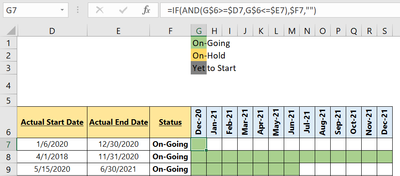
Having trouble in creating a custom column, i have made a simple if condition in excel and have done conditonal formatting to include colour coding. But unable to figure how to do it in Power BI. Please help since I am a beginner in it.
Solved! Go to Solution.
Hi @Ashwini06 ,
Whether your problem has been resolved? If no, could you please provide some original data with Text format and the logic/conditions about how to make condition formatting? Thank you. And here are some blogs about condition formatting, hope they can help you.
Use Conditional Formatting to format another column in Power BI
Write Conditional Statement Using SWITCH in DAX and Power BI
Best Regards
Hi @Ashwini06 ,
Whether your problem has been resolved? If no, could you please provide some original data with Text format and the logic/conditions about how to make condition formatting? Thank you. And here are some blogs about condition formatting, hope they can help you.
Use Conditional Formatting to format another column in Power BI
Write Conditional Statement Using SWITCH in DAX and Power BI
Best Regards
@Ashwini06 - You will need to provide some data. Power BI cannot reference column headers and rows and do relative and fixed cell references. We'd have to understand how your data works and what your expected result is. The link @JW_van_Holst shared is correct for how to do conditional formatting, but it won't help with the calculation of your data.
How to get good help fast. Help us help you.
How To Ask A Technical Question If you Really Want An Answer
How to Get Your Question Answered Quickly - Give us a good and concise explanation
How to provide sample data in the Power BI Forum - Provide data in a table format per the link, or share an Excel/CSV file via OneDrive, Dropbox, etc.. Provide expected output using a screenshot of Excel or other image. Do not provide a screenshot of the source data. I cannot paste an image into Power BI tables.
DAX is for Analysis. Power Query is for Data Modeling
Proud to be a Super User!
MCSA: BI ReportingYou will find the answer here:
https://exceleratorbi.com.au/conditional-formatting-with-a-text-field-in-power-bi/
Check out the April 2026 Power BI update to learn about new features.
If you have recently started exploring Fabric, we'd love to hear how it's going. Your feedback can help with product improvements.
A new Power BI DataViz World Championship is coming this June! Don't miss out on submitting your entry.
| User | Count |
|---|---|
| 3 | |
| 3 | |
| 3 | |
| 2 | |
| 2 |
| User | Count |
|---|---|
| 5 | |
| 4 | |
| 4 | |
| 4 | |
| 4 |