Join us at FabCon Atlanta from March 16 - 20, 2026, for the ultimate Fabric, Power BI, AI and SQL community-led event. Save $200 with code FABCOMM.
Register now!Get Fabric Certified for FREE during Fabric Data Days. Don't miss your chance! Request now
Hey all,
My client had a spreadsheet with Column A = department and column B = process name.. In column C, D, E, if that process (column B) had additional sub processes, they would be listing horizontally, next to its respective process name.
What I want to do is ONLY have column A and B, but everything in C, D, E I want to be bunched in with column B.
So if a process (column B) = “Accounts payable” & in Column A it says it belongs to finance, I want anything that’s next to “Accounts payable” (column c, d, and e) to be placed in column B marked as “Finance” for department, as if they’re all related and bunched together.
I know there’s an easy way to do this in the query editor / PQ. Can someone please connect the dots for me here? Or at least give me the word I need?
Seems like along the lines of pivot/unpivot/transpose family of transformation..
Sorry for this poorly explained request - If anyone can help, please reach out.
Solved! Go to Solution.
@Anonymous
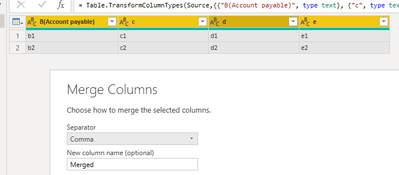
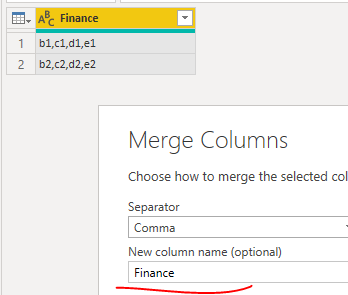
You can just selected the columns =>right click =>select merge columns = change the column name to Finance.
Paul Zheng _ Community Support Team
If this post helps, please Accept it as the solution to help the other members find it more quickly.
@Anonymous
You can just selected the columns =>right click =>select merge columns = change the column name to Finance.
Paul Zheng _ Community Support Team
If this post helps, please Accept it as the solution to help the other members find it more quickly.
@Anonymous : Check the following post
Are you trying to unpivot the other columns apart from the first two?
Some sample data and desired output would help.
Check out the November 2025 Power BI update to learn about new features.
Advance your Data & AI career with 50 days of live learning, contests, hands-on challenges, study groups & certifications and more!
| User | Count |
|---|---|
| 11 | |
| 10 | |
| 6 | |
| 5 | |
| 4 |
| User | Count |
|---|---|
| 26 | |
| 17 | |
| 13 | |
| 13 | |
| 9 |