Join us at FabCon Atlanta from March 16 - 20, 2026, for the ultimate Fabric, Power BI, AI and SQL community-led event. Save $200 with code FABCOMM.
Register now!Learn from the best! Meet the four finalists headed to the FINALS of the Power BI Dataviz World Championships! Register now
I would appreciate help:
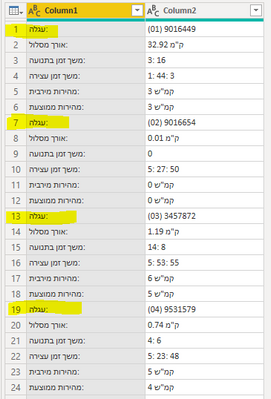
that the values in column 1 be the name of the columns
But every 6 rows will feed the new values in a new row
For example in the attached example there will be 4 lines
Solved! Go to Solution.
TRANSPOSE APPROACH - See the working here - Open a blank query - Home - Advanced Editor - Remove everything from there and paste the below code to test
let
Source = Table.FromRows(Json.Document(Binary.Decompress(Binary.FromText("Tc9LCsAwCEXRvWTcgcbkqcN+NxG6/21UQsEML8LhOUbZy1Z2p1rebZQj4gALzzqjTuC/XVGXGWjWHXVXZpv1RD3C3mZNEgxNs4u2NLXaYmrrWExTStNYfTHhy84KosUUR5rOpGkKC9Ls7PHf+wE=", BinaryEncoding.Base64), Compression.Deflate)), let _t = ((type nullable text) meta [Serialized.Text = true]) in type table [Column1 = _t, Column2 = _t]),
#"Grouped Rows" = Table.Group(Source, {"Column1"}, {{"Temp", each Text.Combine([Column2],";"), type nullable text}}),
#"Split Column by Delimiter" = Table.SplitColumn(#"Grouped Rows", "Temp", Splitter.SplitTextByDelimiter(";", QuoteStyle.Csv), {"Temp.1", "Temp.2", "Temp.3"}),
#"Transposed Table" = Table.Transpose(#"Split Column by Delimiter"),
#"Promoted Headers" = Table.PromoteHeaders(#"Transposed Table", [PromoteAllScalars=true])
in
#"Promoted Headers"
PIVOT APPROACH
let
Source = Table.FromRows(Json.Document(Binary.Decompress(Binary.FromText("Tc9LCsAwCEXRvWTcgcbkqcN+NxG6/21UQsEML8LhOUbZy1Z2p1rebZQj4gALzzqjTuC/XVGXGWjWHXVXZpv1RD3C3mZNEgxNs4u2NLXaYmrrWExTStNYfTHhy84KosUUR5rOpGkKC9Ls7PHf+wE=", BinaryEncoding.Base64), Compression.Deflate)), let _t = ((type nullable text) meta [Serialized.Text = true]) in type table [Column1 = _t, Column2 = _t]),
#"Grouped Rows" = Table.Group(Source, {"Column1"}, {{"Temp", each _, type table [Column1=nullable text, Column2=nullable text]}}),
#"Added Custom" = Table.AddColumn(#"Grouped Rows", "Custom", each Table.AddIndexColumn([Temp],"Index")),
#"Removed Columns" = Table.RemoveColumns(#"Added Custom",{"Temp", "Column1"}),
#"Expanded Custom" = Table.ExpandTableColumn(#"Removed Columns", "Custom", {"Column1", "Column2", "Index"}, {"Column1", "Column2", "Index"}),
#"Pivoted Column" = Table.Pivot(#"Expanded Custom", List.Distinct(#"Expanded Custom"[Column1]), "Column1", "Column2"),
#"Removed Columns1" = Table.RemoveColumns(#"Pivoted Column",{"Index"})
in
#"Removed Columns1"
TRANSPOSE APPROACH - See the working here - Open a blank query - Home - Advanced Editor - Remove everything from there and paste the below code to test
let
Source = Table.FromRows(Json.Document(Binary.Decompress(Binary.FromText("Tc9LCsAwCEXRvWTcgcbkqcN+NxG6/21UQsEML8LhOUbZy1Z2p1rebZQj4gALzzqjTuC/XVGXGWjWHXVXZpv1RD3C3mZNEgxNs4u2NLXaYmrrWExTStNYfTHhy84KosUUR5rOpGkKC9Ls7PHf+wE=", BinaryEncoding.Base64), Compression.Deflate)), let _t = ((type nullable text) meta [Serialized.Text = true]) in type table [Column1 = _t, Column2 = _t]),
#"Grouped Rows" = Table.Group(Source, {"Column1"}, {{"Temp", each Text.Combine([Column2],";"), type nullable text}}),
#"Split Column by Delimiter" = Table.SplitColumn(#"Grouped Rows", "Temp", Splitter.SplitTextByDelimiter(";", QuoteStyle.Csv), {"Temp.1", "Temp.2", "Temp.3"}),
#"Transposed Table" = Table.Transpose(#"Split Column by Delimiter"),
#"Promoted Headers" = Table.PromoteHeaders(#"Transposed Table", [PromoteAllScalars=true])
in
#"Promoted Headers"
PIVOT APPROACH
let
Source = Table.FromRows(Json.Document(Binary.Decompress(Binary.FromText("Tc9LCsAwCEXRvWTcgcbkqcN+NxG6/21UQsEML8LhOUbZy1Z2p1rebZQj4gALzzqjTuC/XVGXGWjWHXVXZpv1RD3C3mZNEgxNs4u2NLXaYmrrWExTStNYfTHhy84KosUUR5rOpGkKC9Ls7PHf+wE=", BinaryEncoding.Base64), Compression.Deflate)), let _t = ((type nullable text) meta [Serialized.Text = true]) in type table [Column1 = _t, Column2 = _t]),
#"Grouped Rows" = Table.Group(Source, {"Column1"}, {{"Temp", each _, type table [Column1=nullable text, Column2=nullable text]}}),
#"Added Custom" = Table.AddColumn(#"Grouped Rows", "Custom", each Table.AddIndexColumn([Temp],"Index")),
#"Removed Columns" = Table.RemoveColumns(#"Added Custom",{"Temp", "Column1"}),
#"Expanded Custom" = Table.ExpandTableColumn(#"Removed Columns", "Custom", {"Column1", "Column2", "Index"}, {"Column1", "Column2", "Index"}),
#"Pivoted Column" = Table.Pivot(#"Expanded Custom", List.Distinct(#"Expanded Custom"[Column1]), "Column1", "Column2"),
#"Removed Columns1" = Table.RemoveColumns(#"Pivoted Column",{"Index"})
in
#"Removed Columns1"
Share feedback directly with Fabric product managers, participate in targeted research studies and influence the Fabric roadmap.
Check out the February 2026 Power BI update to learn about new features.