Join us at FabCon Atlanta from March 16 - 20, 2026, for the ultimate Fabric, Power BI, AI and SQL community-led event. Save $200 with code FABCOMM.
Register now!The Power BI Data Visualization World Championships is back! Get ahead of the game and start preparing now! Learn more
Good morning to all,
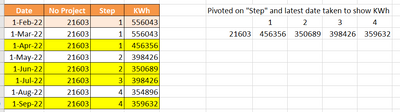
I'm wanting to pivot a dataset in order to obtain the LATEST result in the [KWh].
I have an idea on on to proceed but cannot figure out to code it.
First, I would create an helper column to identify the latest date for the combination [No Project] and [Step]. Lets say i put an X in that column in the row of the max date
Second, Get rid of all the other rows (filter out the non-X)
Third: Delete the helper column AND the date column
Fourth: Do the pivot which I know how.
Any suggestions appreciated
| Date | No Project | Step | KWh |
| 1-Feb-22 | 21603 | 1 | 556043 |
| 1-Mar-22 | 21603 | 1 | 556043 |
| 1-Apr-22 | 21603 | 1 | 456356 |
| 1-May-22 | 21603 | 2 | 398426 |
| 1-Jun-22 | 21603 | 2 | 350689 |
| 1-Jul-22 | 21603 | 3 | 398426 |
| 1-Aug-22 | 21603 | 4 | 354896 |
| 1-Sep-22 | 21603 | 4 | 359632 |
Solved! Go to Solution.
See the working here - Open a blank query - Home - Advanced Editor - Remove everything from there and paste the below code to test
let
Source = Table.FromRows(Json.Document(Binary.Decompress(Binary.FromText("hdA9C8MgEAbg/3JzAt4nOmbpUMjUMTi0ELqUEgoZ+u8bQyIoQoVD5R7eQ6cJsL/Mj54IOiA0x9uOW6maE4bYJTHeP3/EsDSEqLFazviWIp05eKFTXNd3Q6gzH7J4lYLrjGF9lkL2DPHhFLd5aYlgTIfI/4H7Oh6DxPWM3E8XccHVIwpALBDjDw==", BinaryEncoding.Base64), Compression.Deflate)), let _t = ((type nullable text) meta [Serialized.Text = true]) in type table [Date = _t, #"No Project" = _t, Step = _t, KWh = _t]),
#"Changed Type" = Table.TransformColumnTypes(Source,{{"Date", type date}, {"No Project", Int64.Type}, {"Step", Int64.Type}, {"KWh", Int64.Type}}),
#"Grouped Rows" = Table.Group(#"Changed Type", {"No Project", "Step"}, {{"MaxDate", each List.Max([Date]), type nullable date}}),
#"Merged Queries" = Table.NestedJoin(#"Grouped Rows", {"No Project", "Step", "MaxDate"}, #"Changed Type", {"No Project", "Step", "Date"}, "Grouped Rows", JoinKind.LeftOuter),
#"Expanded Grouped Rows" = Table.ExpandTableColumn(#"Merged Queries", "Grouped Rows", {"KWh"}, {"KWh"}),
#"Removed Columns" = Table.RemoveColumns(#"Expanded Grouped Rows",{"MaxDate"}),
#"Pivoted Column" = Table.Pivot(Table.TransformColumnTypes(#"Removed Columns", {{"Step", type text}}, "en-US"), List.Distinct(Table.TransformColumnTypes(#"Removed Columns", {{"Step", type text}}, "en-US")[Step]), "Step", "KWh", List.Sum)
in
#"Pivoted Column"
See the working here - Open a blank query - Home - Advanced Editor - Remove everything from there and paste the below code to test
let
Source = Table.FromRows(Json.Document(Binary.Decompress(Binary.FromText("hdA9C8MgEAbg/3JzAt4nOmbpUMjUMTi0ELqUEgoZ+u8bQyIoQoVD5R7eQ6cJsL/Mj54IOiA0x9uOW6maE4bYJTHeP3/EsDSEqLFazviWIp05eKFTXNd3Q6gzH7J4lYLrjGF9lkL2DPHhFLd5aYlgTIfI/4H7Oh6DxPWM3E8XccHVIwpALBDjDw==", BinaryEncoding.Base64), Compression.Deflate)), let _t = ((type nullable text) meta [Serialized.Text = true]) in type table [Date = _t, #"No Project" = _t, Step = _t, KWh = _t]),
#"Changed Type" = Table.TransformColumnTypes(Source,{{"Date", type date}, {"No Project", Int64.Type}, {"Step", Int64.Type}, {"KWh", Int64.Type}}),
#"Grouped Rows" = Table.Group(#"Changed Type", {"No Project", "Step"}, {{"MaxDate", each List.Max([Date]), type nullable date}}),
#"Merged Queries" = Table.NestedJoin(#"Grouped Rows", {"No Project", "Step", "MaxDate"}, #"Changed Type", {"No Project", "Step", "Date"}, "Grouped Rows", JoinKind.LeftOuter),
#"Expanded Grouped Rows" = Table.ExpandTableColumn(#"Merged Queries", "Grouped Rows", {"KWh"}, {"KWh"}),
#"Removed Columns" = Table.RemoveColumns(#"Expanded Grouped Rows",{"MaxDate"}),
#"Pivoted Column" = Table.Pivot(Table.TransformColumnTypes(#"Removed Columns", {{"Step", type text}}, "en-US"), List.Distinct(Table.TransformColumnTypes(#"Removed Columns", {{"Step", type text}}, "en-US")[Step]), "Step", "KWh", List.Sum)
in
#"Pivoted Column"
The Power BI Data Visualization World Championships is back! Get ahead of the game and start preparing now!
| User | Count |
|---|---|
| 19 | |
| 10 | |
| 9 | |
| 8 | |
| 7 |