Don't miss your chance to take the Fabric Data Engineer (DP-600) exam for FREE! Find out how by attending the DP-600 session on April 23rd (pacific time), live or on-demand.
Learn moreNext up in the FabCon + SQLCon recap series: The roadmap for Microsoft SQL and Maximizing Developer experiences in Fabric. All sessions are available on-demand after the live show. Register now
I have come across this error and seen it discussed here and would like to see if this makes sence ?
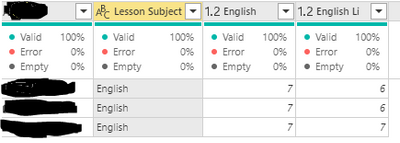
What I have noticed is that if a column that you are pivoting on has the same values as another column, it creates the error.
| If I pivot on this column it throws the error because the Lesson column has English as a value. | I use this column as the non aggrigated values. | |
| Lesson | Assessment | Points |
| English | English | 4 |
| English | English Lit | 3 |
| English | English | 6 |
Many thanks
Solved! Go to Solution.
If you choose "Don't Aggregate" there are two values for the 'English' assessment. 2 into 1 does not go.
So you either use an aggregate or introduce another column e.g. an Index, to prevent aggregation
If you choose "Don't Aggregate" there are two values for the 'English' assessment. 2 into 1 does not go.
So you either use an aggregate or introduce another column e.g. an Index, to prevent aggregation
Thanks for the response.
Ah think I have got it, the pivot acts like a group query were it needs to group on the other columns and aggrigates the value to stop it appearing on seprate rows.
I've added a key into the list and used Max, when I refresh the error has stopped.
Many thanks @HotChilli
If you have recently started exploring Fabric, we'd love to hear how it's going. Your feedback can help with product improvements.
A new Power BI DataViz World Championship is coming this June! Don't miss out on submitting your entry.
Share feedback directly with Fabric product managers, participate in targeted research studies and influence the Fabric roadmap.
| User | Count |
|---|---|
| 6 | |
| 3 | |
| 3 | |
| 3 | |
| 2 |