cancel
Showing results for 
Search instead for 
Did you mean: 

Did you hear? There's a new SQL AI Developer certification (DP-800). Start preparing now and be one of the first to get certified. Register now

Reply
marakud
Frequent Visitor

Pivot Severals Columns

Hello everyone.

I am contacting you to ask for your help.

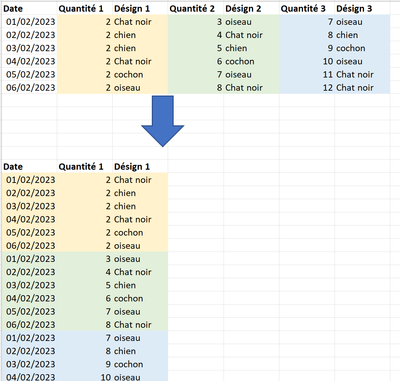
Indeed, I would like to perform the transformation below (see image) in power query.


marakud_1-1675294549113.png


Can you help me please


Thanks !


1 ACCEPTED SOLUTION
serpiva64
Solution Sage
Solution Sage

Hi,

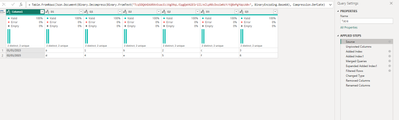
from this

serpiva64_0-1675346962666.png

you can obtain this

serpiva64_1-1675346986223.png

applying the steps of the attached file


If this post is useful to help you to solve your issue, consider giving the post a thumbs up and accepting it as a solution!

View solution in original post

2 REPLIES 2
AlexisOlson
Super User
Super User

@serpiva64's solution looks like it works fine but I think I have a simpler approach.


Unpivot the non-date columns, split the attribute column, and then pivot back.


Here's a full sample query you can paste into the Advanced Editor of a new blank query:

let
    Source = Table.FromRows(Json.Document(Binary.Decompress(Binary.FromText("i45WMjDUNzDSNzIwMlbSUTICYueMxBKFvPzMIiAbJJafWZyaWApkmCM4sTpAjUZoGpMzMlPzgLQJmiEWcDmwNmMc2kyR2JZgdj4QQTWZ4HGkGZJiHSVDAzRnmmLYB1Nqjuw7Q0MUY8FazdC0whVboDnBENVNsbEA", BinaryEncoding.Base64), Compression.Deflate)), let _t = ((type nullable text) meta [Serialized.Text = true]) in type table [Date = _t, #"Quantité 1" = _t, #"Désign 1" = _t, #"Quantité 2" = _t, #"Désign 2" = _t, #"Quantité 3" = _t, #"Désign 3" = _t]),
    #"Unpivoted Columns" = Table.UnpivotOtherColumns(Source, {"Date"}, "Attribute", "Value"),
    #"Split Column by Delimiter" = Table.SplitColumn(#"Unpivoted Columns", "Attribute", Splitter.SplitTextByEachDelimiter({" "}, QuoteStyle.Csv, false), {"Column", "Index"}),
    #"Pivoted Column" = Table.Pivot(#"Split Column by Delimiter", List.Distinct(#"Split Column by Delimiter"[Column]), "Column", "Value"),
    #"Sorted Rows" = Table.Sort(#"Pivoted Column",{{"Index", Order.Ascending}, {"Date", Order.Ascending}})
in
    #"Sorted Rows"
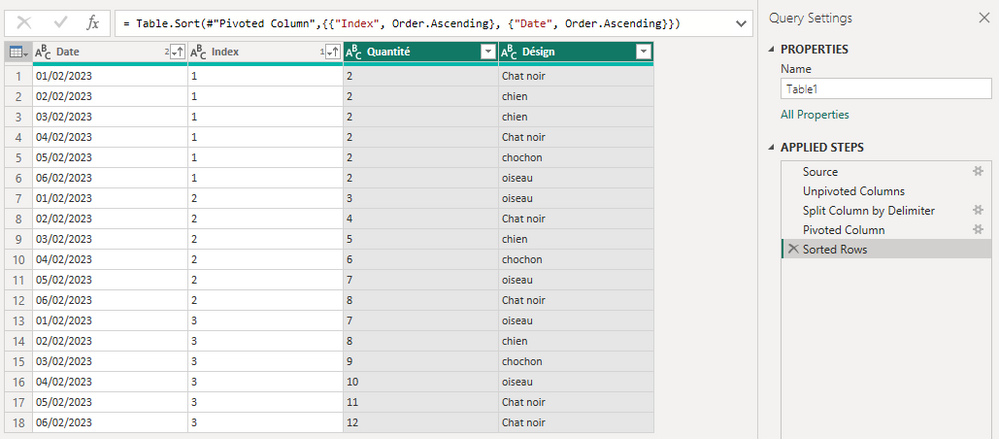
AlexisOlson_0-1675373297862.png

serpiva64
Solution Sage
Solution Sage

Hi,

from this

serpiva64_0-1675346962666.png

you can obtain this

serpiva64_1-1675346986223.png

applying the steps of the attached file


If this post is useful to help you to solve your issue, consider giving the post a thumbs up and accepting it as a solution!

Helpful resources

Announcements
April Power BI Update Carousel

Power BI Monthly Update - April 2026

Check out the April 2026 Power BI update to learn about new features.

Fabric SQL PBI Data Days

Data Days 2026 coming soon!

Sign up to receive a private message when registration opens and key events begin.

New to Fabric survey Carousel

New to Fabric Survey

If you have recently started exploring Fabric, we'd love to hear how it's going. Your feedback can help with product improvements.

Power BI DataViz World Championships carousel

Power BI DataViz World Championships - June 2026

A new Power BI DataViz World Championship is coming this June! Don't miss out on submitting your entry.