Don't miss your chance to take the Fabric Data Engineer (DP-600) exam for FREE! Find out how by watching the DP-600 session on-demand now through April 28th.
Learn moreJoin the FabCon + SQLCon recap series. Up next: Power BI, Real-Time Intelligence, IQ and AI, and Data Factory take center stage. All sessions are available on-demand after the live show. Register now
Hello.
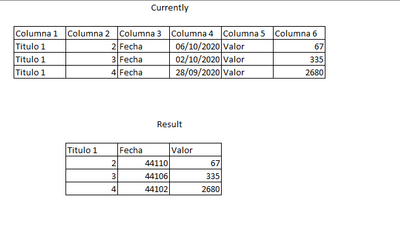
Currently I have a table like the one in the image, which has many rows with the title next to the value, I need to pass it to a table like the one in the image faster, because the original file has many columns. I know it can be done with Pivot Column, but it takes longer. I hope your help. Thank you.
Solved! Go to Solution.
Hello @vazmor
check out this solution. This code fetches the rawdata of every second column with offset 1 and uses every second column the first entry as column name.
let
Source = Table.FromRows(Json.Document(Binary.Decompress(Binary.FromText("i45WclTSUTIEYicgNgFiZyA2V4rVgcgYQWVMoTIWcBljqIwZVMZSKTYWAA==", BinaryEncoding.Base64), Compression.Deflate)), let _t = ((type nullable text) meta [Serialized.Text = true]) in type table [Column1 = _t, Column2 = _t, Column3 = _t, Column4 = _t, Column5 = _t, Column6 = _t]),
#"Changed Type" = Table.TransformColumnTypes(Source,{{"Column1", type text}, {"Column2", Int64.Type}, {"Column3", type text}, {"Column4", Int64.Type}, {"Column5", type text}, {"Column6", Int64.Type}}),
CreateData = List.Transform
(
List.Alternate(Table.ColumnNames(#"Changed Type"), 1,1),
(columnname)=> Table.Column(#"Changed Type", columnname)
),
CreateColumnnames = List.Transform
(
List.Alternate(Table.ColumnNames(#"Changed Type"), 1,1,1),
(header)=> Table.Column(#"Changed Type", header){0}
),
CreateFinalTable = Table.FromColumns
(
CreateData,
CreateColumnnames
)
in
CreateFinalTable
Copy paste this code to the advanced editor in a new blank query to see how the solution works.
If this post helps or solves your problem, please mark it as solution (to help other users find useful content and to acknowledge the work of users that helped you)
Kudoes are nice too
Have fun
Jimmy
Hello @vazmor
check out this solution. This code fetches the rawdata of every second column with offset 1 and uses every second column the first entry as column name.
let
Source = Table.FromRows(Json.Document(Binary.Decompress(Binary.FromText("i45WclTSUTIEYicgNgFiZyA2V4rVgcgYQWVMoTIWcBljqIwZVMZSKTYWAA==", BinaryEncoding.Base64), Compression.Deflate)), let _t = ((type nullable text) meta [Serialized.Text = true]) in type table [Column1 = _t, Column2 = _t, Column3 = _t, Column4 = _t, Column5 = _t, Column6 = _t]),
#"Changed Type" = Table.TransformColumnTypes(Source,{{"Column1", type text}, {"Column2", Int64.Type}, {"Column3", type text}, {"Column4", Int64.Type}, {"Column5", type text}, {"Column6", Int64.Type}}),
CreateData = List.Transform
(
List.Alternate(Table.ColumnNames(#"Changed Type"), 1,1),
(columnname)=> Table.Column(#"Changed Type", columnname)
),
CreateColumnnames = List.Transform
(
List.Alternate(Table.ColumnNames(#"Changed Type"), 1,1,1),
(header)=> Table.Column(#"Changed Type", header){0}
),
CreateFinalTable = Table.FromColumns
(
CreateData,
CreateColumnnames
)
in
CreateFinalTable
Copy paste this code to the advanced editor in a new blank query to see how the solution works.
If this post helps or solves your problem, please mark it as solution (to help other users find useful content and to acknowledge the work of users that helped you)
Kudoes are nice too
Have fun
Jimmy
Thanks, Excelent Solution
Can you please post some data @vazmor per links below - from that image it looks like all you've done is removed some columns, renamed Column4 to Fecha and change the date format to show the integer vs date.
How to get good help fast. Help us help you.
How to Get Your Question Answered Quickly
How to provide sample data in the Power BI Forum
DAX is for Analysis. Power Query is for Data Modeling
Proud to be a Super User!
MCSA: BI ReportingCheck out the April 2026 Power BI update to learn about new features.
If you have recently started exploring Fabric, we'd love to hear how it's going. Your feedback can help with product improvements.
A new Power BI DataViz World Championship is coming this June! Don't miss out on submitting your entry.
| User | Count |
|---|---|
| 3 | |
| 3 | |
| 2 | |
| 2 | |
| 2 |
| User | Count |
|---|---|
| 5 | |
| 4 | |
| 4 | |
| 4 | |
| 4 |