This is best Fabric, Power BI, SQL and AI community event. How do we know? The last event sold out! Save €200 with code FABCMTY200.
Register nowA new Data Days event is coming soon! This time we’re going bigger than ever. Fabric, Power BI, SQL, AI and more. Don't miss out.
Hi Guys,
I want to use this DAX formule in Power Query.
Path = IF(Medewerkers[Active] = "true", PATH(Medewerkers[Email],Medewerkers[Manager Email]),BLANK())
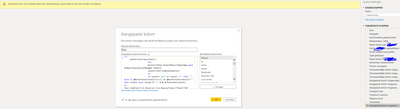
So I tried the following codes in Power Query. But I am getting error about Stackoverloop. I realy dont know what does it means.
let
myfunction=(myvalue)=>
let
mylist=Table.SelectRows(Timestamp,each [Email]=myvalue)[Manager Email],
result=Text.Combine(mylist)
in
if result= null or result ="" then "" else if @myfunction(result)=null or @myfunction(result)="" then result else result & "|" & @ myfunction(result)
in
Text.Combine(List.Reverse(List.RemoveItems({[Email]}&{[Manager Email]}&Text.Split(myfunction([Manager Email]),"|"),{"",null})),"|")
Thanks in advance!
Solved! Go to Solution.
Please see this article. It provides a way to do PATH equivalent with M in your query. One of the selectable outputs matches the output by the PATH function. It also has fewer limitations that the PATH function (see article).
Guest Post: Using List.Accumulate for Input/Output Genealogy – The BIccountant
Pat
To learn more about Power BI, follow me on Twitter or subscribe on YouTube.
Hi Anonymous, I am facing very similar situation as you - I have both condition and path function in DAX that I need to translate to M. I have been trying to write it according to the enclosed webpage but it is still not working. The condition is just always wrong. Can you maybe share how you combined IF and PATH and it worked? Thank you very much for any guidance!
Please see this article. It provides a way to do PATH equivalent with M in your query. One of the selectable outputs matches the output by the PATH function. It also has fewer limitations that the PATH function (see article).
Guest Post: Using List.Accumulate for Input/Output Genealogy – The BIccountant
Pat
To learn more about Power BI, follow me on Twitter or subscribe on YouTube.
Check out the May 2026 Power BI update to learn about new features.
Sign up to receive a private message when registration opens and key events begin.
If you have recently started exploring Fabric, we'd love to hear how it's going. Your feedback can help with product improvements.