cancel
Showing results for 
Search instead for 
Did you mean: 

The Power BI Data Visualization World Championships is back! Get ahead of the game and start preparing now! Learn more

Reply
FMF
Frequent Visitor

Passing parameters to a SQL Query (Google BigQuery)

Hi

I am trying to pass query parameters to a sql query. Basically the connection is ODBC (Google Bigquery). The query runs and returns data perfectly when there are no parameter references. However when I add a parameter reference, It returns a table with Blank data


OK SQL (Returns table with records):

Select *

from xxxx

Where

Location_Country IN ('South Africa')

Limit 1000


NOK SQL (Returns table with 0 records):

Select *

from xxxx

Where

Location_Country IN ("&Country&")

Limit 1000


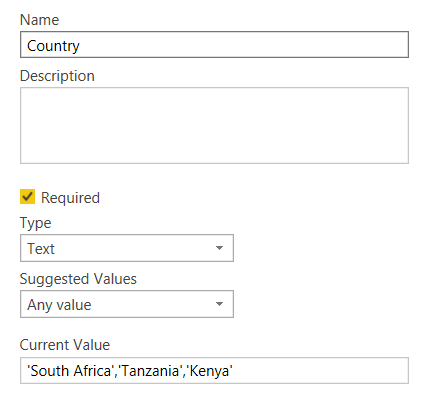
Country is a Parameter (Text Type) created in Power Query. Refer to attached PicCapture.PNG

1 ACCEPTED SOLUTION
dax
Community Support
Community Support

Hi @FMF , 

When you want to pass multiple-values in parameter, you need to change query like below

let
    Source = Sql.Database("localhost", "newsql", [Query="select *  from (select 'a'  as name, 12  as amount#(lf)union all#(lf)select 'b'  as name, 2  as amount#(lf)union all#(lf)select 'c'  as name, 11  as amount)t#(lf)where t.name in (SELECT        Value#(lf)                               FROM            dbo.Split_String('"&pa&"', ',') AS Split_String_1)#(lf)"])
in
    Source

Below is Split_Sring function, you could run this in your database, then it should work.

SET QUOTED_IDENTIFIER ON
SET ANSI_NULLS ON
GO
CREATE FUNCTION [dbo].[Split_String]
(
@List nvarchar(max),
@token nvarchar(5)
)  
RETURNS @RtnValue table 
(
--Id int identity(1,1),
Value nvarchar(100)
) 
AS  
BEGIN

SET @List = RTRIM(LTRIM(@List))
IF @List <> '' 
BEGIN
    WHILE (CHARINDEX(@token, @List)>0)
    BEGIN 

        INSERT INTO @RtnValue (value)
        SELECT Value = LTRIM(RTRIM(SUBSTRING(@List,1,CHARINDEX(@token,@List)-1))) 

        SET @List = SUBSTRING(@List,CHARINDEX(@token,@List)+LEN(@token),LEN(@List))

    END 

    INSERT INTO @RtnValue (Value)
    SELECT Value = LTRIM(RTRIM(@List))
END

RETURN
END

GO

Best Regards,
Zoe Zhi

If this post helps, then please consider Accept it as the solution to help the other members find it more quickly.

View solution in original post

4 REPLIES 4
dax
Community Support
Community Support

Hi @FMF , 

When you want to pass multiple-values in parameter, you need to change query like below

let
    Source = Sql.Database("localhost", "newsql", [Query="select *  from (select 'a'  as name, 12  as amount#(lf)union all#(lf)select 'b'  as name, 2  as amount#(lf)union all#(lf)select 'c'  as name, 11  as amount)t#(lf)where t.name in (SELECT        Value#(lf)                               FROM            dbo.Split_String('"&pa&"', ',') AS Split_String_1)#(lf)"])
in
    Source

Below is Split_Sring function, you could run this in your database, then it should work.

SET QUOTED_IDENTIFIER ON
SET ANSI_NULLS ON
GO
CREATE FUNCTION [dbo].[Split_String]
(
@List nvarchar(max),
@token nvarchar(5)
)  
RETURNS @RtnValue table 
(
--Id int identity(1,1),
Value nvarchar(100)
) 
AS  
BEGIN

SET @List = RTRIM(LTRIM(@List))
IF @List <> '' 
BEGIN
    WHILE (CHARINDEX(@token, @List)>0)
    BEGIN 

        INSERT INTO @RtnValue (value)
        SELECT Value = LTRIM(RTRIM(SUBSTRING(@List,1,CHARINDEX(@token,@List)-1))) 

        SET @List = SUBSTRING(@List,CHARINDEX(@token,@List)+LEN(@token),LEN(@List))

    END 

    INSERT INTO @RtnValue (Value)
    SELECT Value = LTRIM(RTRIM(@List))
END

RETURN
END

GO

Best Regards,
Zoe Zhi

If this post helps, then please consider Accept it as the solution to help the other members find it more quickly.

JirkaZ
Solution Specialist
Solution Specialist

Well if your query is written exactly as is then you are missing the quote marks after the parentheses 

FMF
Frequent Visitor

Hi JirkaZ,


Thanks. So is the below right? or can you help as to how it should be written


Select *

from xxxx

Where

Location_Country IN '("&Country&")'

Limit 1000

JirkaZ
Solution Specialist
Solution Specialist

@FMF Sorry - I was wrong. IMHO there should be no quote marks at all. But you should fire up Fiddler to see what query is actually being sent to the API and modify based on that.

Helpful resources

Announcements
November Power BI Update Carousel

Power BI Monthly Update - November 2025

Check out the November 2025 Power BI update to learn about new features.

Fabric Data Days Carousel

Fabric Data Days

Advance your Data & AI career with 50 days of live learning, contests, hands-on challenges, study groups & certifications and more!

FabCon Atlanta 2026 carousel

FabCon Atlanta 2026

Join us at FabCon Atlanta, March 16-20, for the ultimate Fabric, Power BI, AI and SQL community-led event. Save $200 with code FABCOMM.