cancel
Showing results for 
Search instead for 
Did you mean: 

July 7 - July 17 | Round 2 of the Power BI Dataviz World Championships. Don't miss your chance! Learn more

Reply
FMF
Frequent Visitor

Passing parameters to a SQL Query (Google BigQuery)

Hi

I am trying to pass query parameters to a sql query. Basically the connection is ODBC (Google Bigquery). The query runs and returns data perfectly when there are no parameter references. However when I add a parameter reference, It returns a table with Blank data


OK SQL (Returns table with records):

Select *

from xxxx

Where

Location_Country IN ('South Africa')

Limit 1000


NOK SQL (Returns table with 0 records):

Select *

from xxxx

Where

Location_Country IN ("&Country&")

Limit 1000


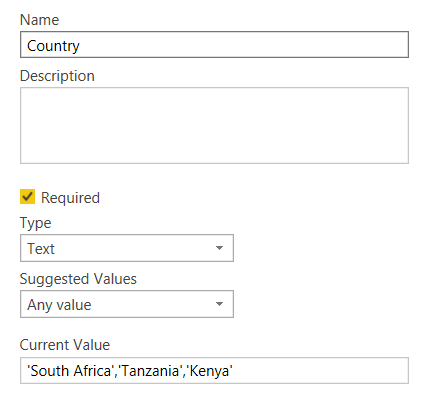
Country is a Parameter (Text Type) created in Power Query. Refer to attached PicCapture.PNG

1 ACCEPTED SOLUTION
dax
Community Support
Community Support

Hi @FMF , 

When you want to pass multiple-values in parameter, you need to change query like below

let
    Source = Sql.Database("localhost", "newsql", [Query="select *  from (select 'a'  as name, 12  as amount#(lf)union all#(lf)select 'b'  as name, 2  as amount#(lf)union all#(lf)select 'c'  as name, 11  as amount)t#(lf)where t.name in (SELECT        Value#(lf)                               FROM            dbo.Split_String('"&pa&"', ',') AS Split_String_1)#(lf)"])
in
    Source

Below is Split_Sring function, you could run this in your database, then it should work.

SET QUOTED_IDENTIFIER ON
SET ANSI_NULLS ON
GO
CREATE FUNCTION [dbo].[Split_String]
(
@List nvarchar(max),
@token nvarchar(5)
)  
RETURNS @RtnValue table 
(
--Id int identity(1,1),
Value nvarchar(100)
) 
AS  
BEGIN

SET @List = RTRIM(LTRIM(@List))
IF @List <> '' 
BEGIN
    WHILE (CHARINDEX(@token, @List)>0)
    BEGIN 

        INSERT INTO @RtnValue (value)
        SELECT Value = LTRIM(RTRIM(SUBSTRING(@List,1,CHARINDEX(@token,@List)-1))) 

        SET @List = SUBSTRING(@List,CHARINDEX(@token,@List)+LEN(@token),LEN(@List))

    END 

    INSERT INTO @RtnValue (Value)
    SELECT Value = LTRIM(RTRIM(@List))
END

RETURN
END

GO

Best Regards,
Zoe Zhi

If this post helps, then please consider Accept it as the solution to help the other members find it more quickly.

View solution in original post

4 REPLIES 4
dax
Community Support
Community Support

Hi @FMF , 

When you want to pass multiple-values in parameter, you need to change query like below

let
    Source = Sql.Database("localhost", "newsql", [Query="select *  from (select 'a'  as name, 12  as amount#(lf)union all#(lf)select 'b'  as name, 2  as amount#(lf)union all#(lf)select 'c'  as name, 11  as amount)t#(lf)where t.name in (SELECT        Value#(lf)                               FROM            dbo.Split_String('"&pa&"', ',') AS Split_String_1)#(lf)"])
in
    Source

Below is Split_Sring function, you could run this in your database, then it should work.

SET QUOTED_IDENTIFIER ON
SET ANSI_NULLS ON
GO
CREATE FUNCTION [dbo].[Split_String]
(
@List nvarchar(max),
@token nvarchar(5)
)  
RETURNS @RtnValue table 
(
--Id int identity(1,1),
Value nvarchar(100)
) 
AS  
BEGIN

SET @List = RTRIM(LTRIM(@List))
IF @List <> '' 
BEGIN
    WHILE (CHARINDEX(@token, @List)>0)
    BEGIN 

        INSERT INTO @RtnValue (value)
        SELECT Value = LTRIM(RTRIM(SUBSTRING(@List,1,CHARINDEX(@token,@List)-1))) 

        SET @List = SUBSTRING(@List,CHARINDEX(@token,@List)+LEN(@token),LEN(@List))

    END 

    INSERT INTO @RtnValue (Value)
    SELECT Value = LTRIM(RTRIM(@List))
END

RETURN
END

GO

Best Regards,
Zoe Zhi

If this post helps, then please consider Accept it as the solution to help the other members find it more quickly.

JirkaZ
Solution Specialist
Solution Specialist

Well if your query is written exactly as is then you are missing the quote marks after the parentheses 

FMF
Frequent Visitor

Hi JirkaZ,


Thanks. So is the below right? or can you help as to how it should be written


Select *

from xxxx

Where

Location_Country IN '("&Country&")'

Limit 1000

JirkaZ
Solution Specialist
Solution Specialist

@FMF Sorry - I was wrong. IMHO there should be no quote marks at all. But you should fire up Fiddler to see what query is actually being sent to the API and modify based on that.

Helpful resources

Announcements
FabCon and SQLCon Barcelona 2026

FabCon & SQLCon – Barcelona 2026

Join us in Barcelona for FabCon and SQLCon, the Fabric, Power BI, SQL, and AI community event. Save €200 with code FABCMTY200.

60 days of Data Days Carousel

Data Days 2026

Join Data Days 2026: 60 days of free live/on-demand sessions, challenges, study groups, and certification opportunities.

Power BI DataViz World Championships carousel

Power BI DataViz World Championships - June 2026

A new Power BI DataViz World Championship is coming this June! Don't miss out on submitting your entry.

Top Solution Authors