FabCon is coming to Atlanta
Join us at FabCon Atlanta from March 16 - 20, 2026, for the ultimate Fabric, Power BI, AI and SQL community-led event. Save $200 with code FABCOMM.
Register now!- Power BI forums
- Get Help with Power BI
- Desktop
- Service
- Report Server
- Power Query
- Mobile Apps
- Developer
- DAX Commands and Tips
- Custom Visuals Development Discussion
- Health and Life Sciences
- Power BI Spanish forums
- Translated Spanish Desktop
- Training and Consulting
- Instructor Led Training
- Dashboard in a Day for Women, by Women
- Galleries
- Data Stories Gallery
- Themes Gallery
- Contests Gallery
- QuickViz Gallery
- Quick Measures Gallery
- Visual Calculations Gallery
- Notebook Gallery
- Translytical Task Flow Gallery
- TMDL Gallery
- R Script Showcase
- Webinars and Video Gallery
- Ideas
- Custom Visuals Ideas (read-only)
- Issues
- Issues
- Events
- Upcoming Events
The Power BI Data Visualization World Championships is back! Get ahead of the game and start preparing now! Learn more
- Power BI forums
- Forums
- Get Help with Power BI
- Power Query
- PQ merge comission data within a range of numbers
- Subscribe to RSS Feed
- Mark Topic as New
- Mark Topic as Read
- Float this Topic for Current User
- Bookmark
- Subscribe
- Printer Friendly Page


- Mark as New
- Bookmark
- Subscribe
- Mute
- Subscribe to RSS Feed
- Permalink
- Report Inappropriate Content
PQ merge comission data within a range of numbers
Hi forum,
Im facing a challenge to solve regarding the calculation of sales comissions.
The comission is depending on a discount for sold items.
I have 2 tables:
1. DimComission
This table contains the [DiscountUpperBoundary%] & [Comission%].
[DiscountUpperBoundary%] [Comission%]
| 0% | 10% |
| 3% | 10% |
| 5% | 10% |
| 10% | 10% |
| 15% | 9% |
| 17% | 8% |
| 20% | 6% |
| 25% | 4% |
| 30% | 0% |
As you can see, the more discount a salesman grants to the customer, the less comission the salesman gets.
2. FactComission
This table containts the real sales data from an ERP system for a lot of orders.
This is just a unique extracts of them:
[ActualDiscount%]
0,00 %
1,00 %
5,00 %
6,00 %
10,00 %
12,00 %
14,50 %
15,40 %
16,00 %
18,00 %
19,00 %
20,00 %
23,00 %
23,50 %
25,00 %
26,00 %
28,00 %
29,00 %
30,00 %
32,50 %
My question: How can i merge the Fact table with the ranges of the Dimensions dynamically?
For example, [ActualDiscount%] 6,00 % is not in the DimComission table so 10% is to be taken, as its the next highest [DiscountUpperBoundary%].
Could this be solved maybe with a list in PQ or are there other solutions?
Thanks for any help and advice
Kind regards,
DataHero
Solved! Go to Solution.


- Mark as New
- Bookmark
- Subscribe
- Mute
- Subscribe to RSS Feed
- Permalink
- Report Inappropriate Content
Hi @DataHero ,
Yes, I think you first need to get the two columns DiscountLowerBoundary and DiscountUpperBoundary in your DimComission table:
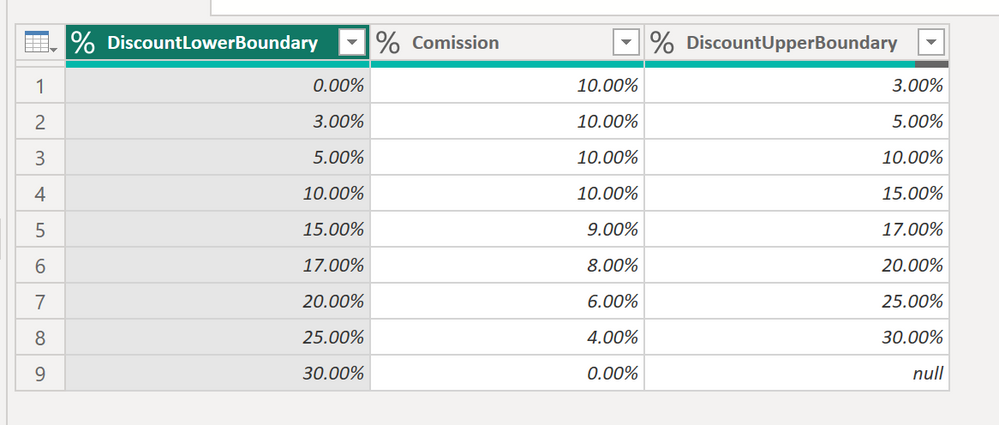
Here the code in Power Query M that you can paste into the advanced editor (if you do not know, how to exactly do this, please check out this quick walkthrough)
let
    Source = Table.FromRows(Json.Document(Binary.Decompress(Binary.FromText("i45WMlBV0lEyBJKxOtFKxsgcU2SOIYo6Q7CcJZRjDuJYQDhGYHVmUA5YmQnUbLAMyIBYAA==", BinaryEncoding.Base64), Compression.Deflate)), let _t = ((type nullable text) meta [Serialized.Text = true]) in type table [DiscountUpperBoundary = _t, Comission = _t]),
    #"Changed Type" = Table.TransformColumnTypes(Source,{{"DiscountUpperBoundary", Percentage.Type}, {"Comission", Percentage.Type}}),
    #"Renamed Columns" = Table.RenameColumns(#"Changed Type",{{"DiscountUpperBoundary", "DiscountLowerBoundary"}}),
    #"Added Index" = Table.AddIndexColumn(#"Renamed Columns", "Index", 0, 1, Int64.Type),
    #"Added Index1" = Table.AddIndexColumn(#"Added Index", "Index.1", 1, 1, Int64.Type),
    #"Merged Queries" = Table.NestedJoin(#"Added Index1", {"Index.1"}, #"Added Index1", {"Index"}, "Added Index1", JoinKind.LeftOuter),
    #"Expanded Added Index1" = Table.ExpandTableColumn(#"Merged Queries", "Added Index1", {"DiscountLowerBoundary"}, {"DiscountUpperBoundary"}),
    #"Removed Columns" = Table.RemoveColumns(#"Expanded Added Index1",{"Index", "Index.1"})
in
    #"Removed Columns"
With them in place, you should be able to get the matches as described in the link:
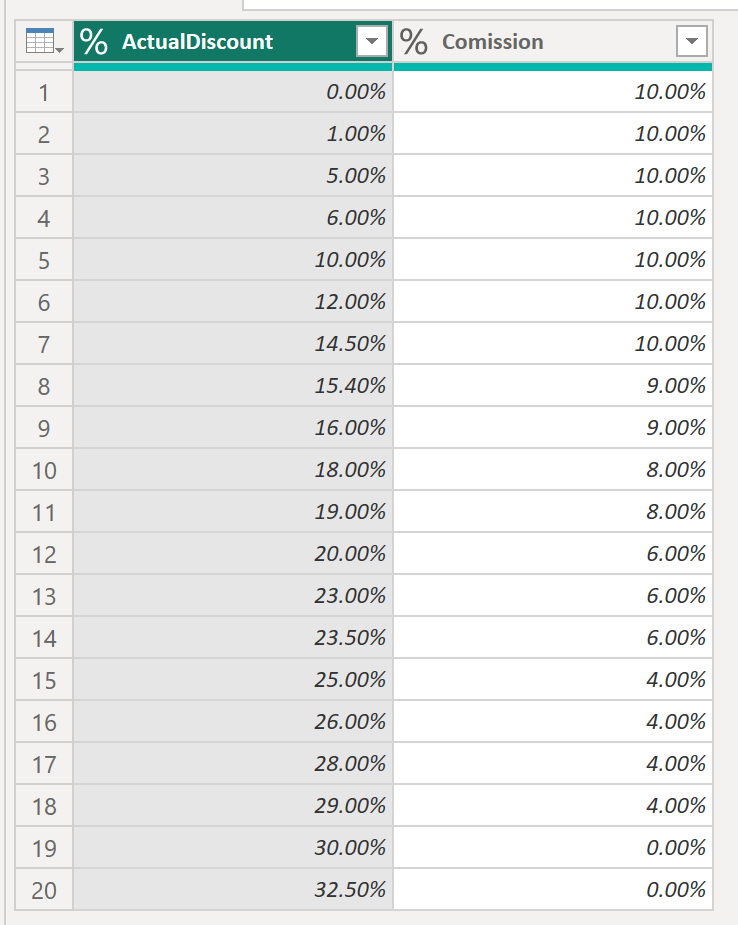
Here the M code:
let
    Source = Table.FromRows(Json.Document(Binary.Decompress(Binary.FromText("Tc7BCcBACETRXoTcgphxDUktsv23kUPQ8fZA/ZgppmaH7DPlakXr5nQsglwaxdBVHGcP+TbBGHyyYuALYAyMgTFnzPEX9gc=", BinaryEncoding.Base64), Compression.Deflate)), let _t = ((type nullable text) meta [Serialized.Text = true]) in type table [ActualDiscount = _t]),
    #"Changed Type1" = Table.TransformColumnTypes(Source,{{"ActualDiscount", Percentage.Type}}),
    Merge = Table.AddColumn(#"Changed Type1", "Comission",
                            (F) =>  Table.SelectRows(DimComission,
                                                    (D)=> D[DiscountUpperBoundary] > F[ActualDiscount] and D[DiscountLowerBoundary] <= F[ActualDiscount] )
                           ),
    #"Expanded Comission" = Table.ExpandTableColumn(Merge, "Comission", {"Comission"}, {"Comission"}),
    #"Replaced Value" = Table.ReplaceValue(#"Expanded Comission",null,0,Replacer.ReplaceValue,{"Comission"}),
    #"Changed Type" = Table.TransformColumnTypes(#"Replaced Value",{{"Comission", Percentage.Type}})
in
    #"Changed Type"
Was it this you were looking for? 🙂
Let me know!
/Tom
https://www.tackytech.blog/
https://www.instagram.com/tackytechtom/
| Did I answer your question❓➡️ Please, mark my post as a solution ✔️ |
| Also happily accepting Kudos 🙂 |
| Feel free to connect with me on LinkedIn! | |
| #proudtobeasuperuser |  |

- Mark as New
- Bookmark
- Subscribe
- Mute
- Subscribe to RSS Feed
- Permalink
- Report Inappropriate Content
Hi
Add a new column in FactComission
try DimComission[#"Comission%"]{List.PositionOf(DimComission[#"DiscountUpperBoundary%"],[#"ActualDiscount%"],1,(x,y)=>x<y)+1} otherwise 0
Stéphane
- Mark as New
- Bookmark
- Subscribe
- Mute
- Subscribe to RSS Feed
- Permalink
- Report Inappropriate Content
Hi @slorin can you explain more about this solution?
What is it doing specifically?
- Mark as New
- Bookmark
- Subscribe
- Mute
- Subscribe to RSS Feed
- Permalink
- Report Inappropriate Content
Hi @DataHero ,
Have a look into this blog post. I think they did something similar there:
Merging with date range using Power Query - Exceed
Let me know if this helps 🙂
/Tom
https://www.tackytech.blog/
https://www.instagram.com/tackytechtom/
| Did I answer your question❓➡️ Please, mark my post as a solution ✔️ |
| Also happily accepting Kudos 🙂 |
| Feel free to connect with me on LinkedIn! | |
| #proudtobeasuperuser | |
- Mark as New
- Bookmark
- Subscribe
- Mute
- Subscribe to RSS Feed
- Permalink
- Report Inappropriate Content
Hi @tackytechtom thank you very much for the link.
I tried that solution and it works partially.
I think the problem is that I dont have ranges in the DimComission table.
There is the upper value only but nothing like 0-3%.
And its very time consuming to change this manually in the data source.
Do you know, how I can implement a proper range with 2 columns in Power Query?
Kind regards,
DataHero
- Mark as New
- Bookmark
- Subscribe
- Mute
- Subscribe to RSS Feed
- Permalink
- Report Inappropriate Content
Hi @DataHero ,
Yes, I think you first need to get the two columns DiscountLowerBoundary and DiscountUpperBoundary in your DimComission table:
Here the code in Power Query M that you can paste into the advanced editor (if you do not know, how to exactly do this, please check out this quick walkthrough)
let
    Source = Table.FromRows(Json.Document(Binary.Decompress(Binary.FromText("i45WMlBV0lEyBJKxOtFKxsgcU2SOIYo6Q7CcJZRjDuJYQDhGYHVmUA5YmQnUbLAMyIBYAA==", BinaryEncoding.Base64), Compression.Deflate)), let _t = ((type nullable text) meta [Serialized.Text = true]) in type table [DiscountUpperBoundary = _t, Comission = _t]),
    #"Changed Type" = Table.TransformColumnTypes(Source,{{"DiscountUpperBoundary", Percentage.Type}, {"Comission", Percentage.Type}}),
    #"Renamed Columns" = Table.RenameColumns(#"Changed Type",{{"DiscountUpperBoundary", "DiscountLowerBoundary"}}),
    #"Added Index" = Table.AddIndexColumn(#"Renamed Columns", "Index", 0, 1, Int64.Type),
    #"Added Index1" = Table.AddIndexColumn(#"Added Index", "Index.1", 1, 1, Int64.Type),
    #"Merged Queries" = Table.NestedJoin(#"Added Index1", {"Index.1"}, #"Added Index1", {"Index"}, "Added Index1", JoinKind.LeftOuter),
    #"Expanded Added Index1" = Table.ExpandTableColumn(#"Merged Queries", "Added Index1", {"DiscountLowerBoundary"}, {"DiscountUpperBoundary"}),
    #"Removed Columns" = Table.RemoveColumns(#"Expanded Added Index1",{"Index", "Index.1"})
in
    #"Removed Columns"
With them in place, you should be able to get the matches as described in the link:
Here the M code:
let
    Source = Table.FromRows(Json.Document(Binary.Decompress(Binary.FromText("Tc7BCcBACETRXoTcgphxDUktsv23kUPQ8fZA/ZgppmaH7DPlakXr5nQsglwaxdBVHGcP+TbBGHyyYuALYAyMgTFnzPEX9gc=", BinaryEncoding.Base64), Compression.Deflate)), let _t = ((type nullable text) meta [Serialized.Text = true]) in type table [ActualDiscount = _t]),
    #"Changed Type1" = Table.TransformColumnTypes(Source,{{"ActualDiscount", Percentage.Type}}),
    Merge = Table.AddColumn(#"Changed Type1", "Comission",
                            (F) =>  Table.SelectRows(DimComission,
                                                    (D)=> D[DiscountUpperBoundary] > F[ActualDiscount] and D[DiscountLowerBoundary] <= F[ActualDiscount] )
                           ),
    #"Expanded Comission" = Table.ExpandTableColumn(Merge, "Comission", {"Comission"}, {"Comission"}),
    #"Replaced Value" = Table.ReplaceValue(#"Expanded Comission",null,0,Replacer.ReplaceValue,{"Comission"}),
    #"Changed Type" = Table.TransformColumnTypes(#"Replaced Value",{{"Comission", Percentage.Type}})
in
    #"Changed Type"
Was it this you were looking for? 🙂
Let me know!
/Tom
https://www.tackytech.blog/
https://www.instagram.com/tackytechtom/
| Did I answer your question❓➡️ Please, mark my post as a solution ✔️ |
| Also happily accepting Kudos 🙂 |
| Feel free to connect with me on LinkedIn! | |
| #proudtobeasuperuser | |
- Mark as New
- Bookmark
- Subscribe
- Mute
- Subscribe to RSS Feed
- Permalink
- Report Inappropriate Content
This is really impressive!
Thank you so much for your help!
Kind regards,
DataHero

Helpful resources

Power BI Dataviz World Championships
The Power BI Data Visualization World Championships is back! Get ahead of the game and start preparing now!

Power BI Monthly Update - November 2025
Check out the November 2025 Power BI update to learn about new features.

FabCon Atlanta 2026
Join us at FabCon Atlanta, March 16-20, for the ultimate Fabric, Power BI, AI and SQL community-led event. Save $200 with code FABCOMM.

| User | Count |
|---|---|
| 10 | |
| 6 | |
| 5 | |
| 4 | |
| 2 |


