Don't miss your chance to take the Fabric Data Engineer (DP-600) exam for FREE! Find out how by watching the DP-600 session on-demand now through April 28th.
Learn moreJoin the FabCon + SQLCon recap series. Up next: Power BI, Real-Time Intelligence, IQ and AI, and Data Factory take center stage. All sessions are available on-demand after the live show. Register now
Hi,
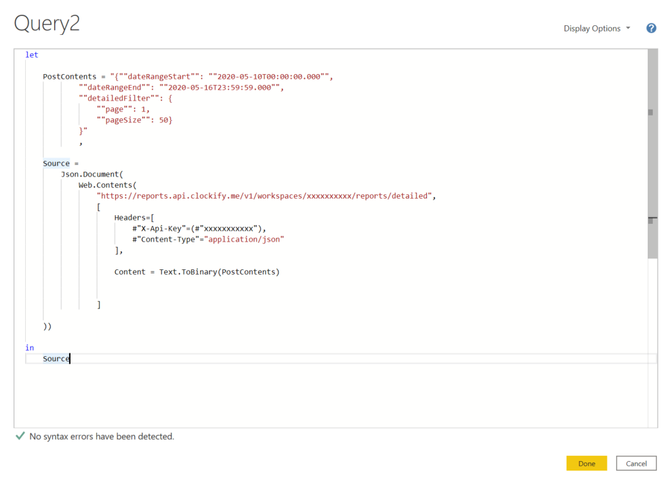
I'm really struggling to find what is wrong with my M code to make a POST request. Although I know you would need to know the API to know exactly what is wrong but I just want to check that there is nothing wrong with the way I am making the request? As I am getting a 400. Bad Request error.
For info the API I'm using is Clockify.
I have connected to the API fine for GET requests but can't figure out what I'm doing wrong. And I just want to rule out that I am doing something wrong with the Request rather than misunderstanding the API.
Thanks for any help at all
Solved! Go to Solution.
Hi @Anonymous ,
I cannot spot anything obvious.
But you can reduce the risk of typing errors if you use the Json.FromValue function to define the body of your request: Easy POST requests with Power BI and Power Query using Json.FromValue – The BIccountant
Imke Feldmann (The BIccountant)
If you liked my solution, please give it a thumbs up. And if I did answer your question, please mark this post as a solution. Thanks!
How to integrate M-code into your solution -- How to get your questions answered quickly -- How to provide sample data -- Check out more PBI- learning resources here -- Performance Tipps for M-queries
Hi @Anonymous ,
I cannot spot anything obvious.
But you can reduce the risk of typing errors if you use the Json.FromValue function to define the body of your request: Easy POST requests with Power BI and Power Query using Json.FromValue – The BIccountant
Imke Feldmann (The BIccountant)
If you liked my solution, please give it a thumbs up. And if I did answer your question, please mark this post as a solution. Thanks!
How to integrate M-code into your solution -- How to get your questions answered quickly -- How to provide sample data -- Check out more PBI- learning resources here -- Performance Tipps for M-queries
Check out the April 2026 Power BI update to learn about new features.
If you have recently started exploring Fabric, we'd love to hear how it's going. Your feedback can help with product improvements.
A new Power BI DataViz World Championship is coming this June! Don't miss out on submitting your entry.
| User | Count |
|---|---|
| 5 | |
| 3 | |
| 3 | |
| 3 | |
| 3 |
| User | Count |
|---|---|
| 8 | |
| 6 | |
| 5 | |
| 5 | |
| 4 |