Join us at FabCon Atlanta from March 16 - 20, 2026, for the ultimate Fabric, Power BI, AI and SQL community-led event. Save $200 with code FABCOMM.
Register now!The Power BI Data Visualization World Championships is back! Get ahead of the game and start preparing now! Learn more
Hi,
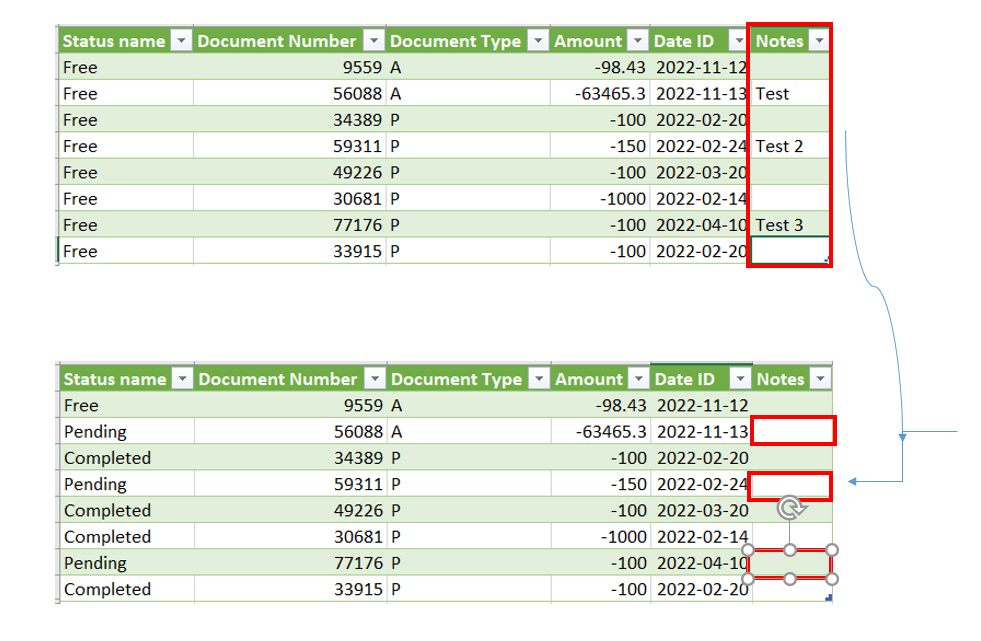
We do an extract of SAP to get all items with their current status at the time of the extract. We than use that file to manage workload therefore employees are using this extraction as their worklist for the week. I want to know if it is possible to merge a specific column from their worklist to the next oervall extract. For example:
Both files have unique ID # associated to each transactions therefore is it possible to use this to merge a column named notes to the next full extract we have?
Solved! Go to Solution.
Don't bring in the original Notes column. Either delete it or select the other columns.
Then merge your file in and keep the Notes column from that.
DAX is for Analysis. Power Query is for Data Modeling
Proud to be a Super User!
MCSA: BI ReportingDon't bring in the original Notes column. Either delete it or select the other columns.
Then merge your file in and keep the Notes column from that.
DAX is for Analysis. Power Query is for Data Modeling
Proud to be a Super User!
MCSA: BI ReportingThe Power BI Data Visualization World Championships is back! Get ahead of the game and start preparing now!
| User | Count |
|---|---|
| 19 | |
| 10 | |
| 9 | |
| 7 | |
| 6 |