Don't miss your chance to take the Fabric Data Engineer (DP-700) exam on us!
Learn moreWe've captured the moments from FabCon & SQLCon that everyone is talking about, and we are bringing them to the community, live and on-demand. Starts on April 14th. Register now
Hi,
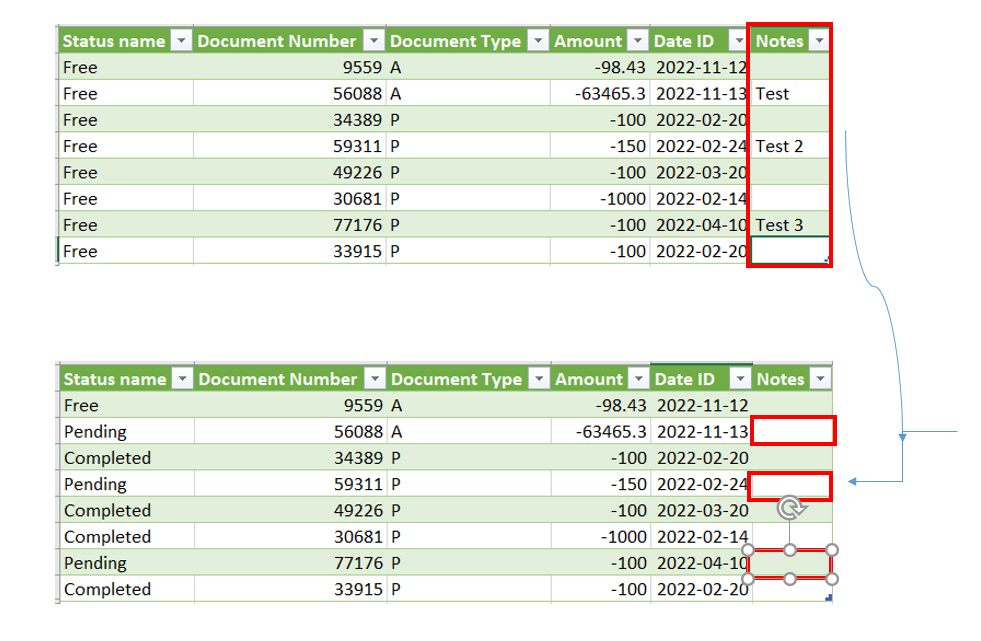
We do an extract of SAP to get all items with their current status at the time of the extract. We than use that file to manage workload therefore employees are using this extraction as their worklist for the week. I want to know if it is possible to merge a specific column from their worklist to the next oervall extract. For example:
Both files have unique ID # associated to each transactions therefore is it possible to use this to merge a column named notes to the next full extract we have?
Solved! Go to Solution.
Don't bring in the original Notes column. Either delete it or select the other columns.
Then merge your file in and keep the Notes column from that.
DAX is for Analysis. Power Query is for Data Modeling
Proud to be a Super User!
MCSA: BI ReportingDon't bring in the original Notes column. Either delete it or select the other columns.
Then merge your file in and keep the Notes column from that.
DAX is for Analysis. Power Query is for Data Modeling
Proud to be a Super User!
MCSA: BI ReportingIf you have recently started exploring Fabric, we'd love to hear how it's going. Your feedback can help with product improvements.
A new Power BI DataViz World Championship is coming this June! Don't miss out on submitting your entry.
Share feedback directly with Fabric product managers, participate in targeted research studies and influence the Fabric roadmap.
| User | Count |
|---|---|
| 5 | |
| 4 | |
| 3 | |
| 2 | |
| 2 |
| User | Count |
|---|---|
| 8 | |
| 6 | |
| 6 | |
| 6 | |
| 5 |