Join us at FabCon Atlanta from March 16 - 20, 2026, for the ultimate Fabric, Power BI, AI and SQL community-led event. Save $200 with code FABCOMM.
Register now!The Power BI Data Visualization World Championships is back! Get ahead of the game and start preparing now! Learn more
Hi, I am New
maybe someone can help me here
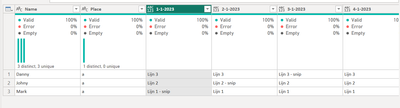
I need to overlaay two tabel
I tried to group but got stuck, how to do this using :
#"Aantal samengevoegd" = Table.AggregateTableColumn(#"Rijen gegroepeerd", "Aantal", {{"1-1-2023", List.Buffer, "1-1-2023"}}),
#"Uitgepakte waarden" = Table.TransformColumns(#"Aantal samengevoegd", {"1-1-2023", each Text.Combine(List.Transform(_, Text.From), " "), type text}) with replacing dates for "each _"??
Thank You for Help!
Solved! Go to Solution.
Hello - instead of looping through columns, I think it would be better to append the tables, unpivot, transform and repivot, like this:
let
Source = Table.Combine({Table1, Table2}),
#"Unpivoted Other Columns" = Table.UnpivotOtherColumns(Source, {"Name", "Place"}, "Attribute", "Value"),
#"Replaced Value" = Table.ReplaceValue(#"Unpivoted Other Columns","",null,Replacer.ReplaceValue,{"Value"}),
#"Grouped Rows" = Table.Group(#"Replaced Value", {"Name", "Place", "Attribute"}, {{"Data", each _, type table [Name=nullable text, Place=nullable text, Attribute=text, Value=text]}}),
#"Added Custom" = Table.AddColumn(#"Grouped Rows", "Custom", each if List.NonNullCount ( [Data][Value] ) > 1 then Text.Combine ( List.Sort ( [Data] [Value] ), " - " ) else List.RemoveNulls ( [Data][Value] ){0} ),
#"Removed Columns" = Table.RemoveColumns(#"Added Custom",{"Data"}),
#"Pivoted Column" = Table.Pivot(#"Removed Columns", List.Distinct(#"Removed Columns"[Attribute]), "Attribute", "Custom")
in
#"Pivoted Column"
Result
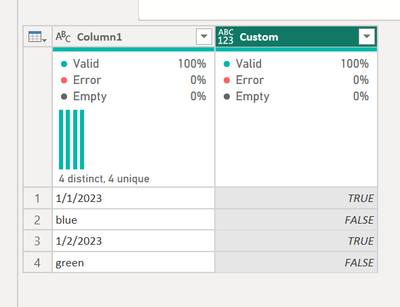
Hello - below is how you can add a new column that checks whether or not the value is a date. If you can post a sample of your data and show what your expected result is I can help further.
let
Source = Table.FromRows(Json.Document(Binary.Decompress(Binary.FromText("i45WMtQ31DcyMDJWitWJVkrKKU0FM4BiCNH0otTUPKXYWAA=", BinaryEncoding.Base64), Compression.Deflate)), let _t = ((type nullable text) meta [Serialized.Text = true]) in type table [Column1 = _t]),
#"Changed Type" = Table.TransformColumnTypes(Source,{{"Column1", type text}}),
#"Added Custom" = Table.AddColumn(#"Changed Type", "Custom", each try Value.Is ( Date.From ( [Column1] ), type date ) otherwise false)
in
#"Added Custom"
I do not want to do this same step 365 times, it is not going about to chacke if is date or not, I want to use List with colums.... something like this....
#"Aantal samengevoegd" = Table.AggregateTableColumn(#"Rijen gegroepeerd", "Aantal", {{"1-1-2023", List.Buffer, "Totaal van 1-1-2023"}, {"2-1-2023", List.Buffer, "Totaal van 2-1-2023"}}),
I need something like Table.AggregateTableColumn(#"Rijen gegroepeerd", "Aantal", each _ Column in ColumnList, List.Buffer, Column Name)
#"Uitgepakte waarden" = Table.TransformColumns(#"Aantal samengevoegd", {"Totaal van 1-1-2023", each Text.Combine(List.Transform(_, Text.From), " "), type text}),
#"Uitgepakte waarden1" = Table.TransformColumns(#"Uitgepakte waarden", {"Totaal van 2-1-2023", each Text.Combine(List.Transform(_, Text.From), " "), type text})
This one i need to do one time and not 365 times....
#"Uitgepakte waarden1" = Table.TransformColumns(#"Uitgepakte waarden", {each column, each Text.Combine(List.Transform(_, Text.From), " "), type text})
I'm not sure I do it good
Hello - instead of looping through columns, I think it would be better to append the tables, unpivot, transform and repivot, like this:
let
Source = Table.Combine({Table1, Table2}),
#"Unpivoted Other Columns" = Table.UnpivotOtherColumns(Source, {"Name", "Place"}, "Attribute", "Value"),
#"Replaced Value" = Table.ReplaceValue(#"Unpivoted Other Columns","",null,Replacer.ReplaceValue,{"Value"}),
#"Grouped Rows" = Table.Group(#"Replaced Value", {"Name", "Place", "Attribute"}, {{"Data", each _, type table [Name=nullable text, Place=nullable text, Attribute=text, Value=text]}}),
#"Added Custom" = Table.AddColumn(#"Grouped Rows", "Custom", each if List.NonNullCount ( [Data][Value] ) > 1 then Text.Combine ( List.Sort ( [Data] [Value] ), " - " ) else List.RemoveNulls ( [Data][Value] ){0} ),
#"Removed Columns" = Table.RemoveColumns(#"Added Custom",{"Data"}),
#"Pivoted Column" = Table.Pivot(#"Removed Columns", List.Distinct(#"Removed Columns"[Attribute]), "Attribute", "Custom")
in
#"Pivoted Column"
Result
thank you for your help, it works perfectly😁
The Power BI Data Visualization World Championships is back! Get ahead of the game and start preparing now!
Check out the November 2025 Power BI update to learn about new features.
| User | Count |
|---|---|
| 10 | |
| 6 | |
| 5 | |
| 4 | |
| 2 |