We've captured the moments from FabCon & SQLCon that everyone is talking about, and we are bringing them to the community, live and on-demand. Starts on April 14th. Register now
Hi,
I can use the operators = and <> between two dates. But I get an error when I use <, >, >= or <=. I have both my fields are a Date data type.
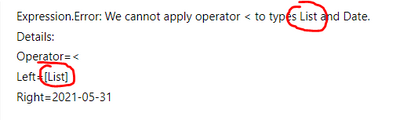
Expression.Error: We cannot apply operator < to types List and Date.
Details:
Operator=<
Left=[List]
Right=2021-05-31
Solved! Go to Solution.
Are you trying to apply this comparison across different tables? If you are then, yes, you will need to provide row context for the calculation for the remote table.
If you're making the comparison across two columns in the same table then the row context should be implicit, and there's another issue at play.
Pete
Proud to be a Datanaut!
Hi @Anonymous ,
Power Query quite clearly thinks that one of your dates is actually a list:
You need to ensure that both columns only contain dates in every row.
Pete
Proud to be a Datanaut!
Every row only have dates.
I think I found my problem. Even if it's a table containing only one row, I still need to identify that row. Without identifying the row it reads it has a list.
Thanks
Are you trying to apply this comparison across different tables? If you are then, yes, you will need to provide row context for the calculation for the remote table.
If you're making the comparison across two columns in the same table then the row context should be implicit, and there's another issue at play.
Pete
Proud to be a Datanaut!
If you have recently started exploring Fabric, we'd love to hear how it's going. Your feedback can help with product improvements.
A new Power BI DataViz World Championship is coming this June! Don't miss out on submitting your entry.
Share feedback directly with Fabric product managers, participate in targeted research studies and influence the Fabric roadmap.
| User | Count |
|---|---|
| 5 | |
| 3 | |
| 3 | |
| 2 | |
| 2 |
| User | Count |
|---|---|
| 11 | |
| 10 | |
| 7 | |
| 7 | |
| 6 |