cancel
Showing results for 
Search instead for 
Did you mean: 

View all the Fabric Data Days sessions on demand. View schedule

Reply
Harish
New Member

On-Premise Data Gateway (Personal Mode) Installation failing

Hi All,


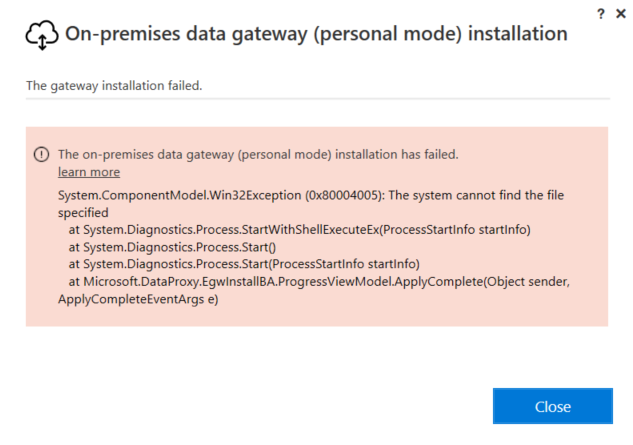
I'm new to the forums and I was trying to update from the older version of the Power Bi Personal Gateway to the newer version and I seem to have hit a wall with the installation. I was not able to update with the existing installation so had to uninstall the previous version and download newer version and do a fresh installation, but I keep getting an error stating the installation failed due to some files not being found.
Appreciate some much needed help on this.


powerbi_install_error.PNG


1 REPLY 1
Anonymous
Not applicable

@Harish,

Do you install previous personal gateway from Control Panel? If so, after you uninstall previous version of Personal gateway and failed installation of on-premise gateway(personal mode), reboot your machine , right-click the setup package and start "Run as administrator" to start the installation.

Moreover, if your firewall is on and you have proxy setting in your organization, please follow the guide in the similar thread below to configure your gateway.

http://community.powerbi.com/t5/Integrations-with-Files-and/On-premises-data-gateway-personal-mode-n...

Regards,
Lydia

Helpful resources

Announcements
November Power BI Update Carousel

Power BI Monthly Update - November 2025

Check out the November 2025 Power BI update to learn about new features.

Fabric Data Days Carousel

Fabric Data Days

Advance your Data & AI career with 50 days of live learning, contests, hands-on challenges, study groups & certifications and more!

FabCon Atlanta 2026 carousel

FabCon Atlanta 2026

Join us at FabCon Atlanta, March 16-20, for the ultimate Fabric, Power BI, AI and SQL community-led event. Save $200 with code FABCOMM.