cancel
Showing results for 
Search instead for 
Did you mean: 

July 7 - July 17 | Round 2 of the Power BI Dataviz World Championships. Don't miss your chance! Learn more

Reply
Anonymous
Not applicable

OData error calling function when identical table works fine

Hi, I have an odata function which I've setup to return exactly the same data as a entity table (verified json is the same through fiddler). However, the function call gives a json error, whist the table call works. If i reduce the size of one of the string fields, then the json parses no problem when called from the function. There seems to be something strange with the call to the odata function truncating the json value.


This works:

let
Source = OData.Feed("https://MYIP/odata", null, [Implementation="2.0"]),
tableData= Source{[Name="MYTABLE",Signature="table"]}[Data],
#"Kept First Rows" = Table.FirstN(tableData,1)
in
#"Kept First Rows"


This does not:


let
Source = OData.Feed("https://MYIP/odata", null, [Implementation="2.0"]),
#"Top_function (NumberToReturn as number) as table" = Source{[Name="Top",Signature="function (NumberToReturn as number) as table"]},
Data = #"Top_function (NumberToReturn as number) as table"[Data],
#"Invoked FunctionData" = Data(1)
in
#"Invoked FunctionData"


In the web API they both generate exactly the same data - confirmed by fiddler on both requests.


The error is:


DataSource.Error: OData: Invalid JSON. Unexpected end of input reached while processing a JSON string value.
Details:
DataSourceKind=OData

1 ACCEPTED SOLUTION
v-piga-msft
Resident Rockstar
Resident Rockstar

Hi @Anonymous ,


let
Source = OData.Feed("https://MYIP/odata", null, [Implementation="2.0"]),
#"Top_function (NumberToReturn as number) as table" = Source{[Name="Top",Signature="function (NumberToReturn as number) as table"]},
Data = #"Top_function (NumberToReturn as number) as table"[Data],
#"Invoked FunctionData" = Data(1)
in
#"Invoked FunctionData"


By my test step by step, I'm afraid that the error may caused by the #"Top_function (NumberToReturn as number) as table"  and Data(1).

You could try the query below.

let
Source = OData.Feed("http://services.odata.org/V3/Northwind/Northwind.svc/", null, [Implementation="2.0"]),
#"Employees table" = Source{[Name="Employees",Signature="table"]},
#"Data" = #"Employees table" [Data],
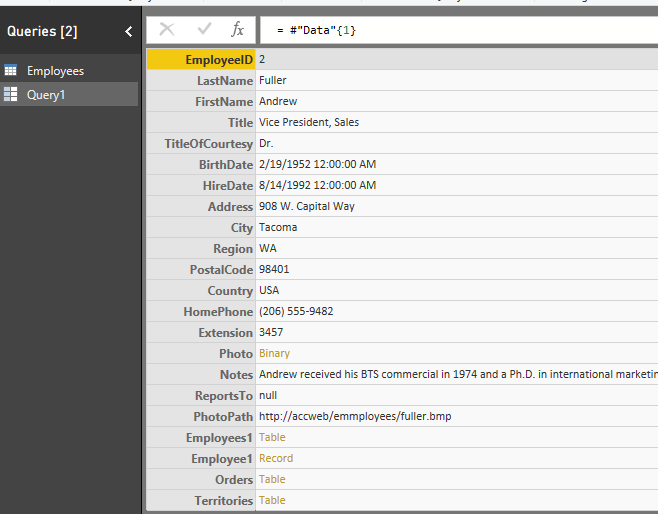
#"Invoked FunctionData" = #"Data"{1}
in
#"Invoked FunctionData"

Capture.PNG

Best  Regards,

Cherry


Community Support Team _ Cherry Gao
If this post helps, then please consider Accept it as the solution to help the other members find it more quickly.

View solution in original post

2 REPLIES 2
v-piga-msft
Resident Rockstar
Resident Rockstar

Hi @Anonymous ,

Have you solved your problem?

If you have solved, please always accept the replies making sense as solution to your question so that people who may have the same question can get the solution directly.

If you still need help, please feel free to ask.

Best  Regards,

Cherry


Community Support Team _ Cherry Gao
If this post helps, then please consider Accept it as the solution to help the other members find it more quickly.
v-piga-msft
Resident Rockstar
Resident Rockstar

Hi @Anonymous ,


let
Source = OData.Feed("https://MYIP/odata", null, [Implementation="2.0"]),
#"Top_function (NumberToReturn as number) as table" = Source{[Name="Top",Signature="function (NumberToReturn as number) as table"]},
Data = #"Top_function (NumberToReturn as number) as table"[Data],
#"Invoked FunctionData" = Data(1)
in
#"Invoked FunctionData"


By my test step by step, I'm afraid that the error may caused by the #"Top_function (NumberToReturn as number) as table"  and Data(1).

You could try the query below.

let
Source = OData.Feed("http://services.odata.org/V3/Northwind/Northwind.svc/", null, [Implementation="2.0"]),
#"Employees table" = Source{[Name="Employees",Signature="table"]},
#"Data" = #"Employees table" [Data],
#"Invoked FunctionData" = #"Data"{1}
in
#"Invoked FunctionData"

Capture.PNG

Best  Regards,

Cherry


Community Support Team _ Cherry Gao
If this post helps, then please consider Accept it as the solution to help the other members find it more quickly.

Helpful resources

Announcements
FabCon and SQLCon Barcelona 2026

FabCon & SQLCon – Barcelona 2026

Join us in Barcelona for FabCon and SQLCon, the Fabric, Power BI, SQL, and AI community event. Save €200 with code FABCMTY200.

60 days of Data Days Carousel

Data Days 2026

Join Fabric Data Days 2026: 60 days of free live/on-demand sessions, challenges, study groups, and certification opportunities.

Power BI DataViz World Championships carousel

Power BI DataViz World Championships - June 2026

A new Power BI DataViz World Championship is coming this June! Don't miss out on submitting your entry.