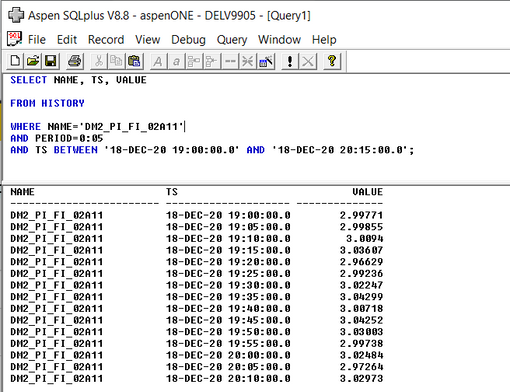
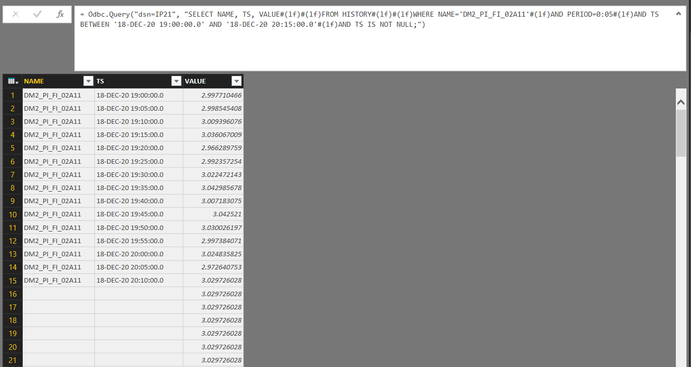
Hi, Not sure if you ever solved this issue but I have made successful connection.
All steps assume you have got the correct approvals etc from your IT and OT teams.
First step is to create a PowerBI gateway in your local network, in a segment/VLAN/subnet that has access to your IP21 historian. This should be a machine that stays on 100% of the time, or at least is configured to reboot automatically and power-on after AC loss. You will need to have admin access to install.
Second step is to register the Aspen SQLPlus ODBC drivers on the machine. You will need the 64-bit drivers. See the linked article. Again, you will need to have admin access to install.
Fourth step is to create the necessary 64-bit DSNs on the machine hosting the PowerBI gateway. You will need one for each IP21 historian you want to access.
Fifth step (which is repeated for each connection you setup within the PowerBI ecosystem is to setup a connection. When setting up your connection, the connection string is just
DSN=[DSN name from PowerBI gateway machine]
You will configure the connection to use the necessary gateway, and you can choose to put some SQLPlus code into the code block; if you don't add code, you can select the tables in the next window.
Depending on your security model, you will likely need to enter a set of user credentials. These may be the domain service account that IP21 runs using, or could be a separately created service account that has access, or a basic account if your IP21 isn't running on a domain joined server. This will be specific to your environment.
As noted, you can either create specifc queries in the connection or you can use a single connection within a semantic model and make many queries. We are using queries that replicate the many extractions that have been built in countless Excel sheets using the Excel add-in.
The most fun comes from writing the queries in a way that makes the time-series data digestable in a format that mimics what the users are used to seeing as the output from the Excel add-in.