cancel
Showing results for 
Search instead for 
Did you mean: 

Level up your Power BI skills this month - build one visual each week and tell better stories with data! Get started

Reply
stewars3
Regular Visitor

ODBC SQL Query to IP21 Data Source

Hi Everyone,


I am somewhat new to PowerBI and this is my first time posting to this forum so excuse me if I mess anything up but I have used PowerQuery in Excel at an intermediate level for some time now. 


I have been having an issue with a query for a bit now that I just cannot figure out. I am trying to connect to data collected by an industrial data historian called IP21. I am using an ODBC connector with a SQL driver made for the historian and created a 32bit data source and am using 32 bit powerbi. 


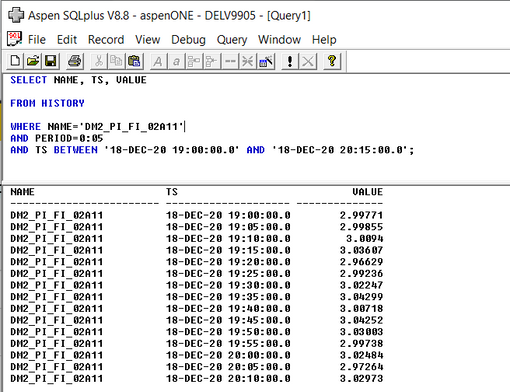
This is what the query should return including the origninal SQL statement:

SQLplusQuery.PNG

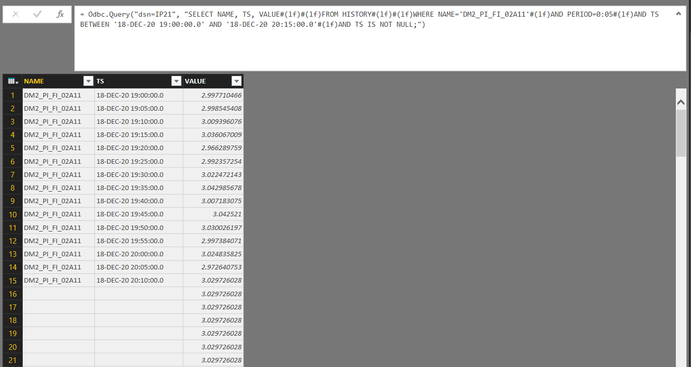
Using this same statement everything is ok other than it loads infinite null/blank rows and copies the last process value down with it:

PowerBIQuery.PNG


Perhaps there is an issue with my SQL statement? I only recently began picking up SQL as I am much more familiar with C++ and VBA.


Any suggestions would be great, and I look forward to what is possible in PowerBI.


Thanks

4 REPLIES 4
simantraj987
New Member

Could you share all procedure with me that how are you connecting power BI to IP21?

Hi, Not sure if you ever solved this issue but I have made successful connection.


All steps assume you have got the correct approvals etc from your IT and OT teams.


First step is to create a PowerBI gateway in your local network, in a segment/VLAN/subnet that has access to your IP21 historian.  This should be a machine that stays on 100% of the time, or at least is configured to reboot automatically and power-on after AC loss. You will need to have admin access to install.


Second step is to register the Aspen SQLPlus ODBC drivers on the machine. You will need the 64-bit drivers. See the linked article. Again, you will need to have admin access to install.


Fourth step is to create the necessary 64-bit DSNs on the machine hosting the PowerBI gateway. You will need one for each IP21 historian you want to access. 


Fifth step (which is repeated for each connection you setup within the PowerBI ecosystem is to setup a connection. When setting up your connection, the connection string is just 

DSN=[DSN name from PowerBI gateway machine]

You will configure the connection to use the necessary gateway, and you can choose to put some SQLPlus code into the code block; if you don't add code, you can select the tables in the next window.

Depending on your security model, you will likely need to enter a set of user credentials. These may be the domain service account that IP21 runs using, or could be a separately created service account that has access, or a basic account if your IP21 isn't running on a domain joined server. This will be specific to your environment.


As noted, you can either create specifc queries in the connection or you can use a single connection within a semantic model and make many queries. We are using queries that replicate the many extractions that have been built in countless Excel sheets using the Excel add-in. 


The most fun comes from writing the queries in a way that makes the time-series data digestable in a format that mimics what the users are used to seeing as the output from the Excel add-in.

PhilipTreacy
Super User
Super User

Hi @stewars3 

What result do you get if you run the SQL directly against the database?

Regards

Phil


Did I answer your question? Then please mark my post as the solution.
If I helped you, click on the Thumbs Up to give Kudos.


Blog :: YouTube Channel :: Connect on Linkedin


Proud to be a Super User!


Hi @PhilipTreacy 


Do you mean running the SQL statement in command prompt? I'm not sure I know how to but I'm sure I could somehow figure it out.


I ran the SQL in a command line type program called "Aspen SQLplus" and the results are shown in the first picture. You can see the last point is at 20:10:00 in both but the last Value is repeated for some reason while using PowerQuery. 


Thanks 


Scott

Helpful resources

Announcements
April Power BI Update Carousel

Power BI Monthly Update - April 2026

Check out the April 2026 Power BI update to learn about new features.

Fabric SQL PBI Data Days

Data Days 2026 coming soon!

Sign up to receive a private message when registration opens and key events begin.

New to Fabric survey Carousel

New to Fabric Survey

If you have recently started exploring Fabric, we'd love to hear how it's going. Your feedback can help with product improvements.

Power BI DataViz World Championships carousel

Power BI DataViz World Championships - June 2026

A new Power BI DataViz World Championship is coming this June! Don't miss out on submitting your entry.

Top Solution Authors