cancel
Showing results for 
Search instead for 
Did you mean: 

July 7 - July 17 | Round 2 of the Power BI Dataviz World Championships. Don't miss your chance! Learn more

Reply
MennoTwill
Frequent Visitor

No Authorisation REST API after Publish Header

Hi all,


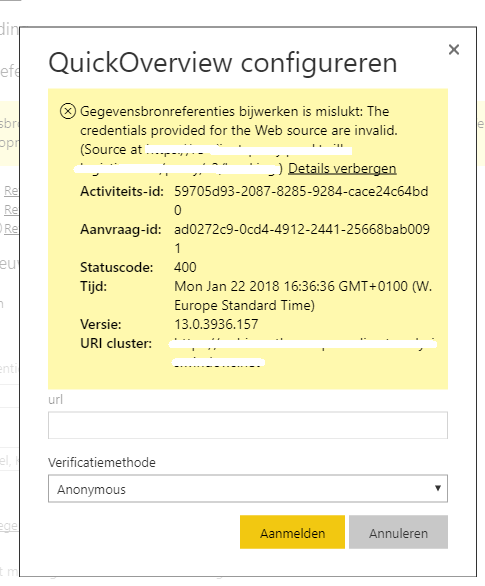
I have designed a dashboard within Power BI Desktop using our own data. This data is accessed using a REST API which is authorized using a token in the header. Everything works fine, but then I publish to Power BI Services and want to schedule the refresh. It shows a 400 error. It seems to be that the header is lost during publish?

error.png


I checked for hours on forums, but couldn't find any real solution. The only thing I found was this topic (https://community.powerbi.com/t5/Service/web-contents-with-specified-headers-works-in-PBI-desktop-bu...) but without any solution. Can someone help me to fix this final piece?

Thanks in advance.

5 REPLIES 5
Anonymous
Not applicable

@MennoTwill,

Could you please post the power query code in Advanced Editor of your query for us to analyze? Do mask sensitive data before you upload code.

In addition, please review my reply in  the similar thread below and check if it helps you.
http://community.powerbi.com/t5/Integrations-with-Files-and/Dataset-Refresh-REST-API-amp-JSON-with-r...

Regards,
Lydia

Thanks for your reply.


I read the topic you are mentioning and changed the code. This code works in Power BI Desktop, but still not on Power BI Services.
This is the code I'm originally using to connect:


Source = Json.Document(Web.Contents("URL", [Headers=[Authorization="API KEY"]]))

I also split it into the URL + relative path, but that doesn't work either. And I changed it to have Web.Contents on one row and Json.Document at the second, but that also didn't work that well.


Hope someone can help me to solve it.

Anonymous
Not applicable

@MennoTwill,

Do you use any parameter in the URL?

Regards,
Lydia

@Anonymous No, it is just a normal url like: www.google.com/api/v3/information


@MennoTwill Would try with #"Authorization"="key" in your header.

There is also an option in Options and settings > Options > Privacy that I've had to set to 'Always Ignore Privacy Level settings' for it to work.

Helpful resources

Announcements
FabCon and SQLCon Barcelona 2026

FabCon & SQLCon – Barcelona 2026

Join us in Barcelona for FabCon and SQLCon, the Fabric, Power BI, SQL, and AI community event. Save €200 with code FABCMTY200.

Fabric Community Sticker Design Challenge Barcelona Carousel

Fabric Community Sticker Challenge - Barcelona 2026

If you love stickers, then you will definitely want to check out our community sticker challenge, Barcelona edition!

July Power BI Update Carousel

Power BI Monthly Update - July 2026

Check out the July 2026 Power BI update to learn about new features.

Power BI DataViz World Championships carousel

Power BI DataViz World Championships - June 2026

A new Power BI DataViz World Championship is coming this June! Don't miss out on submitting your entry.