cancel
Showing results for 
Search instead for 
Did you mean: 

The Power BI Data Visualization World Championships is back! Get ahead of the game and start preparing now! Learn more

Reply
MennoTwill
Frequent Visitor

No Authorisation REST API after Publish Header

Hi all,


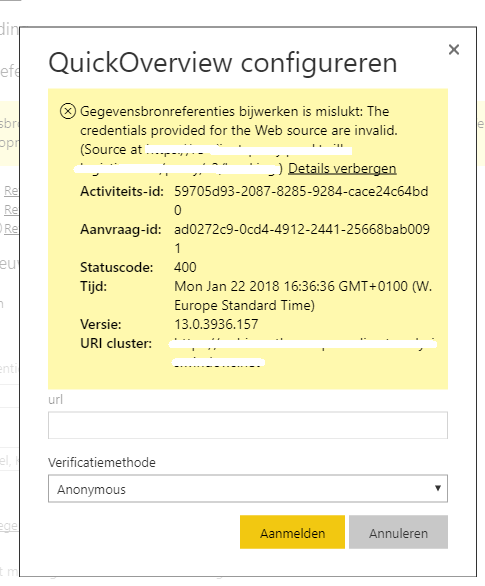
I have designed a dashboard within Power BI Desktop using our own data. This data is accessed using a REST API which is authorized using a token in the header. Everything works fine, but then I publish to Power BI Services and want to schedule the refresh. It shows a 400 error. It seems to be that the header is lost during publish?

error.png


I checked for hours on forums, but couldn't find any real solution. The only thing I found was this topic (https://community.powerbi.com/t5/Service/web-contents-with-specified-headers-works-in-PBI-desktop-bu...) but without any solution. Can someone help me to fix this final piece?

Thanks in advance.

5 REPLIES 5
Anonymous
Not applicable

@MennoTwill,

Could you please post the power query code in Advanced Editor of your query for us to analyze? Do mask sensitive data before you upload code.

In addition, please review my reply in  the similar thread below and check if it helps you.
http://community.powerbi.com/t5/Integrations-with-Files-and/Dataset-Refresh-REST-API-amp-JSON-with-r...

Regards,
Lydia

Thanks for your reply.


I read the topic you are mentioning and changed the code. This code works in Power BI Desktop, but still not on Power BI Services.
This is the code I'm originally using to connect:


Source = Json.Document(Web.Contents("URL", [Headers=[Authorization="API KEY"]]))

I also split it into the URL + relative path, but that doesn't work either. And I changed it to have Web.Contents on one row and Json.Document at the second, but that also didn't work that well.


Hope someone can help me to solve it.

Anonymous
Not applicable

@MennoTwill,

Do you use any parameter in the URL?

Regards,
Lydia

@Anonymous No, it is just a normal url like: www.google.com/api/v3/information


@MennoTwill Would try with #"Authorization"="key" in your header.

There is also an option in Options and settings > Options > Privacy that I've had to set to 'Always Ignore Privacy Level settings' for it to work.

Helpful resources

Announcements
Power BI DataViz World Championships

Power BI Dataviz World Championships

The Power BI Data Visualization World Championships is back! Get ahead of the game and start preparing now!

December 2025 Power BI Update Carousel

Power BI Monthly Update - December 2025

Check out the December 2025 Power BI Holiday Recap!

FabCon Atlanta 2026 carousel

FabCon Atlanta 2026

Join us at FabCon Atlanta, March 16-20, for the ultimate Fabric, Power BI, AI and SQL community-led event. Save $200 with code FABCOMM.

Top Solution Authors