Get certified for free when you join Fabric Data Days 2026 and dive into Fabric, Power BI, SQL, AI, and other essential data skills.
Join nowTry your skills in the Power BI Dataviz World Championship! Round one ends June 26. Join now
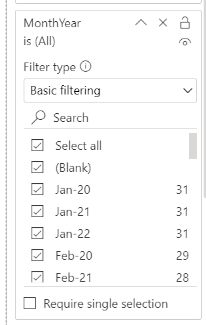
With the new year, we are looking to add 2023 monthly data into my query but unfortunately, it is not populating. All of the CSV has the correct updated data, but when I export my file I don't see Jan-23. Below is a screenshot of what I see when it comes to my filter. Any suggestions are welcomed!
Solved! Go to Solution.
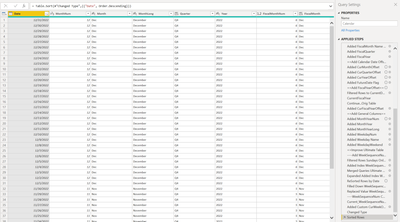
Scroll up to the top of the applied steps. I'm guessing there are a couple of steps/parameters that define the date range with hardcoded values. You can update these to suit your needs.
If you don't want hardcoded values that you need to update every year, it's possible to determine a date range from the data you load in. I often do something like
[...]
StartDate = #date(Date.Year(List.Min(Data[Date])), 1, 1),
EndDate = #date(Date.Year(List.Max(Data[Date])), 12, 31),
[...]
This goes from the start of the year of the minimal date to the end of the year on the maximal date from the Data table.
I can't tell just from the screenshot.
So what I notice is that our calendar file hasn't been updated since Feb 2022, does anyone know an easier way than manually updating this query? I am still fairly new to the program and don't know much about it.
Scroll up to the top of the applied steps. I'm guessing there are a couple of steps/parameters that define the date range with hardcoded values. You can update these to suit your needs.
If you don't want hardcoded values that you need to update every year, it's possible to determine a date range from the data you load in. I often do something like
[...]
StartDate = #date(Date.Year(List.Min(Data[Date])), 1, 1),
EndDate = #date(Date.Year(List.Max(Data[Date])), 12, 31),
[...]
This goes from the start of the year of the minimal date to the end of the year on the maximal date from the Data table.
Don't miss out on Data Days, June 15 through August 7. Learn Fabric, Power BI, SQL, AI and more.
Check out the May 2026 Power BI update to learn about new features.
| User | Count |
|---|---|
| 4 | |
| 4 | |
| 2 | |
| 2 | |
| 1 |
| User | Count |
|---|---|
| 11 | |
| 10 | |
| 5 | |
| 4 | |
| 4 |