cancel
Showing results for 
Search instead for 
Did you mean: 

We've captured the moments from FabCon & SQLCon that everyone is talking about, and we are bringing them to the community, live and on-demand. Starts on April 14th. Register now

Reply
GaëlleFromGers
Regular Visitor

Nested Join with default key if null values

Hi all,


I have a referential that I would like to merge in a table table using multiple columns.

In order to avoid to duplicated lines in my referential, I would like my nested join to take into account null vlaue in my key column from referential for any case in not specify.


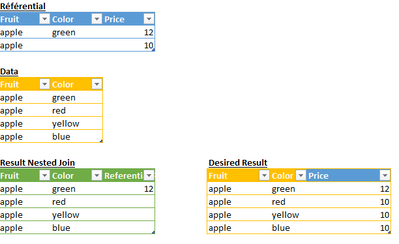
In this simplified example below, the nested join function is based on columns Fruit and Color.

The price column from referential is null in the result table because their no null color in the data table.

I would like the price to be by default the value corresponding to null value in referentiel if it is different than green.

See desired result table.


Is anyone knows if it is possible? 


GalleFromGers_0-1675260938222.png

Thanks in advance to the community for your help,

Gaëlle.


1 ACCEPTED SOLUTION
v-jingzhang
Community Support
Community Support

Hi @GaëlleFromGers 


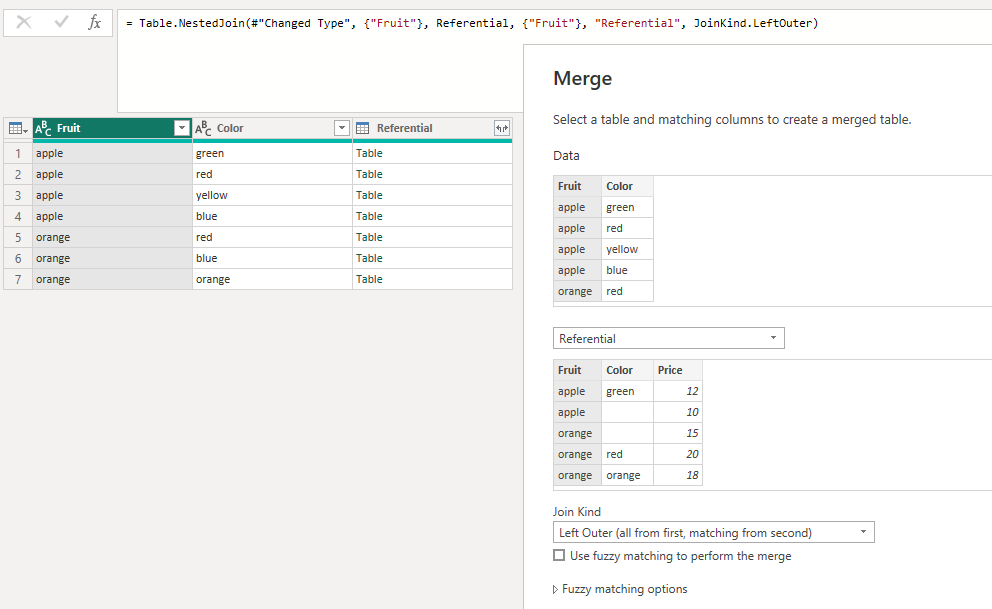
When merging queries, only base it on Fruit column. 

vjingzhang_0-1675318279518.png

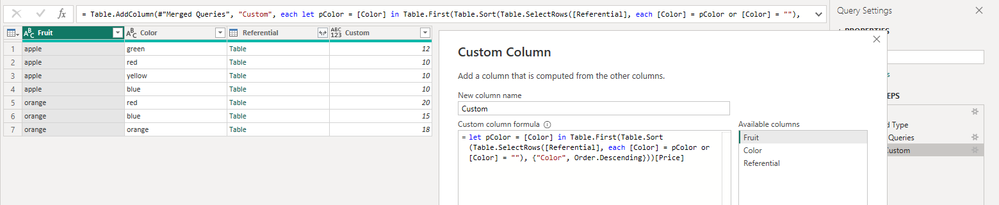
Then add a custom column with below code to get the prices. 

= let pColor = [Color] in Table.First(Table.Sort(Table.SelectRows([Referential], each [Color] = pColor or [Color] = ""), {"Color", Order.Descending}))[Price]

vjingzhang_1-1675318381926.png

Remove column "Referential". 


Best Regards,
Community Support Team _ Jing
If this post helps, please Accept it as Solution to help other members find it.


View solution in original post

6 REPLIES 6
GaëlleFromGers
Regular Visitor

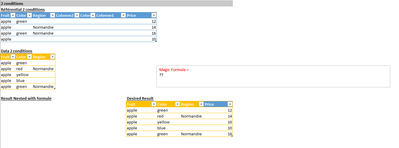
One last question on the subject, what if I have 2 conditions with the same specificity?

For instance Color and Region?

GalleFromGers_0-1675432271101.png

Thanks in advacne for your help,

Hi @GaëlleFromGers 


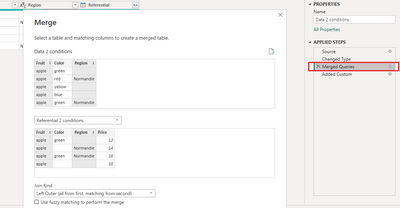
You just need to modify the Merged Queries step to base the nested join operation on Fruit and Region.  

vjingzhang_0-1675669867689.png


Best Regards,
Community Support Team _ Jing
If this post helps, please Accept it as Solution to help other members find it.

Actually, Region shoudl work like tyhe color: given region ou default value if not mentionned in the referential. 

I thought it would be another parameter in the custom step?

Hi @GaëlleFromGers 


I'm sorry. You're correct. You can modify the custom column step similar to below one:

= let pColor = [Color], pRegion = [Region] in Table.First(Table.Sort(Table.SelectRows([Referential], each ([Color] = pColor or [Color] = "") and ([Region] = pRegion or [Region] = "")), {{"Color", Order.Descending}, {"Region", Order.Descending}}))[Price]

BR,

Jing

v-jingzhang
Community Support
Community Support

Hi @GaëlleFromGers 


When merging queries, only base it on Fruit column. 

vjingzhang_0-1675318279518.png

Then add a custom column with below code to get the prices. 

= let pColor = [Color] in Table.First(Table.Sort(Table.SelectRows([Referential], each [Color] = pColor or [Color] = ""), {"Color", Order.Descending}))[Price]

vjingzhang_1-1675318381926.png

Remove column "Referential". 


Best Regards,
Community Support Team _ Jing
If this post helps, please Accept it as Solution to help other members find it.


Jing,

Thank you so much for your quick support.

I just had to modify the custom column as follow and in works perfectly:

= Table.AddColumn(Source, "Personnalisé", each let pColor = [Color] in Table.First(Table.Sort(Table.SelectRows([Referential], each [Color] = pColor or [Color] = null), {"Color", Order.Descending}))[Price])


Next time, I will attach my file to help 😉


Thanks again and have a nice day,

Gaëlle.

Helpful resources

Announcements
New to Fabric survey Carousel

New to Fabric Survey

If you have recently started exploring Fabric, we'd love to hear how it's going. Your feedback can help with product improvements.

Power BI DataViz World Championships carousel

Power BI DataViz World Championships - June 2026

A new Power BI DataViz World Championship is coming this June! Don't miss out on submitting your entry.

Join our Fabric User Panel

Join our Fabric User Panel

Share feedback directly with Fabric product managers, participate in targeted research studies and influence the Fabric roadmap.

March Power BI Update Carousel

Power BI Community Update - March 2026

Check out the March 2026 Power BI update to learn about new features.