Join us at FabCon Atlanta from March 16 - 20, 2026, for the ultimate Fabric, Power BI, AI and SQL community-led event. Save $200 with code FABCOMM.
Register now!Learn from the best! Meet the four finalists headed to the FINALS of the Power BI Dataviz World Championships! Register now
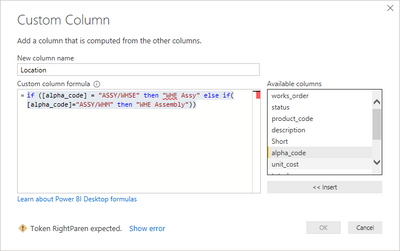
I have the following code in a custom column, and it simply refuses to accept any variant of the very first then string value I want to add. Doesnt matter what I do, I get the same error. this seems like basic functionality, but i cannot get it to work at all. (I Can get it to work on the table view, but I really want this within the query.
Any help will be greatly appreciated as I need this custom column for use elsewhere in the power bi report
Solved! Go to Solution.
@hyperbob0811 - You don't use the paren's with if statements in M code. That's DAX syntax.
Should be:
if [alpha_code] = ...
@hyperbob0811 - You don't use the paren's with if statements in M code. That's DAX syntax.
Should be:
if [alpha_code] = ...
Thanks, now I get a token else error - how do I end this formula?
@hyperbob0811 - Add else "" or something like that.
excellent thanks - I was in full DAX and excel mode with the parenthesis and comma's - this seems like you basically right it out as you would say it!
Share feedback directly with Fabric product managers, participate in targeted research studies and influence the Fabric roadmap.
Check out the February 2026 Power BI update to learn about new features.
| User | Count |
|---|---|
| 16 | |
| 12 | |
| 9 | |
| 6 | |
| 6 |