cancel
Showing results for 
Search instead for 
Did you mean: 

The Power BI Data Visualization World Championships is back! Get ahead of the game and start preparing now! Learn more

Reply
coolshib
Helper III
Helper III

Neer Help on Power Query Nested If statement

Hello Everyone,
I have column in my data set which is as follows:

100
200
300
400 Cr
500
600
200 Cr


I am looking for a power query formula which would return the following values:
(If cell contains "Cr" then remove "Cr" and multiply by -1).

100.00
200.00
300.00
-400.00
500.00
600.00
-200.00


Thank you so much in advance.

Regards
Shib

1 ACCEPTED SOLUTION
Jimmy801
Community Champion
Community Champion

Hello @coolshib 


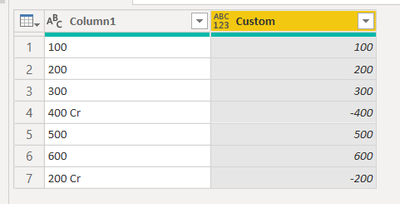
here another approach. Add a new column with this formula. It checks if your text is containing "Cr" then text is splitted by " " and using the first part and multiplying with -1 otherwise not

if Text.Contains([Column1],"Cr") then Number.From(Text.Split([Column1]," "){0})*-1 else Number.From([Column1])

 Here the complete code example

let
    Source = Table.FromRows(Json.Document(Binary.Decompress(Binary.FromText("i45WMjQwUIrViVYygtLGUNrEwEDBuQjMNIUKmSGUgqViAQ==", BinaryEncoding.Base64), Compression.Deflate)), let _t = ((type nullable text) meta [Serialized.Text = true]) in type table [Column1 = _t]),
    #"Changed Type" = Table.TransformColumnTypes(Source,{{"Column1", type text}}),
    #"Added Custom" = Table.AddColumn(#"Changed Type", "Custom", each if Text.Contains([Column1],"Cr") then Number.From(Text.Split([Column1]," "){0})*-1 else Number.From([Column1]))
in
    #"Added Custom"

Jimmy801_0-1613113424421.png

Copy paste this code to the advanced editor in a new blank query to see how the solution works.

If this post helps or solves your problem, please mark it as solution (to help other users find useful content and to acknowledge the work of users that helped you)
Kudoes are nice too

Have fun

Jimmy

View solution in original post

4 REPLIES 4
Jimmy801
Community Champion
Community Champion

Hello @coolshib 


here another approach. Add a new column with this formula. It checks if your text is containing "Cr" then text is splitted by " " and using the first part and multiplying with -1 otherwise not

if Text.Contains([Column1],"Cr") then Number.From(Text.Split([Column1]," "){0})*-1 else Number.From([Column1])

 Here the complete code example

let
    Source = Table.FromRows(Json.Document(Binary.Decompress(Binary.FromText("i45WMjQwUIrViVYygtLGUNrEwEDBuQjMNIUKmSGUgqViAQ==", BinaryEncoding.Base64), Compression.Deflate)), let _t = ((type nullable text) meta [Serialized.Text = true]) in type table [Column1 = _t]),
    #"Changed Type" = Table.TransformColumnTypes(Source,{{"Column1", type text}}),
    #"Added Custom" = Table.AddColumn(#"Changed Type", "Custom", each if Text.Contains([Column1],"Cr") then Number.From(Text.Split([Column1]," "){0})*-1 else Number.From([Column1]))
in
    #"Added Custom"

Jimmy801_0-1613113424421.png

Copy paste this code to the advanced editor in a new blank query to see how the solution works.

If this post helps or solves your problem, please mark it as solution (to help other users find useful content and to acknowledge the work of users that helped you)
Kudoes are nice too

Have fun

Jimmy

@Jimmy801Thank you so much for the solution. This is exaclty what i wanted.

harshnathani
Community Champion
Community Champion

HI @coolshib ,


let
    Source = Table.FromRows(Json.Document(Binary.Decompress(Binary.FromText("i45WMjQwUIrViVYygtLGUNrEwEDBuQjMNIUKmSGUgqViAQ==", BinaryEncoding.Base64), Compression.Deflate)), let _t = ((type nullable text) meta [Serialized.Text = true]) in type table [Column1 = _t]),
    #"Changed Type" = Table.TransformColumnTypes(Source,{{"Column1", type text}}),
    #"Split Column by Character Transition" = Table.SplitColumn(#"Changed Type", "Column1", Splitter.SplitTextByCharacterTransition({"0".."9"}, (c) => not List.Contains({"0".."9"}, c)), {"Column1.1", "Column1.2"}),
    #"Changed Type1" = Table.TransformColumnTypes(#"Split Column by Character Transition",{{"Column1.1", Int64.Type}}),
    #"Added Conditional Column" = Table.AddColumn(#"Changed Type1", "Custom", each if [Column1.2] = null then [Column1.1] * 1 else [Column1.1] * -1)
in
    #"Added Conditional Column"


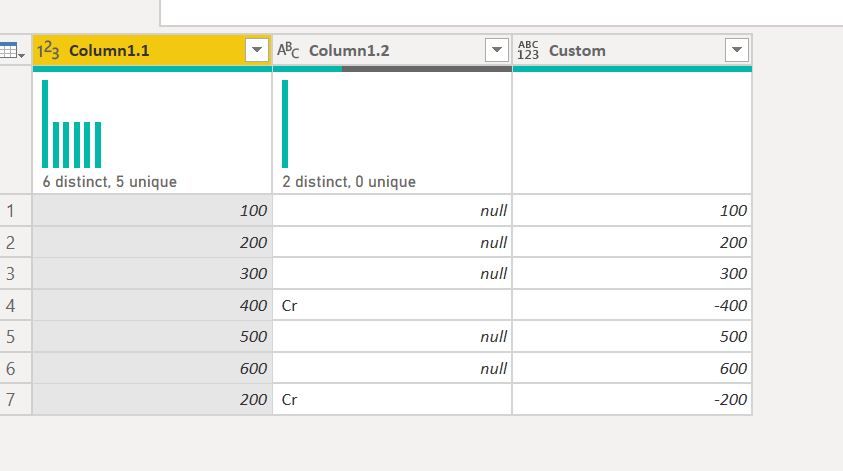
Split the column by Digit to Non Digit

Add a Conditional Column 


Table.AddColumn(#"Changed Type1", "Custom", each if [Column1.2] = null then [Column1.1] * 1 else [Column1.1] * -1)


1.JPG


Regards,
Harsh Nathani
Did I answer your question? Mark my post as a solution! Appreciate with a Kudos!! (Click the Thumbs Up Button)

Thank you so much for your response.

Helpful resources

Announcements
Power BI DataViz World Championships

Power BI Dataviz World Championships

The Power BI Data Visualization World Championships is back! Get ahead of the game and start preparing now!

December 2025 Power BI Update Carousel

Power BI Monthly Update - December 2025

Check out the December 2025 Power BI Holiday Recap!

FabCon Atlanta 2026 carousel

FabCon Atlanta 2026

Join us at FabCon Atlanta, March 16-20, for the ultimate Fabric, Power BI, AI and SQL community-led event. Save $200 with code FABCOMM.

Top Solution Authors