cancel
Showing results for 
Search instead for 
Did you mean: 

Did you hear? There's a new SQL AI Developer certification (DP-800). Start preparing now and be one of the first to get certified. Register now

Reply
gco
Resolver II
Resolver II

Need help with measures

Hi there,


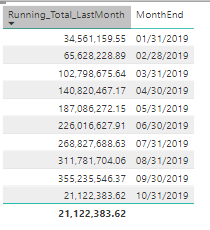
Could you please help me figure out how to create a measure that only displays the data from 01/31 up to 09/30 below?

I cannot use a filter in the view because i will be replacing 10/31 value with another.  So my main goal is to create another measure


Overall_Total = Running_Total_LastMonth + Oct31_total


Powerbi_running_total.png

Here is the measure i am using

Running_Total_LastMonth =

CALCULATE (

   SUM(values),

   FILTER(

       ALL('Date'[MonthEnd]),

      'Date'[MonthEnd] <= MAX('Date'[MonthEnd])  // i was trying to modify this so that it does not display current month data.  

)

)


Any help is greatly appreciated.

Thank you

Glen

1 ACCEPTED SOLUTION
v-juanli-msft
Community Support
Community Support

Hi @gco 

Create a measure

Measure =
IF (
    MAX ( 'calendar'[year] ) = YEAR ( TODAY () )
        && MAX ( 'calendar'[month] ) < MONTH ( TODAY () ),
    CALCULATE (
        SUM ( Sheet8[value] ),
        FILTER (
            ALL ( 'calendar' ),
            'calendar'[year] = YEAR ( TODAY () )
                && 'calendar'[month] < MONTH ( TODAY () )
                && 'calendar'[Date] <= MAX ( 'calendar'[Date] )
        )
    )
)

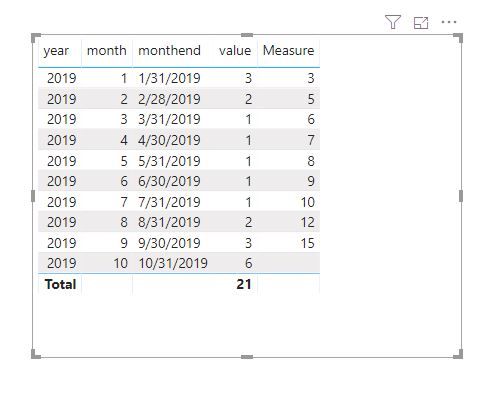
Capture14.JPG

My calendar table

calendar = ADDCOLUMNS(CALENDARAUTO(),"year",YEAR([Date]),"month",MONTH([Date]))

add column

monthend = ENDOFMONTH('calendar'[Date])
Best Regards
Maggie
Community Support Team _ Maggie Li
If this post helps, then please consider Accept it as the solution to help the other members find it more quickly.


View solution in original post

4 REPLIES 4
v-juanli-msft
Community Support
Community Support

Hi @gco 

Create a measure

Measure =
IF (
    MAX ( 'calendar'[year] ) = YEAR ( TODAY () )
        && MAX ( 'calendar'[month] ) < MONTH ( TODAY () ),
    CALCULATE (
        SUM ( Sheet8[value] ),
        FILTER (
            ALL ( 'calendar' ),
            'calendar'[year] = YEAR ( TODAY () )
                && 'calendar'[month] < MONTH ( TODAY () )
                && 'calendar'[Date] <= MAX ( 'calendar'[Date] )
        )
    )
)

Capture14.JPG

My calendar table

calendar = ADDCOLUMNS(CALENDARAUTO(),"year",YEAR([Date]),"month",MONTH([Date]))

add column

monthend = ENDOFMONTH('calendar'[Date])
Best Regards
Maggie
Community Support Team _ Maggie Li
If this post helps, then please consider Accept it as the solution to help the other members find it more quickly.


Hi @v-juanli-msft and @Greg_Deckler 


Thank you.  I am sure i would be able to use your measures in my other project.


I have actually fixed my problem by taking the total of the previous months + current month.  I created a calculated column on my previous months table and had used the measure:  


Total_Prev_months = CALCULATE (SUM (Prev_Months[Balances]), FILTER (Prev_Months, Prev_Months[IsThisYear] = "YES"))

Total_Current_month = CALCULATE (SUM (Daily_Data[Balances]), FILTER (Daily_Data, Daily_Data[IsCurrentMonth] = "YES"))


Thank you again

Glen

The calculated columns are for the IsThisYear, and IsCurrentMonth.

Greg_Deckler
Community Champion
Community Champion

See if my Time Intelligence the Hard Way provides a different way of accomplishing what you are going for.

https://community.powerbi.com/t5/Quick-Measures-Gallery/Time-Intelligence-quot-The-Hard-Way-quot-TIT...


Follow on LinkedIn
@ me in replies or I'll lose your thread!!!
Instead of a Kudo, please vote for this idea
Become an expert!: Enterprise DNA
External Tools: MSHGQM
YouTube Channel!: Microsoft Hates Greg
Latest book!:
DAX For Humans

DAX is easy, CALCULATE makes DAX hard...

Helpful resources

Announcements
April Power BI Update Carousel

Power BI Monthly Update - April 2026

Check out the April 2026 Power BI update to learn about new features.

Fabric SQL PBI Data Days

Data Days 2026 coming soon!

Sign up to receive a private message when registration opens and key events begin.

New to Fabric survey Carousel

New to Fabric Survey

If you have recently started exploring Fabric, we'd love to hear how it's going. Your feedback can help with product improvements.

Power BI DataViz World Championships carousel

Power BI DataViz World Championships - June 2026

A new Power BI DataViz World Championship is coming this June! Don't miss out on submitting your entry.