cancel
Showing results for 
Search instead for 
Did you mean: 

Data Days is here! Join us now for 60+ days of learning, challenges, and connection. Learn more

Reply
Zenly
Regular Visitor

Need help on Loop for paginated API

Hi,


I wish to create a loop code for the following URL https://boardgamegeek.com/xmlapi2/plays?username=ZENLY&mindate=2018-01-01&page=1


The https://boardgamegeek.com/xmlapi2/plays API only returns 100 results per page, and I would like to automate the Power BI Query to get data for all the pages and stop when the API/webpage don't find/returns any more data.


So for 940 results, the loop should get data for 10 XML pages/tables, append these into one big table, and then stop.


Thanks for any replies. 🙂

-Carl

3 REPLIES 3
mahoneypat
Microsoft Employee
Microsoft Employee

Please see this article for how to avoid that error with relativepath.

Chris Webb's BI Blog: Using The RelativePath And Query Options With Web.Contents() In Power Query An...


Pat


Did I answer your question? Mark my post as a solution! Kudos are also appreciated!

To learn more about Power BI, follow me on Twitter or subscribe on YouTube.


@mahoneypa HoosierBI on YouTube


ppm1
Solution Sage
Solution Sage

This is definitely doable. I don't have time to work it out, but here is a quick way to get going, but creating a list of page numbers and concatenating them into the web call on each row. To see how it works, just create a blank query, open the Advanced Editor and replace the text there with the M code below.


let
    Source = {1..10},
    #"Converted to Table" = Table.FromList(Source, Splitter.SplitByNothing(), null, null, ExtraValues.Error),
    #"Changed Type" = Table.TransformColumnTypes(#"Converted to Table",{{"Column1", type text}}),
    #"Renamed Columns" = Table.RenameColumns(#"Changed Type",{{"Column1", "PageNum"}}),
    #"Added Custom" = Table.AddColumn(#"Renamed Columns", "Custom", each Xml.Tables(Web.Contents("https://boardgamegeek.com/xmlapi2/plays?username=ZENLY&mindate=2018-01-01&page="&[PageNum]))),
    #"Expanded Custom" = Table.ExpandTableColumn(#"Added Custom", "Custom", {"play"}, {"play"})
in
    #"Expanded Custom"


Pat

Microsoft Employee
Zenly
Regular Visitor

Hi Pat,


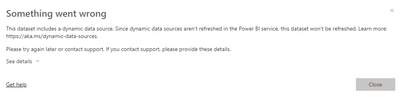
Thank you for your reply. I tried your code and it is very helpfull. Will this code break the Power BI Pro Refresh? 

Zenly_0-1675067874689.png


Zenly_1-1675067922854.png


-Carl


Helpful resources

Announcements
Fabric Data Days is here Carousel

Fabric Data Days 2026

Don't miss out on Data Days, June 15 through August 7. Learn Fabric, Power BI, SQL, AI and more.

May Power BI Update Carousel

Power BI Monthly Update - May 2026

Check out the May 2026 Power BI update to learn about new features.

Power BI DataViz World Championships carousel

Power BI DataViz World Championships - June 2026

A new Power BI DataViz World Championship is coming this June! Don't miss out on submitting your entry.