FabCon is coming to Atlanta
Join us at FabCon Atlanta from March 16 - 20, 2026, for the ultimate Fabric, Power BI, AI and SQL community-led event. Save $200 with code FABCOMM.
Register now!- Power BI forums
- Get Help with Power BI
- Desktop
- Service
- Report Server
- Power Query
- Mobile Apps
- Developer
- DAX Commands and Tips
- Custom Visuals Development Discussion
- Health and Life Sciences
- Power BI Spanish forums
- Translated Spanish Desktop
- Training and Consulting
- Instructor Led Training
- Dashboard in a Day for Women, by Women
- Galleries
- Data Stories Gallery
- Themes Gallery
- Contests Gallery
- QuickViz Gallery
- Quick Measures Gallery
- Visual Calculations Gallery
- Notebook Gallery
- Translytical Task Flow Gallery
- TMDL Gallery
- R Script Showcase
- Webinars and Video Gallery
- Ideas
- Custom Visuals Ideas (read-only)
- Issues
- Issues
- Events
- Upcoming Events
The Power BI Data Visualization World Championships is back! Get ahead of the game and start preparing now! Learn more
- Power BI forums
- Forums
- Get Help with Power BI
- Power Query
- Need help created a new column with formula
- Subscribe to RSS Feed
- Mark Topic as New
- Mark Topic as Read
- Float this Topic for Current User
- Bookmark
- Subscribe
- Printer Friendly Page

- Mark as New
- Bookmark
- Subscribe
- Mute
- Subscribe to RSS Feed
- Permalink
- Report Inappropriate Content
Need help created a new column with formula
I have a table called Team Members with columns called prop_id, Allocation, and Role. Unfortunately, Allocation is not always correct in the data source for some situations and it can't be fixed easily there, so I need to use a formula to resolve it during the query. Basically, if there are multiple Team Member records with Role='lead' for a given prop_id, then the Allocation is correct, but if there is only one Team Member record with Role='lead' then Allocation comes in as 0. I need to transform that 0 to 100 for these cases. I want to create a new column called "Corrected Allocation", but I'm not really sure how to write the M code to accomplish this.
I think I need to use code to create a temporary table with all records with the current row's prop_id and Role='lead', then evaluate if there is only one row in that table. If so, Corrected Allocation would be set to 100. If there is more than one row, then Corrected Allocation would be set to Allocation.
Can someone help me translate that to M?
Thanks!
Solved! Go to Solution.


- Mark as New
- Bookmark
- Subscribe
- Mute
- Subscribe to RSS Feed
- Permalink
- Report Inappropriate Content
Hi @Anonymous ,
We can create a calculated column as below.
Column =
VAR a =
    CALCULATE (
        COUNTROWS ( 'Table' ),
        FILTER (
            'Table',
            'Table'[Role] = "Lead"
                && 'Table'[prop_id] = EARLIER ( 'Table'[prop_id] )
                && 'Table'[Member ID] <= EARLIER ( 'Table'[Member ID] )
        )
    )
VAR b =
    CALCULATE (
        SUM ( 'Table'[Allocation] ),
        FILTER (
            'Table',
            'Table'[Role] = "Lead"
                && 'Table'[prop_id] = EARLIER ( 'Table'[prop_id] )
                && 'Table'[Member ID] <= EARLIER ( 'Table'[Member ID] )
        )
    )
RETURN
    IF ( NOT ( ISBLANK ( a ) ) && b = 0, 100, 'Table'[Allocation] )
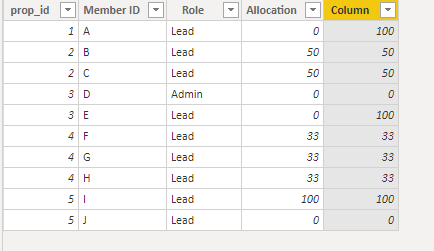
If this post helps, then please consider Accept it as the solution to help the others find it more quickly.
- Mark as New
- Bookmark
- Subscribe
- Mute
- Subscribe to RSS Feed
- Permalink
- Report Inappropriate Content
Hi @Anonymous ,
We can create a calculated column as below.
Column =
VAR a =
    CALCULATE (
        COUNTROWS ( 'Table' ),
        FILTER (
            'Table',
            'Table'[Role] = "Lead"
                && 'Table'[prop_id] = EARLIER ( 'Table'[prop_id] )
                && 'Table'[Member ID] <= EARLIER ( 'Table'[Member ID] )
        )
    )
VAR b =
    CALCULATE (
        SUM ( 'Table'[Allocation] ),
        FILTER (
            'Table',
            'Table'[Role] = "Lead"
                && 'Table'[prop_id] = EARLIER ( 'Table'[prop_id] )
                && 'Table'[Member ID] <= EARLIER ( 'Table'[Member ID] )
        )
    )
RETURN
    IF ( NOT ( ISBLANK ( a ) ) && b = 0, 100, 'Table'[Allocation] )
If this post helps, then please consider Accept it as the solution to help the others find it more quickly.
- Mark as New
- Bookmark
- Subscribe
- Mute
- Subscribe to RSS Feed
- Permalink
- Report Inappropriate Content
This totally worked. I was trying to do it with M in Power Query, but just creating a custom column with a DAX formula was easy with your instructions.


- Mark as New
- Bookmark
- Subscribe
- Mute
- Subscribe to RSS Feed
- Permalink
- Report Inappropriate Content
@Anonymous ,
One thing to be aware of is that there is significantly higher overhead using a Calculated Column as opposed to doing this in Power Query.
Did I answer your question? Mark my post as a solution!
Proud to be a Super User!
- Mark as New
- Bookmark
- Subscribe
- Mute
- Subscribe to RSS Feed
- Permalink
- Report Inappropriate Content
Hi @Anonymous
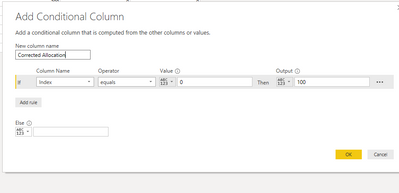
I need to transform that 0 to 100 for these cases. I want to create a new column called "Corrected Allocation", but I'm not really sure how to write the M code to accomplish this.
How about using a conditional statement and change Index to Allocation.
If this solves your issues, please mark it as the solution, so that others can find it easily. Kudos are nice too.
Nathaniel
Did I answer your question? Mark my post as a solution!
Proud to be a Super User!
- Mark as New
- Bookmark
- Subscribe
- Mute
- Subscribe to RSS Feed
- Permalink
- Report Inappropriate Content
Hi @Anonymous ,
Then add [Role] =lead
If this solves your issues, please mark it as the solution, so that others can find it easily. Kudos are nice too.
Nathaniel
Did I answer your question? Mark my post as a solution!
Proud to be a Super User!
- Mark as New
- Bookmark
- Subscribe
- Mute
- Subscribe to RSS Feed
- Permalink
- Report Inappropriate Content
use "and"
Did I answer your question? Mark my post as a solution!
Proud to be a Super User!
- Mark as New
- Bookmark
- Subscribe
- Mute
- Subscribe to RSS Feed
- Permalink
- Report Inappropriate Content
Where does Index come from?
- Mark as New
- Bookmark
- Subscribe
- Mute
- Subscribe to RSS Feed
- Permalink
- Report Inappropriate Content
@Anonymous ,
In that post, read "How about using a conditional statement and change Index to Allocation. That was just the column name in the pbix I am working in. You put your own column name in there. When it shows you the if statement, right after [Allocation] is where to put the and along with [Role] = "lead".
If this solves your issues, please mark it as the solution, so that others can find it easily. Kudos are nice too.
Nathaniel
Did I answer your question? Mark my post as a solution!
Proud to be a Super User!
- Mark as New
- Bookmark
- Subscribe
- Mute
- Subscribe to RSS Feed
- Permalink
- Report Inappropriate Content
So there is one additional level of complexity that I don't think that quite addresses. Here is what I want the table to look like:
prop_id         Member ID       Role             Allocation             Corrected Allocation
1                     A         lead              0                           100
2                     B         lead              50                         50
2                     C         lead              50                         50
3                     D         admin           0                           0
3                     E         lead              0                            100
4                     F         lead              33                          33
4                     G         lead              33                           33
4                     H         lead              33                           33
5                     I         lead              100                         100
5                     J         lead              0                           0
For prop_id #1 there is only one team member and she is lead, so her allocation should change from 0 to 100. prop_id #2 has two people in the lead role, so their allocation is already correct and it just has to be copied over directly. prop_id #3 only has one person in the lead role, so their allocation should be corrected from 0 to 100. prop_id # 4 has three people in the lead role so their allocations are also correct. prop_id # 5 has two leads, so even though one is 0, it is correct and shouldn't be changed. Note that allocations are arbitrary, not evenly split, but they do add up to 100.
So it isn't as simple as looking at just another column in the same row. I need to somehow look across multiple rows. That said, the logic is fairly simple, I think.
- Mark as New
- Bookmark
- Subscribe
- Mute
- Subscribe to RSS Feed
- Permalink
- Report Inappropriate Content
Hi @Anonymous ,
So the logic is count the number of rows of prop id, and if 1 and if role = lead, then change to 100 else just use the existing allocation. Correct?
Have to go off line for a bit, but tell me if you can write this, else I will do when I am back.
If this solves your issues, please mark it as the solution, so that others can find it easily. Kudos are nice too.
Nathaniel
Did I answer your question? Mark my post as a solution!
Proud to be a Super User!
- Mark as New
- Bookmark
- Subscribe
- Mute
- Subscribe to RSS Feed
- Permalink
- Report Inappropriate Content
Count the number of rows of prop_id where role='lead'. If it = 1, then set Corrected Allocation to 100. Else, Corrected Allocation = Allocation.
- Mark as New
- Bookmark
- Subscribe
- Mute
- Subscribe to RSS Feed
- Permalink
- Report Inappropriate Content
Hi @Anonymous ,
Does Allocation come in at 0 for any other situations?
Nathaniel
Did I answer your question? Mark my post as a solution!
Proud to be a Super User!
- Mark as New
- Bookmark
- Subscribe
- Mute
- Subscribe to RSS Feed
- Permalink
- Report Inappropriate Content
Yes, when Role has other values, Allocation may equal zero. I only care about the Team Members with Role='lead'. If Role='admin', Allocation should be zero, but they get filtered out of my report anyway.
Helpful resources

Power BI Dataviz World Championships
The Power BI Data Visualization World Championships is back! Get ahead of the game and start preparing now!

Power BI Monthly Update - December 2025
Check out the December 2025 Power BI Holiday Recap!

FabCon Atlanta 2026
Join us at FabCon Atlanta, March 16-20, for the ultimate Fabric, Power BI, AI and SQL community-led event. Save $200 with code FABCOMM.


| User | Count |
|---|---|
| 19 | |
| 9 | |
| 8 | |
| 7 | |
| 6 |


