cancel
Showing results for 
Search instead for 
Did you mean: 

The Power BI Data Visualization World Championships is back! Get ahead of the game and start preparing now! Learn more

Reply
Padelman
New Member

Multiple relations between Insightly table

Hi,


I using Power BI to show the results of our Insightly data.

In Insightly I have projects for each customer, and under each project include their own tasks.


Now I'm trying to show the User, Project, and Task, Status in Power BI, but the table projects do not include the tasks... and the table tasks... do not include the projects. May I stablish a relation? is there any way to do that?


Please help, thanks,


Albert

5 REPLIES 5
ET
Regular Visitor

Is there a way to get my Insightly data into Power BI Desktop on a windows PC?


It was really easy with the Power BI Online, but there is less functionality and I don't think your can transfer from Power BI Online to Power BI Desktop. I don't want to put too many hours into something that I may wish to 'upgrade' to Power BI Desktop later on.

Youssef
Microsoft Employee
Microsoft Employee

Power BI Desktop doesn't offer a connector to Inisghtly's API yet. If you like, please go submit an idea here to help us prioritize adding that: https://ideas.powerbi.com/forums/265200-power-bi


Youssef Shoukry
Product Manager, Power BI
v-qiuyu-msft
Community Support
Community Support

Hi @Padelman,


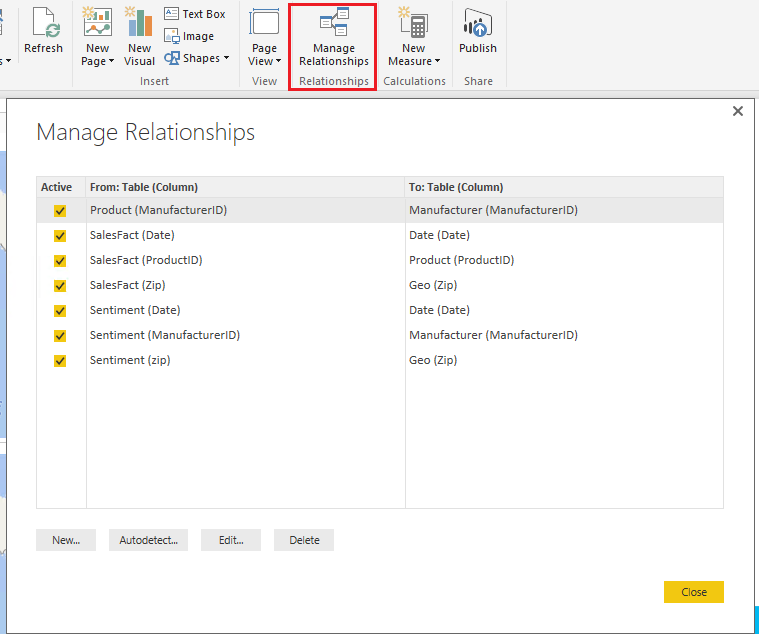
When you import projects table and tasks table into Power BI Desktop, it can autodetect the relationship and we can also create and manage relationship manually between those two tables like below:


q2.PNG


Reference:
Create and manage relationships in Power BI Desktop


Best Regards,
Qiuyun Yu

Community Support Team _ Qiuyun Yu
If this post helps, then please consider Accept it as the solution to help the other members find it more quickly.

Dear all,


Thanks for your answer, but I'm using Power BI on a Mac... so just web based. Any alternative solution to Power BI Desktop?

Hi @Padelman,


In my original reply, the solution is for Power BI Desktop. In Power BI Service, we can't do much for data model. 


As the Power BI desktop can only run on the Windows system currently, you aren't able to mange the relationship on MAC. To workaround the issue, you can use one computer which supports Power BI Desktop to create relationships, then publish the report to Power BI Service. On MAC, you can logon the Power BI Service to view the report.


Best Regards,
Qiuyun Yu

Community Support Team _ Qiuyun Yu
If this post helps, then please consider Accept it as the solution to help the other members find it more quickly.

Helpful resources

Announcements
Power BI DataViz World Championships

Power BI Dataviz World Championships

The Power BI Data Visualization World Championships is back! Get ahead of the game and start preparing now!

December 2025 Power BI Update Carousel

Power BI Monthly Update - December 2025

Check out the December 2025 Power BI Holiday Recap!

FabCon Atlanta 2026 carousel

FabCon Atlanta 2026

Join us at FabCon Atlanta, March 16-20, for the ultimate Fabric, Power BI, AI and SQL community-led event. Save $200 with code FABCOMM.

Top Solution Authors