Don't miss your chance to take the Fabric Data Engineer (DP-600) exam for FREE! Find out how by watching the DP-600 session on-demand now through April 28th.
Learn moreJoin the FabCon + SQLCon recap series. Up next: Power BI, Real-Time Intelligence, IQ and AI, and Data Factory take center stage. All sessions are available on-demand after the live show. Register now
Hi,
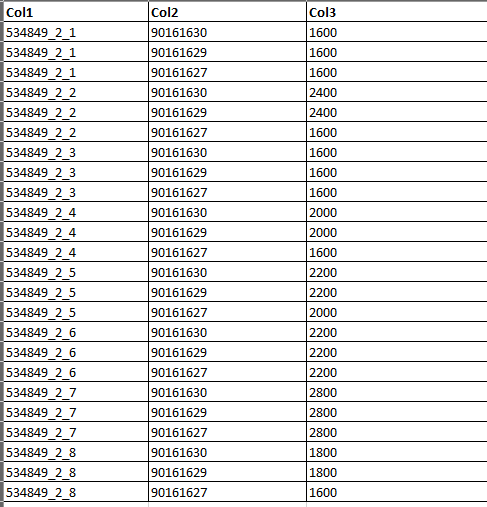
I'm having a problem with multiple column sorting. In this case the dataset is about 100 000 row which I want sort based on 3 columns. In all columns that are used for sorting the data type is text and format as follows (1234_1_1; 5678; 1). When I apply the sort, the it is not as expected. However, if I take an small subset of the data sorting works as expected. Sorting with the whole dataset works correctly also in Excel. The first sorting column (1234_1_1) is concatenated, however, even if do the sorting based on the original values (numbers as text) the sorting fails. Result is the same if I change the data type as numbers. Any ideas? Example what I'm hoping to get below.
Thank you
Mikko
Solved! Go to Solution.
Thanks for your reply. I did some futher tests and the Power Query sorting works. The reason for sorting is to do data clening using "remove dublicates" after this. However, even if the sortig works on the Power Query side the rows are not sorted as expected in the Data view with this data set. Not sure if Power Query sorting should affect the data view but it would be very strange if not.
Hi @Anttonen
As tested, it works on my side.
Please tell me what's wrong on your side and what's your expected result.
Best Regards
Maggie
Community Support Team _ Maggie Li
If this post helps, then please consider Accept it as the solution to help the other members find it more quickly.
Thanks for your reply. I did some futher tests and the Power Query sorting works. The reason for sorting is to do data clening using "remove dublicates" after this. However, even if the sortig works on the Power Query side the rows are not sorted as expected in the Data view with this data set. Not sure if Power Query sorting should affect the data view but it would be very strange if not.
Hi @Anttonen,
Try splitting col1 into 3 columns with "_" as the delimiter and then sort the table on the basis of the 5 columns.
Check out the April 2026 Power BI update to learn about new features.
If you have recently started exploring Fabric, we'd love to hear how it's going. Your feedback can help with product improvements.
A new Power BI DataViz World Championship is coming this June! Don't miss out on submitting your entry.
| User | Count |
|---|---|
| 6 | |
| 5 | |
| 5 | |
| 5 | |
| 4 |