Don't miss your chance to take the Fabric Data Engineer (DP-700) exam on us!
Learn moreWe've captured the moments from FabCon & SQLCon that everyone is talking about, and we are bringing them to the community, live and on-demand. Starts on April 14th. Register now
Hi Community!
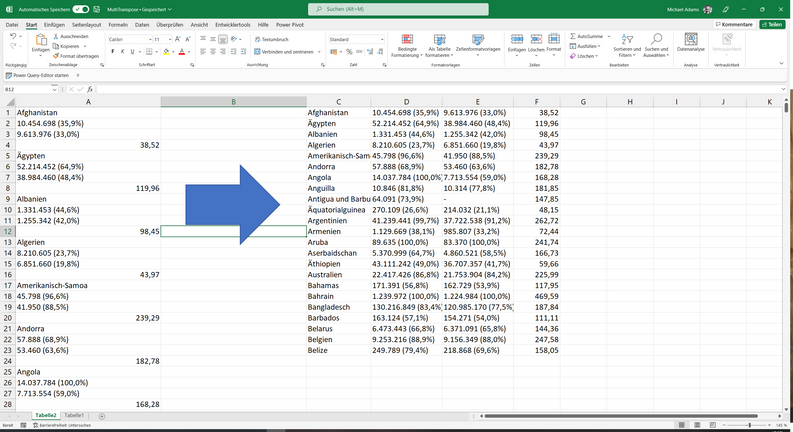
I need some kind of multi transpose from a column:
Example File here: https://edvadamsde-my.sharepoint.com/:x:/g/personal/adams_edv-adams_de/EcJEphvMqcdGo4MbaM8iMw8BJoC4i...
Thanks and regards,
Michael
Solved! Go to Solution.
just for the data you shown
=#table(4,List.Split(PreviousStepName[Column1],4))
just for the data you shown
=#table(4,List.Split(PreviousStepName[Column1],4))
Thanks a lot for this elegant solution!
This is awesome. Never thought of using List.Split ever. You taught me this trick. Thank you, so much.
it's my pleasure.
Add an Index column
Add a custom column using Number.IntegerDivide to divide the Index Column by 4 (as you have groups of 4).
Add a custom column(name it Heading) using Number.Mod([Index], 4) to create the field which we will use for column headings.
Then remove the Index column
Then Pivot the Heading column (pick the original column for Values column and Don't Aggregate)
--
That's the method. Have a go and I can help if you get stuck (There will be exact examples on this forum or the web too)
Nice approach, it worked, thanks a lot!
If you have recently started exploring Fabric, we'd love to hear how it's going. Your feedback can help with product improvements.
A new Power BI DataViz World Championship is coming this June! Don't miss out on submitting your entry.
Share feedback directly with Fabric product managers, participate in targeted research studies and influence the Fabric roadmap.
| User | Count |
|---|---|
| 5 | |
| 4 | |
| 3 | |
| 2 | |
| 2 |
| User | Count |
|---|---|
| 8 | |
| 7 | |
| 6 | |
| 6 | |
| 5 |