cancel
Showing results for 
Search instead for 
Did you mean: 

Try your skills in the Power BI Dataviz World Championship! Round one ends June 26. Join now

Reply
COR2
Frequent Visitor

Multi Select Lookup Column shows as Table in Power Query

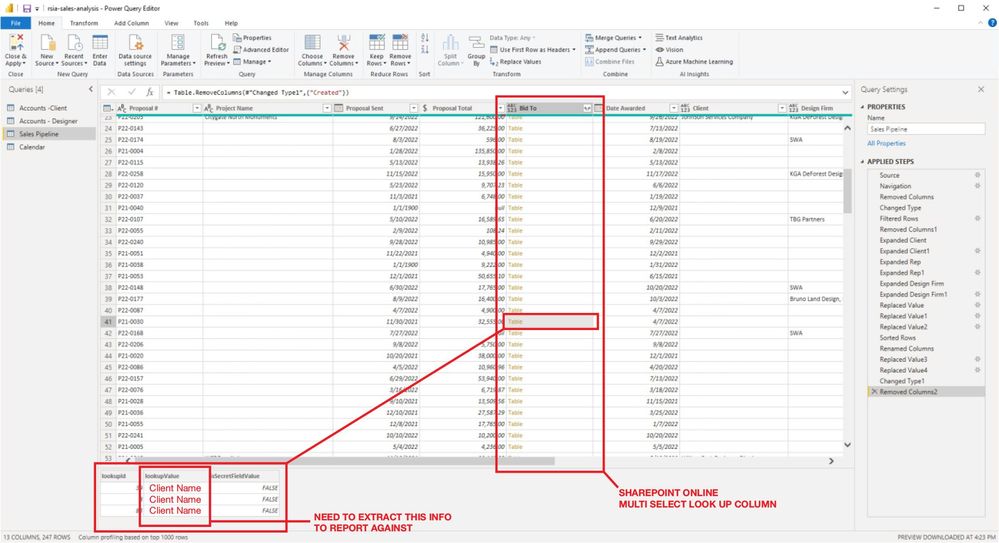
I am attempting to build a report from our Sales List in SP Online. One of the columns ("Bid To") is a multi-select lookup column in which we select all of the clients the project bid was snt to. The number of selections range from 1 to 5 or 6.


When I query the list, the "Bid To" column is brought in as a Table. There are a couple of other single-select look up columns in the list that were brought is as either a List or as a Record. These were simple enought to expand, however I am stuck on the extracting the LookUp Value(s) from the table.


I have been digging through the forums, as well as any video tutorials i can find, but have not found any solutions. I am currently trying to create a custom column and leverage one of the Table, Record, or List Functions but as I am new to Power Bi and M, this is a bit of struggle.


The ultimate goal is to be able to report the total amount (both currency and quantity) of bids that were sent to each of the clients.


I would greatly appreacite any help I can get.

1 ACCEPTED SOLUTION
COR2
Frequent Visitor

For anyone who runs into this issue:


https://www.youtube.com/watch?v=-By3WdkHlLU


Text.Combine(Table.ToList(Table.SelectColumns([ColumnWithTables], "TableColumn")), "; ")


View solution in original post

3 REPLIES 3
COR2
Frequent Visitor

For anyone who runs into this issue:


https://www.youtube.com/watch?v=-By3WdkHlLU


Text.Combine(Table.ToList(Table.SelectColumns([ColumnWithTables], "TableColumn")), "; ")


COR2
Frequent Visitor

Thank you @Anonymous...


I may not have been clear when describing my issue: When I query a SP Online List, the values in one of the columns (a multi-select lookup column) appear in the Pwer Query Editor as "Table." I need to extract the lookupValue from the table to leverage in reports.


power-query.jpg


When I try to "Expand" the column, the action returns only the first row.


I would appreciate any suggestions!

Anonymous
Not applicable

Hi @COR2 ,


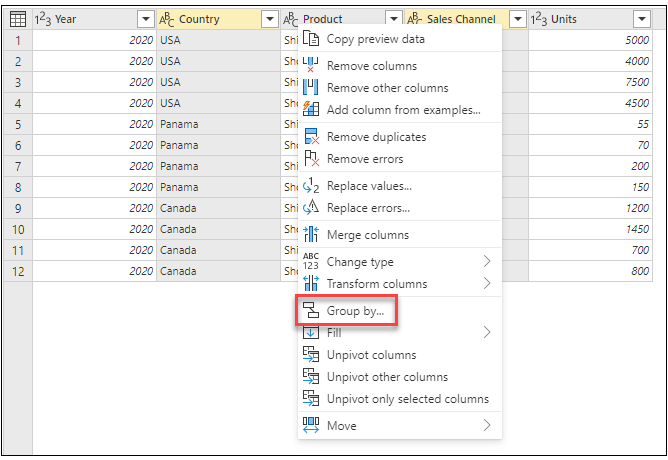
I would suggest you try the Group By feature in Power Query.

Grouping or summarizing rows - Power Query | Microsoft Learn

vstephenmsft_0-1669355387034.png


Best Regards,

Stephen Tao


If this post helps, then please consider Accept it as the solution to help the other members find it more quickly.


Helpful resources

Announcements
Fabric Data Days is here Carousel

Data Days 2026

Don't miss out on Data Days, June 15 through August 7. Learn Fabric, Power BI, SQL, AI and more.

Power BI DataViz World Championships carousel

Power BI DataViz World Championships - June 2026

A new Power BI DataViz World Championship is coming this June! Don't miss out on submitting your entry.