Share feedback directly with Fabric product managers, participate in targeted research studies and influence the Fabric roadmap.
Sign up nowGet Fabric certified for FREE! Don't miss your chance! Learn more
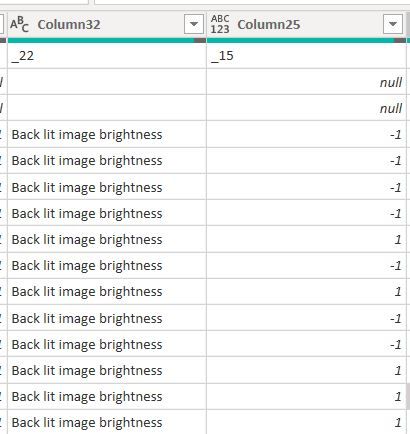
I am looking to move a particular cell value (the column has only 1 value) from Column 32 and use it as a header for Column 25. I do not need Column 32 after this transformation.
Similarly, I have 18 (+18) other Columns that I need to replicate this transformation to.
How would I do this?
Many thanks!
You could Table.Skip the first three rows, and then you should be able to use the GUI Pivot function, using Column 25 as the attribute and column 32 as the value, and choose "Do not aggregate". I would test it for you but I'm on my phone.
--Nate
@Anonymous Can you show how it is done?
Step 1:
I should be able to get something like this. I take the text 'Back lit image brightness' from Column 32 and use it for Column 25
Column 25
Back lit image brightness
-1
-1
Step 2: I can then promote the header for the columsn to look like this
Back lit image brightness
-1
-1
Hope this makes more sense now.
Thank you again
Hi @Anonymous
What value exactly do you want from Column32. You show more than one in the sample. Do you want to show the expected result that goes with the data above? Plus best if you share the sample data above in text-tabular format instead of on a screen cap, so that the contents can be copied.
|
|
Please accept the solution when done and consider giving a thumbs up if posts are helpful. Contact me privately for support with any larger-scale BI needs, tutoring, etc. |
If you love stickers, then you will definitely want to check out our Community Sticker Challenge!
Check out the January 2026 Power BI update to learn about new features.
| User | Count |
|---|---|
| 7 | |
| 5 | |
| 4 | |
| 3 | |
| 3 |
| User | Count |
|---|---|
| 13 | |
| 11 | |
| 11 | |
| 8 | |
| 6 |