cancel
Showing results for 
Search instead for 
Did you mean: 

Learn from the best! Meet the four finalists headed to the FINALS of the Power BI Dataviz World Championships! Register now

Reply
Anonymous
Not applicable

Month over Month

Hello I am trying to show a month by month comparison betweeen total views. I have been looking at youtube and this channel as well for answers and im not sure if I dont have enough data or what exactly I am doing wrong. I only have 3 months worth of data so maybe thats my issue 

I started out with just one dataset "data" which has a column of "Total Views"

My first attempt i did:


tv = SUM(data[Total Views])
 
total views last month =
CALCULATE(
[tv],
PARALLELPERIOD(
'data'[Date].[Date],
-1,
MONTH)
)

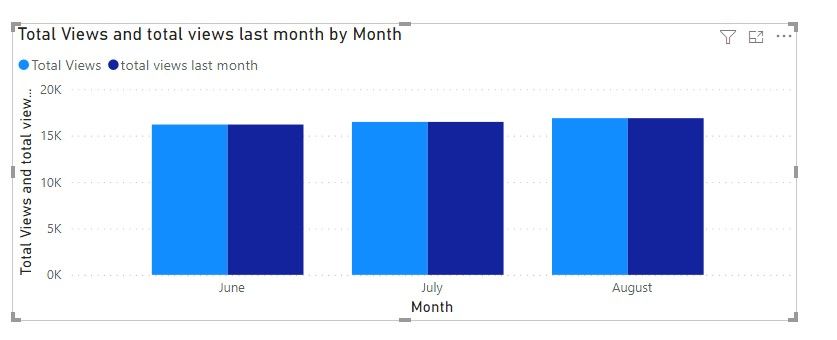
but i just get the exact same number for that month when trying to graph it ot show it in a table
Screenshot_46.jpg
also tried this code:
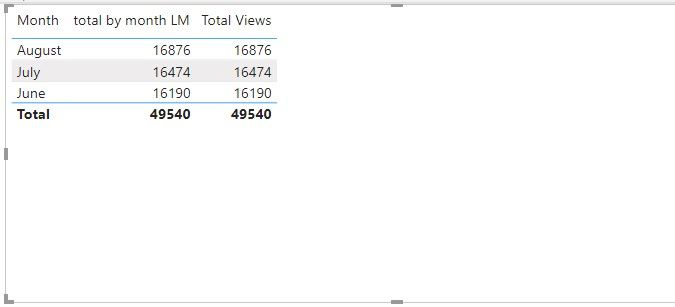
total by month LM = CALCULATE(SUM(data[Total Views]),DATEADD(data[Date].[Date],-1,MONTH))
 
but gives me the same results 
Screenshot_47.jpg
 
The end goal would be to have a bar chart that would show the difference between the current month and past month 

also tried 

PrevMonthRev = CALCULATE(sum(data[Total Views]),PREVIOUSMONTH('data'[Date].[Date]))
but thats not even giving me any numbers 
1 ACCEPTED SOLUTION
Anonymous
Not applicable

Hi @Anonymous ,


I tried this and it worked on my side:

PrevMonthRev = CALCULATE(sum(data[Total Views]),PREVIOUSMONTH('data'[Date].[Date]))

You may simply use this:

total by month LM = CALCULATE(SUM('data'[Total Views]),PARALLELPERIOD ( 'data'[Date].[Date], -1, MONTH ))

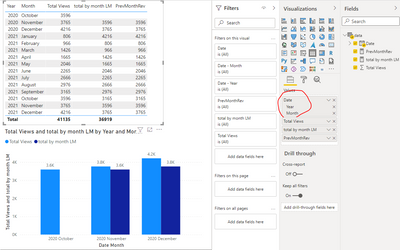
Here is the final output:

Eyelyn9_1-1632968155219.png


Best Regards,
Eyelyn Qin
If this post helps, then please consider Accept it as the solution to help the other members find it more quickly.

View solution in original post

4 REPLIES 4
Anonymous
Not applicable

Hi @Anonymous ,


I tried this and it worked on my side:

PrevMonthRev = CALCULATE(sum(data[Total Views]),PREVIOUSMONTH('data'[Date].[Date]))

You may simply use this:

total by month LM = CALCULATE(SUM('data'[Total Views]),PARALLELPERIOD ( 'data'[Date].[Date], -1, MONTH ))

Here is the final output:

Eyelyn9_1-1632968155219.png


Best Regards,
Eyelyn Qin
If this post helps, then please consider Accept it as the solution to help the other members find it more quickly.

Anonymous
Not applicable

Awesome, this works perfectly!! Thank you!!

wdx223_Daniel
Community Champion
Community Champion

CALCULATE(SUM(data[Total Views]),DATEADD(data[Date].[Date],-1,MONTH),ALL(data[Date]))

jwelch
Microsoft Employee
Microsoft Employee

Since this question is on DAX, you would be more likely to get an answer by posting in the DAX forum (DAX Commands and Tips - Microsoft Power BI Community).

Helpful resources

Announcements
New to Fabric survey Carousel

New to Fabric Survey

If you have recently started exploring Fabric, we'd love to hear how it's going. Your feedback can help with product improvements.

Power BI DataViz World Championships carousel

Power BI DataViz World Championships - June 2026

A new Power BI DataViz World Championship is coming this June! Don't miss out on submitting your entry.

Join our Fabric User Panel

Join our Fabric User Panel

Share feedback directly with Fabric product managers, participate in targeted research studies and influence the Fabric roadmap.

March Power BI Update Carousel

Power BI Community Update - March 2026

Check out the March 2026 Power BI update to learn about new features.