This is best Fabric, Power BI, SQL and AI community event. How do we know? The last event sold out! Save €200 with code FABCMTY200.
Register nowA new Data Days event is coming soon! This time we’re going bigger than ever. Fabric, Power BI, SQL, AI and more. Don't miss out.
How can I add a month name custom column within power Query? I have a Complete date column already loaded, but want a custom column in format "mmm-yy"
Solved! Go to Solution.
use this formula:
Text.Start(Date.MonthName([Date]), 3) & "-" & Text.End(Text.From(Date.Year([Date])), 2)
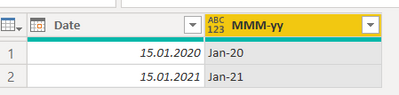
It returns this. You just need to set the column type to Text when done @jcastr02
DAX is for Analysis. Power Query is for Data Modeling
Proud to be a Super User!
MCSA: BI ReportingHello @jcastr02
you can use the formula Date.ToText like this
Date.ToText([Date],"MMM-yy")
Here the complete example
let
Source = Table.FromRows(Json.Document(Binary.Decompress(Binary.FromText("i45WMjTVMzDUMzJQitWBcwyVYmMB", BinaryEncoding.Base64), Compression.Deflate)), let _t = ((type nullable text) meta [Serialized.Text = true]) in type table [Date = _t]),
#"Changed Type" = Table.TransformColumnTypes(Source,{{"Date", type date}}, "de-DE"),
#"Added Custom" = Table.AddColumn(#"Changed Type", "MMM-yy", each Date.ToText([Date],"MMM-yy"))
in
#"Added Custom"
Copy paste this code to the advanced editor in a new blank query to see how the solution works.
If this post helps or solves your problem, please mark it as solution (to help other users find useful content and to acknowledge the work of users that helped you)
Kudoes are nice too
Have fun
Jimmy
Hello @jcastr02
you can use the formula Date.ToText like this
Date.ToText([Date],"MMM-yy")
Here the complete example
let
Source = Table.FromRows(Json.Document(Binary.Decompress(Binary.FromText("i45WMjTVMzDUMzJQitWBcwyVYmMB", BinaryEncoding.Base64), Compression.Deflate)), let _t = ((type nullable text) meta [Serialized.Text = true]) in type table [Date = _t]),
#"Changed Type" = Table.TransformColumnTypes(Source,{{"Date", type date}}, "de-DE"),
#"Added Custom" = Table.AddColumn(#"Changed Type", "MMM-yy", each Date.ToText([Date],"MMM-yy"))
in
#"Added Custom"
Copy paste this code to the advanced editor in a new blank query to see how the solution works.
If this post helps or solves your problem, please mark it as solution (to help other users find useful content and to acknowledge the work of users that helped you)
Kudoes are nice too
Have fun
Jimmy
use this formula:
Text.Start(Date.MonthName([Date]), 3) & "-" & Text.End(Text.From(Date.Year([Date])), 2)
It returns this. You just need to set the column type to Text when done @jcastr02
DAX is for Analysis. Power Query is for Data Modeling
Proud to be a Super User!
MCSA: BI ReportingCheck out the May 2026 Power BI update to learn about new features.
Sign up to receive a private message when registration opens and key events begin.
If you have recently started exploring Fabric, we'd love to hear how it's going. Your feedback can help with product improvements.