cancel
Showing results for 
Search instead for 
Did you mean: 

We've captured the moments from FabCon & SQLCon that everyone is talking about, and we are bringing them to the community, live and on-demand. Starts on April 14th. Register now

Reply
Anonymous
Not applicable

M code for dynamic week in Power Query

Dear all,

I'm facing issue with M code for dynamic week in Power Query, appreciate your advice.

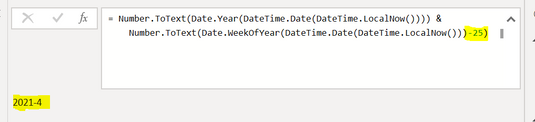
I create a M code to define week# based on the current date as below. There is not issue to define the current week. But, the issue happends in the transition of year for the last weeks if I use the formula as below. This formula looks like cannot define the start or end week of a year.

If I but the current week - 25, the result is 2021-4 instead of week in 2020.

Appreciate your advice!


Nguyen_0-1621250072164.png


My code: Number.ToText(Date.Year(DateTime.Date(DateTime.LocalNow()))) & Number.ToText(Date.WeekOfYear(DateTime.Date(DateTime.LocalNow()))-25)


1 ACCEPTED SOLUTION

Here is modified version that should do that


= let date1 = Date.AddWeeks(Date.From(DateTime.LocalNow()), -25) in Number.ToText(Date.Year(date1)) & Text.PadStart(Number.ToText(Date.WeekOfYear(date1)),2,"0")


Pat


Did I answer your question? Mark my post as a solution! Kudos are also appreciated!

To learn more about Power BI, follow me on Twitter or subscribe on YouTube.


@mahoneypa HoosierBI on YouTube


View solution in original post

4 REPLIES 4
mahoneypat
Microsoft Employee
Microsoft Employee

Please try this expression instead.


= let date1 = Date.AddWeeks(Date.From(DateTime.LocalNow()), -25) in Number.ToText(Date.Year(date1)) & Number.ToText(Date.WeekOfYear(date1))


or you can skip the let and in, and just use the Date.AddWeeks part twice in your original expression

Pat


Did I answer your question? Mark my post as a solution! Kudos are also appreciated!

To learn more about Power BI, follow me on Twitter or subscribe on YouTube.


@mahoneypa HoosierBI on YouTube


Anonymous
Not applicable

Hi @mahoneypat ,

Thanks for your advice!

I still have an issue with the number of week.

Could you please advsie how can I adjust to return the value is "202101" instead of "20211" for week 1 to week 9?


Here is modified version that should do that


= let date1 = Date.AddWeeks(Date.From(DateTime.LocalNow()), -25) in Number.ToText(Date.Year(date1)) & Text.PadStart(Number.ToText(Date.WeekOfYear(date1)),2,"0")


Pat


Did I answer your question? Mark my post as a solution! Kudos are also appreciated!

To learn more about Power BI, follow me on Twitter or subscribe on YouTube.


@mahoneypa HoosierBI on YouTube


Anonymous
Not applicable

Thanks for your support!

Helpful resources

Announcements
New to Fabric survey Carousel

New to Fabric Survey

If you have recently started exploring Fabric, we'd love to hear how it's going. Your feedback can help with product improvements.

Power BI DataViz World Championships carousel

Power BI DataViz World Championships - June 2026

A new Power BI DataViz World Championship is coming this June! Don't miss out on submitting your entry.

Join our Fabric User Panel

Join our Fabric User Panel

Share feedback directly with Fabric product managers, participate in targeted research studies and influence the Fabric roadmap.

March Power BI Update Carousel

Power BI Community Update - March 2026

Check out the March 2026 Power BI update to learn about new features.