A new Data Days event is coming soon!
This time we’re going bigger than ever. Fabric, Power BI, SQL, AI and more. We're covering it all. You won't want to miss it.
Learn more- Power BI forums
- Get Help with Power BI
- Desktop
- Service
- Report Server
- Power Query
- Mobile Apps
- Developer
- DAX Commands and Tips
- Custom Visuals Development Discussion
- Health and Life Sciences
- Power BI Spanish forums
- Translated Spanish Desktop
- Training and Consulting
- Instructor Led Training
- Dashboard in a Day for Women, by Women
- Galleries
- Data Stories Gallery
- Themes Gallery
- Contests Gallery
- QuickViz Gallery
- Quick Measures Gallery
- Visual Calculations Gallery
- Notebook Gallery
- Translytical Task Flow Gallery
- TMDL Gallery
- R Script Showcase
- Webinars and Video Gallery
- Ideas
- Custom Visuals Ideas (read-only)
- Issues
- Issues
- Events
- Upcoming Events
Did you hear? There's a new SQL AI Developer certification (DP-800). Start preparing now and be one of the first to get certified. Register now
- Power BI forums
- Forums
- Get Help with Power BI
- Power Query
- M Query for GETDATE() SQL function
- Subscribe to RSS Feed
- Mark Topic as New
- Mark Topic as Read
- Float this Topic for Current User
- Bookmark
- Subscribe
- Printer Friendly Page


- Mark as New
- Bookmark
- Subscribe
- Mute
- Subscribe to RSS Feed
- Permalink
- Report Inappropriate Content
M Query for GETDATE() SQL function
Folks - I will appreciate if any help to write M Query for getdate() SQL function.
I have a DimDate table in my model from view/table from data warehouse using direct query but table has till the end of current year date for example till 12/31/2020.
I want to modify the M-Code in advance editor to pull data till date. I can do it from backend but I want to do it through M Query.
I tried to do using table.selectrows(dimdate, each[Date]<=getdate()
Thank you
Solved! Go to Solution.


- Mark as New
- Bookmark
- Subscribe
- Mute
- Subscribe to RSS Feed
- Permalink
- Report Inappropriate Content
Hi @sbm, for current date, use this:
= DateTime.Date(
     DateTime.LocalNow()
  )
It still uses DateTime.LocalNow, but the DateTime.Date() around it gets rid of the time and timezone info.
Now, rename that varDate (or varToday, or whatever your naming scheme is), then in the query editor, filter by any date to get the Table.SelectRows() statement set, then replace the hardcoded date the Power Query editor that will look like #date(2020,1,1) and replace with varDate.
Table.SelectRows(#"Changed Type1", each ([Date] <= varDate))
See this file. It will eliminate the May 20 data from the final result (this was posted on May 17)
By the way, this will 100% fold for you in SQL Server. The varDate value will be put in the SQL statement as a fixed amount, which will change every day the thing runs.
EDIT: I just noticed you put in a native query yourself. Don't do that if possible. You should always try to have Power Query generate the SQL for you, and using a native query breaks that feature.
The file has a connection to the ContosoRetailDW DimDate table (you can change the db on your side). This db has date/time in the date field, so I created a new varDateTime. It runs the following SQL statement for me based on this select statement:
Table.SelectRows(dbo_DimDate, each ([Datekey] >= varDateTime))Of course nothing is returned as all of the data in that database is way older than 2020, but it would work with real data.
select [_].[Datekey],
    [_].[FullDateLabel],
    [_].[DateDescription],
    [_].[CalendarYear],
    [_].[CalendarYearLabel],
    [_].[CalendarHalfYear],
    [_].[CalendarHalfYearLabel],
    [_].[CalendarQuarter],
    [_].[CalendarQuarterLabel],
    [_].[CalendarMonth],
    [_].[CalendarMonthLabel],
    [_].[CalendarWeek],
    [_].[CalendarWeekLabel],
    [_].[CalendarDayOfWeek],
    [_].[CalendarDayOfWeekLabel],
    [_].[FiscalYear],
    [_].[FiscalYearLabel],
    [_].[FiscalHalfYear],
    [_].[FiscalHalfYearLabel],
    [_].[FiscalQuarter],
    [_].[FiscalQuarterLabel],
    [_].[FiscalMonth],
    [_].[FiscalMonthLabel],
    [_].[IsWorkDay],
    [_].[IsHoliday],
    [_].[HolidayName],
    [_].[EuropeSeason],
    [_].[NorthAmericaSeason],
    [_].[AsiaSeason]
from [dbo].[DimDate] as [_]
where [_].[Datekey] >= convert(datetime2, '2020-05-17 17:58:47.8988703')
Do some other transformations. You'll be surprised what will fold. You can group, add columns, do basic and even a few nested if/then/else statements, merges, appends, etc. Not everything folds, but I've brought over 10 tables in to a Power Query session, did numerous transformations, merges, etc. and ultimately generated an over 800 line SQL statement befor I had to do a few final transformations that broke folding. That means the SQL server was doing 95% of my work for me. Always try to avoid manual SQL statements in the advanced view.
Did I answer your question? Mark my post as a solution!
Did my answers help arrive at a solution? Give it a kudos by clicking the Thumbs Up!
DAX is for Analysis. Power Query is for Data Modeling
Proud to be a Super User!
MCSA: BI Reporting

- Mark as New
- Bookmark
- Subscribe
- Mute
- Subscribe to RSS Feed
- Permalink
- Report Inappropriate Content
Hi @sbm ,
You could try @edhans 's suggestions, try code like below
= Table.SelectRows(#"Changed Type", each [stime] <= DateTime.Date(DateTime.LocalNow()))or if you are using SQL, I think you could wirte query directly
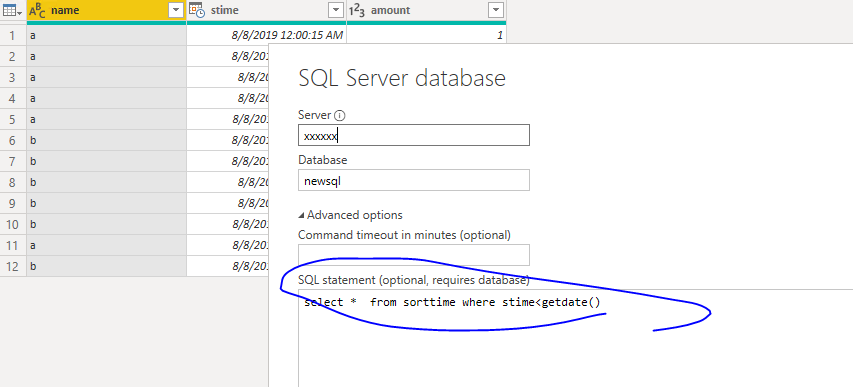
Best Regards,
Zoe Zhi
If this post helps, then please consider Accept it as the solution to help the other members find it more quickly.
- Mark as New
- Bookmark
- Subscribe
- Mute
- Subscribe to RSS Feed
- Permalink
- Report Inappropriate Content
@dax - curious. What would be the advantage to writing a native SQL query? I know the disadvantages are it breaks folding, and there are issues in the service with native queries (especially for Data Flows) where the user doesn't have full admin rights - native queries are blocked outright.
I know there can be edge cases where a SQL guru can write a statement that Power Query cannot and will make very large queries perform faster, but that would generally be rare, and certianly not for a SELECT/WHERE clause.
But maybe there is something I am not seeing...
Did I answer your question? Mark my post as a solution!
Did my answers help arrive at a solution? Give it a kudos by clicking the Thumbs Up!
DAX is for Analysis. Power Query is for Data Modeling
Proud to be a Super User!
MCSA: BI Reporting
- Mark as New
- Bookmark
- Subscribe
- Mute
- Subscribe to RSS Feed
- Permalink
- Report Inappropriate Content
If you want the current date it is DateTime.LocalNow I believe. If that is not it, I do not understand the question.
Follow on LinkedIn
@ me in replies or I'll lose your thread!!!
Instead of a Kudo, please vote for this idea
Become an expert!: Enterprise DNA
External Tools: MSHGQM
YouTube Channel!: Microsoft Hates Greg
Latest book!: DAX For Humans
DAX is easy, CALCULATE makes DAX hard...
- Mark as New
- Bookmark
- Subscribe
- Mute
- Subscribe to RSS Feed
- Permalink
- Report Inappropriate Content
Thank you so much @Greg_Deckler for your response to my question.
DateTime.LocalNow will return the current date and time both in local time zone. I want only the current date which getdate() function returns in SQL.
for example If I need to all column from a table till date, the script will be as below.
select * from DimDate where Date<=getdate()
so I just want M function if available or any logic to achieve current date only.
- Mark as New
- Bookmark
- Subscribe
- Mute
- Subscribe to RSS Feed
- Permalink
- Report Inappropriate Content
Hi @sbm, for current date, use this:
= DateTime.Date(
     DateTime.LocalNow()
  )
It still uses DateTime.LocalNow, but the DateTime.Date() around it gets rid of the time and timezone info.
Now, rename that varDate (or varToday, or whatever your naming scheme is), then in the query editor, filter by any date to get the Table.SelectRows() statement set, then replace the hardcoded date the Power Query editor that will look like #date(2020,1,1) and replace with varDate.
Table.SelectRows(#"Changed Type1", each ([Date] <= varDate))
See this file. It will eliminate the May 20 data from the final result (this was posted on May 17)
By the way, this will 100% fold for you in SQL Server. The varDate value will be put in the SQL statement as a fixed amount, which will change every day the thing runs.
EDIT: I just noticed you put in a native query yourself. Don't do that if possible. You should always try to have Power Query generate the SQL for you, and using a native query breaks that feature.
The file has a connection to the ContosoRetailDW DimDate table (you can change the db on your side). This db has date/time in the date field, so I created a new varDateTime. It runs the following SQL statement for me based on this select statement:
Table.SelectRows(dbo_DimDate, each ([Datekey] >= varDateTime))Of course nothing is returned as all of the data in that database is way older than 2020, but it would work with real data.
select [_].[Datekey],
    [_].[FullDateLabel],
    [_].[DateDescription],
    [_].[CalendarYear],
    [_].[CalendarYearLabel],
    [_].[CalendarHalfYear],
    [_].[CalendarHalfYearLabel],
    [_].[CalendarQuarter],
    [_].[CalendarQuarterLabel],
    [_].[CalendarMonth],
    [_].[CalendarMonthLabel],
    [_].[CalendarWeek],
    [_].[CalendarWeekLabel],
    [_].[CalendarDayOfWeek],
    [_].[CalendarDayOfWeekLabel],
    [_].[FiscalYear],
    [_].[FiscalYearLabel],
    [_].[FiscalHalfYear],
    [_].[FiscalHalfYearLabel],
    [_].[FiscalQuarter],
    [_].[FiscalQuarterLabel],
    [_].[FiscalMonth],
    [_].[FiscalMonthLabel],
    [_].[IsWorkDay],
    [_].[IsHoliday],
    [_].[HolidayName],
    [_].[EuropeSeason],
    [_].[NorthAmericaSeason],
    [_].[AsiaSeason]
from [dbo].[DimDate] as [_]
where [_].[Datekey] >= convert(datetime2, '2020-05-17 17:58:47.8988703')
Do some other transformations. You'll be surprised what will fold. You can group, add columns, do basic and even a few nested if/then/else statements, merges, appends, etc. Not everything folds, but I've brought over 10 tables in to a Power Query session, did numerous transformations, merges, etc. and ultimately generated an over 800 line SQL statement befor I had to do a few final transformations that broke folding. That means the SQL server was doing 95% of my work for me. Always try to avoid manual SQL statements in the advanced view.
Did I answer your question? Mark my post as a solution!
Did my answers help arrive at a solution? Give it a kudos by clicking the Thumbs Up!
DAX is for Analysis. Power Query is for Data Modeling
Proud to be a Super User!
MCSA: BI Reporting

- Mark as New
- Bookmark
- Subscribe
- Mute
- Subscribe to RSS Feed
- Permalink
- Report Inappropriate Content
You may have to play with the Date format, but you should be able to generate the Date with Date.From(DateTime.LocalNow()). If you are querying a single table (e.g., not putting a SQL script in the Advanced window), and add a Filter step on your date column with that parameter, I believe it will "fold" that back to the server (so you are not loading all the rows only to filter them away).
https://docs.microsoft.com/en-us/power-bi/guidance/power-query-folding
If this works for you, please mark it as solution. Kudos are appreciated too. Please let me know if not.
Regards,
Pat
Did I answer your question? Mark my post as a solution! Kudos are also appreciated!
To learn more about Power BI, follow me on Twitter or subscribe on YouTube.
@mahoneypa HoosierBI on YouTube
- Mark as New
- Bookmark
- Subscribe
- Mute
- Subscribe to RSS Feed
- Permalink
- Report Inappropriate Content
@mahoneypat, I didn't use m-query daily. just thought there could be m-function to get current date. I went through your sharing and came across as below example, Please share your thought if I can use it in my direct query model.
let
Source = Sql.Database("localhost", "Adventure Works DW"),
DimDate= Value.NativeQuery(
Source,
"SELECT * FROM DimDate
WHERE Date<=getdate()")
in
DimDate
Thank you

Helpful resources

Power BI Monthly Update - April 2026
Check out the April 2026 Power BI update to learn about new features.

Data Days 2026 coming soon!
Sign up to receive a private message when registration opens and key events begin.

New to Fabric Survey
If you have recently started exploring Fabric, we'd love to hear how it's going. Your feedback can help with product improvements.

Power BI DataViz World Championships - June 2026
A new Power BI DataViz World Championship is coming this June! Don't miss out on submitting your entry.


| User | Count |
|---|---|
| 7 | |
| 5 | |
| 4 | |
| 3 | |
| 3 |


