cancel
Showing results for 
Search instead for 
Did you mean: 

We've captured the moments from FabCon & SQLCon that everyone is talking about, and we are bringing them to the community, live and on-demand. Starts on April 14th. Register now

Reply
UbSamuel
New Member

Losing previous data with each data refresh

Hello community,


I am using power query on excel to retrieve data from an external DB to create reports for a client. I noticed, however, that anytime I do a 'refresh all' on the power query, it updates the date section deleting the previous dates (and accompanying data). I thought the previously queried data is stored on the user's system so that the data refresh only updates the most recent data; instead, it deletes previous dates and updates the latest.


Please how do I refresh in such a way that I can retain the old data while I get the most recent one? Also, is there a way to get the old data that has been replaced?


Any guidance is greatly appreciated. 


PS: I am new to Power Query.

4 REPLIES 4
UbSamuel
New Member

Hi @ams1 ,


Thanks for your response. 


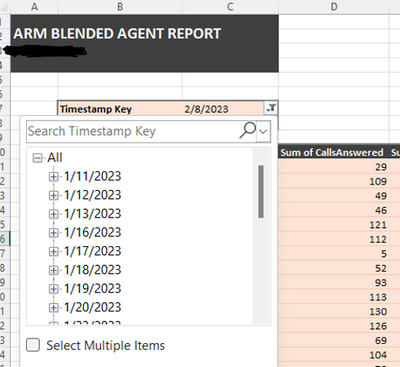
What I mean by that is the timestamp. Please see the snapshot below:


UbSamuel_0-1676038884019.png


On the pivot table, I set the timestamp as a filter so that the users can filter the reports for different days. As you can see in the snapshot above, the 11th of January is the earliest date. It went back much further (December, last year) but I have noticed that each day we refresh the report to get the most recent data, the oldest day is deleted.


I hope it is much clearer now.


Many thanks for your guidance.

ams1
Responsive Resident
Responsive Resident

Hi,


If on every new day refresh, the oldest day is deleted, then maybe there is a limit somewhere - ex. maybe you can get only 200 days back from today.

Hi @ams1 ,


I thought the same thing and this is why I am wondering if such a limit exists and if it can be increased.

ams1
Responsive Resident
Responsive Resident

Hi,


Not sure what you mean by "date section", maybe it's an additional column that exists only in Excel, that was added on the table that is linked to the Query?


At least I would need additional input - a sample table - to help.

Helpful resources

Announcements
New to Fabric survey Carousel

New to Fabric Survey

If you have recently started exploring Fabric, we'd love to hear how it's going. Your feedback can help with product improvements.

Power BI DataViz World Championships carousel

Power BI DataViz World Championships - June 2026

A new Power BI DataViz World Championship is coming this June! Don't miss out on submitting your entry.

Join our Fabric User Panel

Join our Fabric User Panel

Share feedback directly with Fabric product managers, participate in targeted research studies and influence the Fabric roadmap.

March Power BI Update Carousel

Power BI Community Update - March 2026

Check out the March 2026 Power BI update to learn about new features.