cancel
Showing results for 
Search instead for 
Did you mean: 

Learn from the best! Meet the four finalists headed to the FINALS of the Power BI Dataviz World Championships! Register now

Reply
Anonymous
Not applicable

Losing Column Values when Using 'Combine' for CSV values

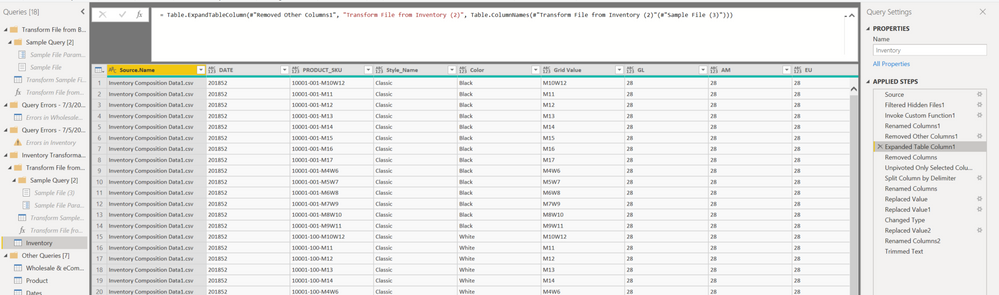
Using Combine .csvs for 5 identically formatting CSV files in powerquery. I have a field called 'DATE' which is the first column in the files, and the row values are loading correctly for the first csv file, but for the following 4 files, I'm losing the row values in the column DATE in the other csv's. They are blank, but in the source file csvs they are not.  Any ideas? 

SourceInventory List.PNGList of Steps Combine.PNG

1 REPLY 1
ImkeF
Community Champion
Community Champion

Power Quey is case sensitive. So an easy explanation would be that there is a slight deviation in writing. (also spaces and non printable characters could cause problems - Text.Trim and Text.Clean would help.)


Another troublemaker are additional columns, as the automatic expansion that you're using here creates a hardcoded value of columns to expand. Removing that solves that problem.

Imke Feldmann (The BIccountant)

If you liked my solution, please give it a thumbs up. And if I did answer your question, please mark this post as a solution. Thanks!

How to integrate M-code into your solution -- How to get your questions answered quickly -- How to provide sample data -- Check out more PBI- learning resources here -- Performance Tipps for M-queries

Helpful resources

Announcements
Join our Fabric User Panel

Join our Fabric User Panel

Share feedback directly with Fabric product managers, participate in targeted research studies and influence the Fabric roadmap.

February Power BI Update Carousel

Power BI Monthly Update - February 2026

Check out the February 2026 Power BI update to learn about new features.

FabCon Atlanta 2026 carousel

FabCon Atlanta 2026

Join us at FabCon Atlanta, March 16-20, for the ultimate Fabric, Power BI, AI and SQL community-led event. Save $200 with code FABCOMM.

Top Solution Authors