Don't miss your chance to take the Fabric Data Engineer (DP-700) exam on us!
Learn moreWe've captured the moments from FabCon & SQLCon that everyone is talking about, and we are bringing them to the community, live and on-demand. Starts on April 14th. Register now
Dears,
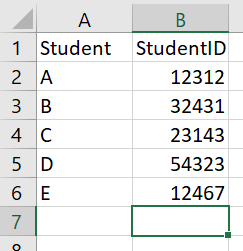
I need your help please, i have a student table that has IDs in a Query1 and this id i will use it to call the API to get the token for each student at the same time i will loop over these Student IDs to generat all tokens and store them in one table to use later.
let
url = "https://api.Student/xxxxxxxxx",
body = "{""Studentref"" :""XXXXXXXXX"", ""StudentID"" :839349,""grant_type"" : ""Student_credentials""}",
Source = Json.Document(Web.Contents(url, [Headers=[Method="POST", #"Content-Type"="application/json", Accept="application/json"], Content=Text.ToBinary(body)]))
in
Source
Thanks in advance
Solved! Go to Solution.
Hi @Anonymous
Without access to the API I can't verify this code works, but this is syntactically correct and will loop through each Student ID and make a POST request to the url.
let
url = "https://api.student/xxxxxxxxx",
GetAPI = (StudentID) =>
let
body = "{""Studentref"" :""XXXXXXXXX"", ""StudentID"" :"& StudentID &",""grant_type"" : ""Student_credentials""}",
json = Json.Document(Web.Contents(url, [Headers=[ #"Content-Type"="application/json", Accept="application/json"], Content=Text.ToBinary(body)]))
in
json,
Source = Table.FromRows(Json.Document(Binary.Decompress(Binary.FromText("i45WclTSUTI0MjY0UorViVZyAvKMjUyMDcE8ZyAPKGViDOa5AHmmJsZGEJ4rWJ+JmblSbCwA", BinaryEncoding.Base64), Compression.Deflate)), let _t = ((type nullable text) meta [Serialized.Text = true]) in type table [Student = _t, StudentID = _t]),
#"Added Custom" = Table.AddColumn(Source, "JSON", each GetAPI([StudentID]))
in
#"Added Custom"
Regards
Phil
If I answered your question please mark my post as the solution.
If my answer helped solve your problem, give it a kudos by clicking on the Thumbs Up.
Proud to be a Super User!
Hi @Anonymous
That Source = step is created by Power BI when I entered your sample data into my PBI Desktop to create the source table.
You shoud create your own table of Student/Stuent ID and then import that into PBI so that your Source step loads that table.
Regards
Phil
If I answered your question please mark my post as the solution.
If my answer helped solve your problem, give it a kudos by clicking on the Thumbs Up.
Proud to be a Super User!
Hi @Anonymous
Without access to the API I can't verify this code works, but this is syntactically correct and will loop through each Student ID and make a POST request to the url.
let
url = "https://api.student/xxxxxxxxx",
GetAPI = (StudentID) =>
let
body = "{""Studentref"" :""XXXXXXXXX"", ""StudentID"" :"& StudentID &",""grant_type"" : ""Student_credentials""}",
json = Json.Document(Web.Contents(url, [Headers=[ #"Content-Type"="application/json", Accept="application/json"], Content=Text.ToBinary(body)]))
in
json,
Source = Table.FromRows(Json.Document(Binary.Decompress(Binary.FromText("i45WclTSUTI0MjY0UorViVZyAvKMjUyMDcE8ZyAPKGViDOa5AHmmJsZGEJ4rWJ+JmblSbCwA", BinaryEncoding.Base64), Compression.Deflate)), let _t = ((type nullable text) meta [Serialized.Text = true]) in type table [Student = _t, StudentID = _t]),
#"Added Custom" = Table.AddColumn(Source, "JSON", each GetAPI([StudentID]))
in
#"Added Custom"
Regards
Phil
If I answered your question please mark my post as the solution.
If my answer helped solve your problem, give it a kudos by clicking on the Thumbs Up.
Proud to be a Super User!
Thank you so much Philip, I will go through it and i have combined the file and i want to generate the
binary text, but how i can get the Binary.FromText?
Source = Table.FromRows(Json.Document(Binary.Decompress(Binary.FromText("i45WclTSUTI0MjY0UorViVZyAvKMjUyMDcE8ZyAPKGViDOa5AHmmJsZGEJ4rWJ+JmblSbCwA", BinaryEncoding.Base64), Compression.Deflate))
If you have recently started exploring Fabric, we'd love to hear how it's going. Your feedback can help with product improvements.
A new Power BI DataViz World Championship is coming this June! Don't miss out on submitting your entry.
Share feedback directly with Fabric product managers, participate in targeted research studies and influence the Fabric roadmap.
| User | Count |
|---|---|
| 5 | |
| 4 | |
| 3 | |
| 2 | |
| 2 |
| User | Count |
|---|---|
| 8 | |
| 7 | |
| 6 | |
| 6 | |
| 5 |