cancel
Showing results for 
Search instead for 
Did you mean: 

Next up in the FabCon + SQLCon recap series: The roadmap for Microsoft SQL and Maximizing Developer experiences in Fabric. All sessions are available on-demand after the live show. Register now

Reply
Sudharsanan
Helper III
Helper III

Loading selected data in power query/BI

Hello Folks,


I am trying to load  few rows from the large data using power Query. for example the file have 1000 rows and i need to load only the rows with certain keyword from a clolum. So is it possible to filter the data before reaching the power query editor? or is there an

3 REPLIES 3
BITomS
Solution Supplier
Solution Supplier

Hi @Sudharsanan,


The simple answer is yes.


It may help if you specify what type of database your source data is coming from, but for example, with a SQL server connection: You (or your database administrator, if this is not you) can create a view in your source database using a WHERE clause to only bring in row data based on the keyword in the column.


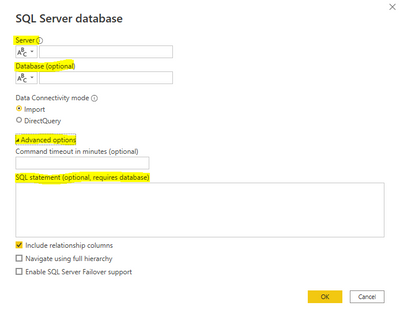
Alternatively, if you do not have the access to create this view, you can write this query yourself in Power Query. When you select 'New Source' you can write the SQL statement under advanced options, but you will have to know the DB server name:

OEMTomS_0-1658409494946.png


The principle is the same for other types of databases and there is even a 'blank query' option under 'New Source' which may allow you to achieve what you need.


Having said this, 1000 rows is not a very large amount of data, so Power Query should be fairly adept at handling this through an applied filter step.


Hope this helps.

Thank you @BITomS for your promt response


Actuall my source is in actual desktop where other application drops the file with month Name for everymonth. so i wanted my query to be updated based on the month dynamically. for example, if the file is placed for Aug 2022, my file should get refreshed without any manual changes on the source.


hope this gives better understanding:)

@Sudharsanan - yes, this sounds like a completely different issue to the original post!


For the problem in your response, you can use the connection from 'Get Data' > 'More' > 'File' > 'Folder' and enter the folder path. You must ensure the folder location contains only the files you need and that they have aligned formatting. This article may help: https://support.microsoft.com/en-us/office/import-data-from-a-folder-with-multiple-files-power-query...


Edit: I just re-read your response and it sounds like you are just focused on a single file being stored in the same location - in this case, you can filter the table based on the file created date using the Date/Time filter: Is Latest.

Helpful resources

Announcements
New to Fabric survey Carousel

New to Fabric Survey

If you have recently started exploring Fabric, we'd love to hear how it's going. Your feedback can help with product improvements.

Power BI DataViz World Championships carousel

Power BI DataViz World Championships - June 2026

A new Power BI DataViz World Championship is coming this June! Don't miss out on submitting your entry.

Join our Fabric User Panel

Join our Fabric User Panel

Share feedback directly with Fabric product managers, participate in targeted research studies and influence the Fabric roadmap.

March Power BI Update Carousel

Power BI Community Update - March 2026

Check out the March 2026 Power BI update to learn about new features.