Don't miss your chance to take the Fabric Data Engineer (DP-700) exam on us!
Learn moreWe've captured the moments from FabCon & SQLCon that everyone is talking about, and we are bringing them to the community, live and on-demand. Starts on April 14th. Register now
I have a dataflow that is connected to an Oracle table. Dataflow works okay, there is a null value in one of the rows. The data preview for the dataflow shows this as (null) All good. When I load data into Power BI from the dataflow the null value is converted into empty. Hence an extra step is required to replace empty with null. I need the null as I'm using PATH functions in DAX which require null. Is this a bug or feature?
Solved! Go to Solution.
Hi
As tested, if the column is of text type or contains many types, when connect to dataflow with Power BI Desktop,
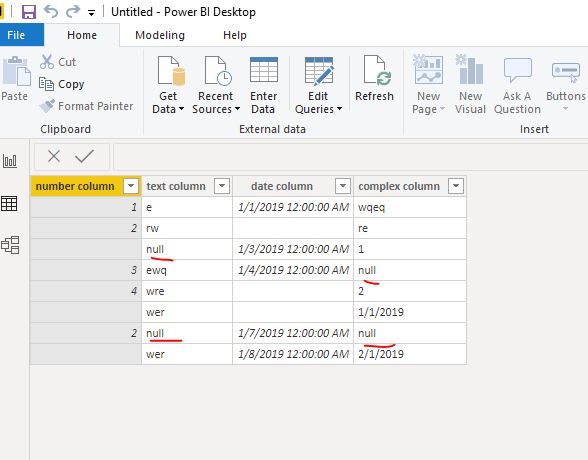
These columns show "null" cells as blank cell in Edit queries.
When loading into data model, all columns regardless of type text, number, date,,ect, would show "null" celss as blank cell.
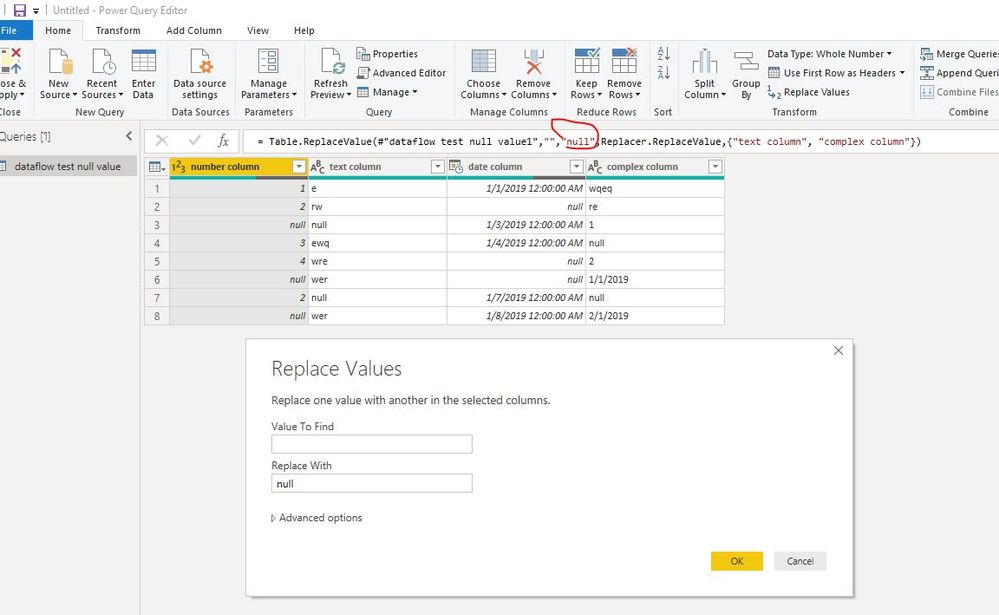
To solve it, select teh columns, replace blank cell with "null",
If the UI doesn't work, please change the code with "null" as below.
Best Regards
Maggie
Community Support Team _ Maggie Li
If this post helps, then please consider Accept it as the solution to help the other members find it more quickly.
Hi
As tested, if the column is of text type or contains many types, when connect to dataflow with Power BI Desktop,
These columns show "null" cells as blank cell in Edit queries.
When loading into data model, all columns regardless of type text, number, date,,ect, would show "null" celss as blank cell.
To solve it, select teh columns, replace blank cell with "null",
If the UI doesn't work, please change the code with "null" as below.
Best Regards
Maggie
Community Support Team _ Maggie Li
If this post helps, then please consider Accept it as the solution to help the other members find it more quickly.
Hi @leehbi99 ,
I tried this in a text column, and a numbers column. The number column will only replace with a number like 0 if I use a find and replace. The text column will replace with null. Not sure that is your problem. If checking the column type does not work, try @ImkeF who knows all the back doors in M language.
If this solves your issues, please mark it as the solution, so that others can find it easily. Kudos are nice too.
Nathaniel
Proud to be a Super User!
If you have recently started exploring Fabric, we'd love to hear how it's going. Your feedback can help with product improvements.
A new Power BI DataViz World Championship is coming this June! Don't miss out on submitting your entry.
Share feedback directly with Fabric product managers, participate in targeted research studies and influence the Fabric roadmap.
| User | Count |
|---|---|
| 5 | |
| 3 | |
| 3 | |
| 2 | |
| 2 |
| User | Count |
|---|---|
| 9 | |
| 8 | |
| 7 | |
| 5 | |
| 5 |