Join us at FabCon Atlanta from March 16 - 20, 2026, for the ultimate Fabric, Power BI, AI and SQL community-led event. Save $200 with code FABCOMM.
Register now!The Power BI Data Visualization World Championships is back! Get ahead of the game and start preparing now! Learn more
Hi All,
I am facing an issue where I need to show the last refresh date time in EST taking into account the day light savings during summer and winter. Est doesnot have a fixed start date of summer.
Request your kind help with this.
Thanks in advance!
Solved! Go to Solution.
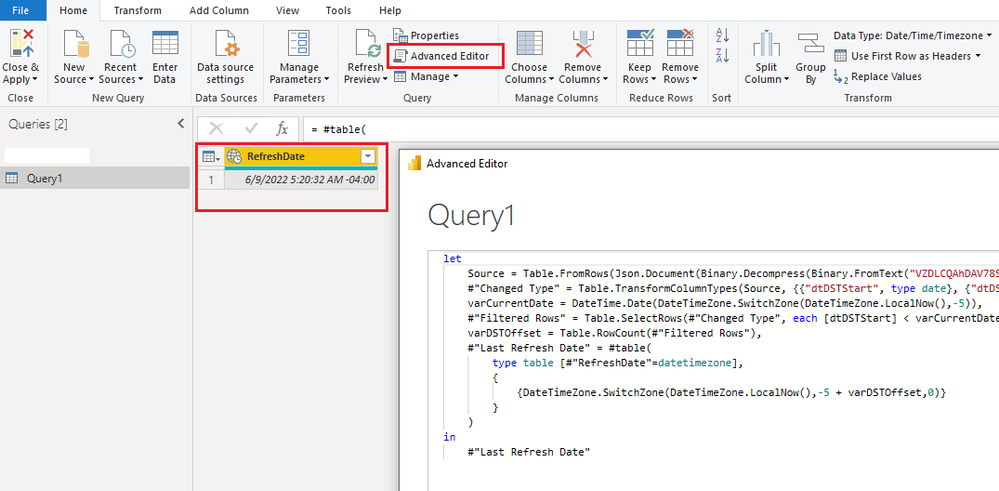
You can use this code. To use it, create a blank query, open its Advanced Editor and paste this code to replace anything there.
let
Source = Table.FromRows(Json.Document(Binary.Decompress(Binary.FromText("VZDLCQAhDAV78Sxonv9axP7bWLNPMN4mDMYhc7oUBAFRmvNOJBTy8r8RnTpNJh8TdRo0iUzT94BIIeTzRBdAaBr5GF0A0FTyMZqGdNM2mwDkG7CZZuhQKEA2ZdWI+pQ1U9ae/7v5v9vTYNzTYNiyFG/Z5rU+", BinaryEncoding.Base64), Compression.Deflate)), let _t = ((type nullable text) meta [Serialized.Text = true]) in type table [dtDSTStart = _t, dtDSTEnd = _t]),
#"Changed Type" = Table.TransformColumnTypes(Source, {{"dtDSTStart", type date}, {"dtDSTEnd", type date}}, "en-US"),
varCurrentDate = DateTime.Date(DateTimeZone.SwitchZone(DateTimeZone.LocalNow(),-5)),
#"Filtered Rows" = Table.SelectRows(#"Changed Type", each [dtDSTStart] < varCurrentDate and [dtDSTEnd] > varCurrentDate),
varDSTOffset = Table.RowCount(#"Filtered Rows"),
#"Last Refresh Date" = #table(
type table [#"RefreshDate"=datetimezone],
{
{DateTimeZone.SwitchZone(DateTimeZone.LocalNow(),-5 + varDSTOffset,0)}
}
)
in
#"Last Refresh Date"
Best Regards,
Community Support Team _ Jing
If this post helps, please Accept it as Solution to help other members find it.
Hi,
One of the easiest ways is to build the logic yourself. In that way you don't have to do an API request or anything of the sort. I generated the following code:
let
UTC_DateTimeZone = DateTimeZone.UtcNow(),
UTC_Date = Date.From(UTC_DateTimeZone),
StartSummerTime = Date.StartOfWeek(#date(Date.Year(UTC_Date), 3, 31), Day.Sunday),
StartWinterTime = Date.StartOfWeek(#date(Date.Year(UTC_Date), 10, 31), Day.Sunday),
UTC_Offset = if UTC_Date >= StartSummerTime and UTC_Date < StartWinterTime then 2 else 1,
CET_Timezone = DateTimeZone.SwitchZone(UTC_DateTimeZone, UTC_Offset)
in
CET_Timezone
If this was a bit too quick, you can follow the explanation on my blog. Here I delve into the cause of the refresh stamp inconsistencies and show how to solve it step by step.
Fix Last Refresh Date/Time in Power BI (Incl Daylight Savings)
Cheers
Rick
--------------------------------------------------
@ me in replies or I'll lose your thread
Master Power Query M? -> https://powerquery.how
Read in-depth articles? -> BI Gorilla
Youtube Channel: BI Gorilla
If this post helps, then please consider accepting it as the solution to help other members find it more quickly.
You can use this code. To use it, create a blank query, open its Advanced Editor and paste this code to replace anything there.
let
Source = Table.FromRows(Json.Document(Binary.Decompress(Binary.FromText("VZDLCQAhDAV78Sxonv9axP7bWLNPMN4mDMYhc7oUBAFRmvNOJBTy8r8RnTpNJh8TdRo0iUzT94BIIeTzRBdAaBr5GF0A0FTyMZqGdNM2mwDkG7CZZuhQKEA2ZdWI+pQ1U9ae/7v5v9vTYNzTYNiyFG/Z5rU+", BinaryEncoding.Base64), Compression.Deflate)), let _t = ((type nullable text) meta [Serialized.Text = true]) in type table [dtDSTStart = _t, dtDSTEnd = _t]),
#"Changed Type" = Table.TransformColumnTypes(Source, {{"dtDSTStart", type date}, {"dtDSTEnd", type date}}, "en-US"),
varCurrentDate = DateTime.Date(DateTimeZone.SwitchZone(DateTimeZone.LocalNow(),-5)),
#"Filtered Rows" = Table.SelectRows(#"Changed Type", each [dtDSTStart] < varCurrentDate and [dtDSTEnd] > varCurrentDate),
varDSTOffset = Table.RowCount(#"Filtered Rows"),
#"Last Refresh Date" = #table(
type table [#"RefreshDate"=datetimezone],
{
{DateTimeZone.SwitchZone(DateTimeZone.LocalNow(),-5 + varDSTOffset,0)}
}
)
in
#"Last Refresh Date"
Best Regards,
Community Support Team _ Jing
If this post helps, please Accept it as Solution to help other members find it.
You have a few options
1. You can use Date.DayOfWeek and Date.Month to determine if daylight savings has gone into effect.
2. You can hard code a lookup table that goes far enough in the future with the start and end of daylight savings.
3. You can create a free Azure Maps instance and query it for the current time/timezone.
The Power BI Data Visualization World Championships is back! Get ahead of the game and start preparing now!
Check out the November 2025 Power BI update to learn about new features.
| User | Count |
|---|---|
| 10 | |
| 6 | |
| 5 | |
| 4 | |
| 2 |