FabCon is coming to Atlanta
Join us at FabCon Atlanta from March 16 - 20, 2026, for the ultimate Fabric, Power BI, AI and SQL community-led event. Save $200 with code FABCOMM.
Register now!- Power BI forums
- Get Help with Power BI
- Desktop
- Service
- Report Server
- Power Query
- Mobile Apps
- Developer
- DAX Commands and Tips
- Custom Visuals Development Discussion
- Health and Life Sciences
- Power BI Spanish forums
- Translated Spanish Desktop
- Training and Consulting
- Instructor Led Training
- Dashboard in a Day for Women, by Women
- Galleries
- Data Stories Gallery
- Themes Gallery
- Contests Gallery
- QuickViz Gallery
- Quick Measures Gallery
- Visual Calculations Gallery
- Notebook Gallery
- Translytical Task Flow Gallery
- TMDL Gallery
- R Script Showcase
- Webinars and Video Gallery
- Ideas
- Custom Visuals Ideas (read-only)
- Issues
- Issues
- Events
- Upcoming Events
The Power BI Data Visualization World Championships is back! Get ahead of the game and start preparing now! Learn more
- Power BI forums
- Forums
- Get Help with Power BI
- Power Query
- Last 3 years from table that's not a date table.
- Subscribe to RSS Feed
- Mark Topic as New
- Mark Topic as Read
- Float this Topic for Current User
- Bookmark
- Subscribe
- Printer Friendly Page

- Mark as New
- Bookmark
- Subscribe
- Mute
- Subscribe to RSS Feed
- Permalink
- Report Inappropriate Content
Last 3 years from table that's not a date table.
Hi Power Query heroes!
My organisation has a table as attached. I would like to create a cloumn to filter my reports for the last 3 'admission' years.
I was thinking of something along the lines of if [Is Current Admission Year] = Y then list {[Academic Year], [Year Minus 1], [Year Minus 2]} of that row to every row.
Then a column to check if the academic year is equal to any value in the list, so only 2020,2019,2018 would result in true dynamically.
How can I apply the result of the first if statement to every row?
Thanks in advance for your suggestions.
JK
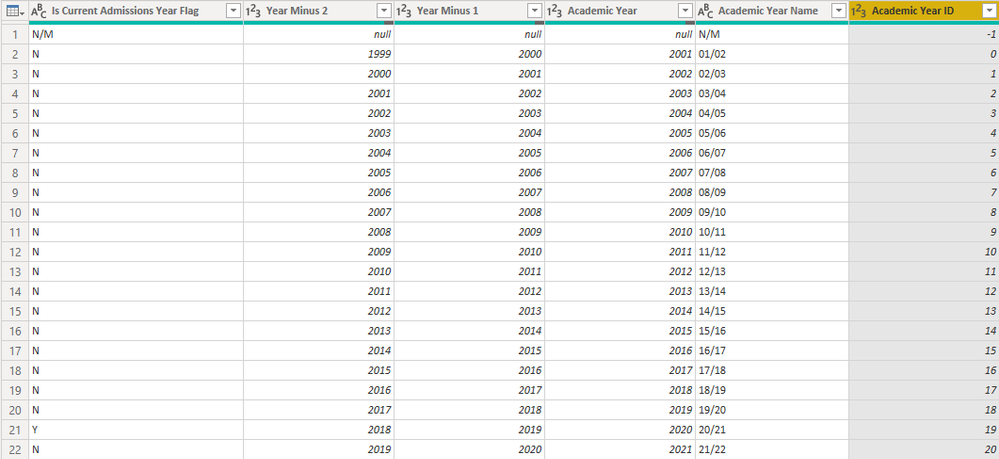
Solved! Go to Solution.


- Mark as New
- Bookmark
- Subscribe
- Mute
- Subscribe to RSS Feed
- Permalink
- Report Inappropriate Content
Hi @Anonymous
Fixing a little bit @artemus' code:
    CurrYear = PreviousStep{[Is Current Admissions Year Flag = "Y"]}[Academic Year],
    LastThree = Table.AddColumn(PreviousStep, "Is in last 3", each 0 <= (CurrYear - [Academic Year]) and (CurrYear - [Academic Year]) < 3, Logical.Type)
First, computing Current Academic Year only once --> less load
Second, calling that to create a true/false column.
I wasn't sure if you want current year included or not. If not, you should change the constraints.
Then, you can use this T/F column however you like. Since CurrYear is dynamic, it will change when data changes.
- Mark as New
- Bookmark
- Subscribe
- Mute
- Subscribe to RSS Feed
- Permalink
- Report Inappropriate Content
Hi @Anonymous
Fixing a little bit @artemus' code:
    CurrYear = PreviousStep{[Is Current Admissions Year Flag = "Y"]}[Academic Year],
    LastThree = Table.AddColumn(PreviousStep, "Is in last 3", each 0 <= (CurrYear - [Academic Year]) and (CurrYear - [Academic Year]) < 3, Logical.Type)
First, computing Current Academic Year only once --> less load
Second, calling that to create a true/false column.
I wasn't sure if you want current year included or not. If not, you should change the constraints.
Then, you can use this T/F column however you like. Since CurrYear is dynamic, it will change when data changes.


- Mark as New
- Bookmark
- Subscribe
- Mute
- Subscribe to RSS Feed
- Permalink
- Report Inappropriate Content
You could do this in query, but it is probably easier with a DAX calculated column with a formula like this, replacing with the Table[Column] for your actual Date column.
If this works for you, please mark it as the solution. Kudos are appreciated too. Please let me know if not.
Regards,
Pat
Did I answer your question? Mark my post as a solution! Kudos are also appreciated!
To learn more about Power BI, follow me on Twitter or subscribe on YouTube.
@mahoneypa HoosierBI on YouTube
- Mark as New
- Bookmark
- Subscribe
- Mute
- Subscribe to RSS Feed
- Permalink
- Report Inappropriate Content
Thanks for taking ther time to offer a suggestion Pat. Unfortunately this currently needs to be in Power Query for a table as described. I don't have a "date" to call upon in this way.
Best wishes
JK

- Mark as New
- Bookmark
- Subscribe
- Mute
- Subscribe to RSS Feed
- Permalink
- Report Inappropriate Content
Assuming that [Is Current Admission Year Flag] is unique in the table you can just grab that row at any time (and there is no future year in the table).
Like:
= PreviousStep{[Is Current Admission Year Flag = "Y"]}[Academic Year] - [Acedemic Year] <= 3Where PreviousStep is the name of your Previous step (e.g. Source if it is the first step)
- Mark as New
- Bookmark
- Subscribe
- Mute
- Subscribe to RSS Feed
- Permalink
- Report Inappropriate Content
Thanks Artemus.
When I try the following:
#"Last three" = Table.AddColumn(#"Changed Type", "Counting Years", each {[Is Current Admissions Year Flag]="Y"}[Academic Year]-[Academic Year]<=3)
There is an error, cannot apply field access to to type list. Am I missing something?
Also you mention "no future years in the table". For which there is. The flag will always be one row up from the bottom if that makes a difference?
Thanks
JK
- Mark as New
- Bookmark
- Subscribe
- Mute
- Subscribe to RSS Feed
- Permalink
- Report Inappropriate Content
Opps, you are right, I made a typo:
#"Last three" = Table.AddColumn(#"Changed Type", "Counting Years", each PreviousStep{[Is Current Admissions Year Flag="Y"]}[Academic Year]-[Academic Year]<=3)
Here is what is should be
- Mark as New
- Bookmark
- Subscribe
- Mute
- Subscribe to RSS Feed
- Permalink
- Report Inappropriate Content
Syntactically I can get a result but this is True,False.
I basically need to go to the row where [Is Current Admissions Year] = "Y" (will change each year), then get the years required, either by calculation or refering to the coumns that host them, [Academic Year], [Year Minus 1], [Year Minus 2]. Place these specific values in a new column in each row.
From there I can check if the academic year for a row matches any value in the new column to use as a filter later.
Does that make sense?
- Mark as New
- Bookmark
- Subscribe
- Mute
- Subscribe to RSS Feed
- Permalink
- Report Inappropriate Content
Sure that is easy, just remove the last part of the formula:
#"Last three" = Table.AddColumn(#"Changed Type", "Counting Years", each PreviousStep{[Is Current Admissions Year Flag="Y"]}
Then do a column expansion
Helpful resources

Power BI Dataviz World Championships
The Power BI Data Visualization World Championships is back! Get ahead of the game and start preparing now!

Power BI Monthly Update - December 2025
Check out the December 2025 Power BI Holiday Recap!

FabCon Atlanta 2026
Join us at FabCon Atlanta, March 16-20, for the ultimate Fabric, Power BI, AI and SQL community-led event. Save $200 with code FABCOMM.


| User | Count |
|---|---|
| 15 | |
| 9 | |
| 9 | |
| 8 | |
| 8 |


