Join us at FabCon Atlanta from March 16 - 20, 2026, for the ultimate Fabric, Power BI, AI and SQL community-led event. Save $200 with code FABCOMM.
Register now!The Power BI Data Visualization World Championships is back! Get ahead of the game and start preparing now! Learn more
Hi @Anonymous ,
First in KPI table,create a column as below:
_Avg KPI per day =
IF (
'KPI'[Avg KPI per day] = 0,
CALCULATE (
MAX ( 'KPI'[Avg KPI per day] ),
FILTER (
'KPI',
'KPI'[Material Type] = EARLIER ( 'KPI'[Material Type] )
&& 'KPI'[Avg KPI per day] <> 0
)
),
'KPI'[Avg KPI per day]
)
Then in data table create a column as below:
KPI.Avg KPI per day =
LOOKUPVALUE (
'KPI'[_Avg KPI per day],
'KPI'[Site A], 'Data'[Site A],
'KPI'[Site B], 'Data'[Site B],
'KPI'[Material Type], 'Data'[Material Type],
BLANK ()
)
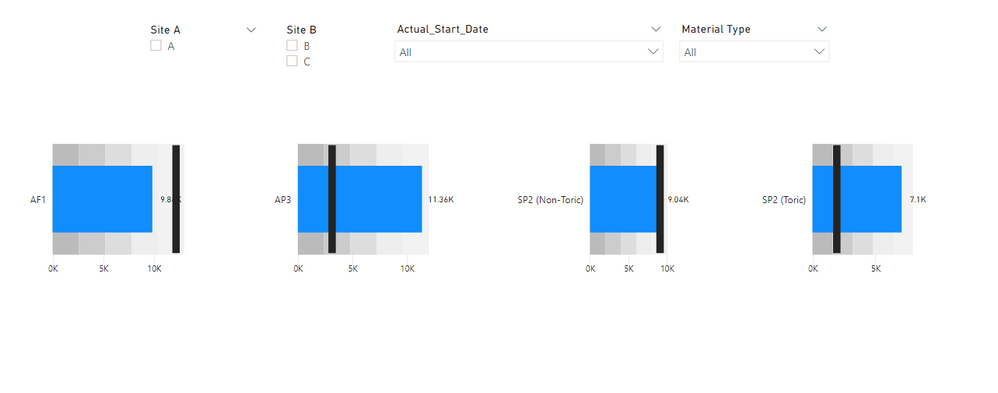
And you will see:
For the related .pbix file,pls see attached.
Best Regards,
Kelly
Did I answer your question? Mark my reply as a solution!
Hi @Anonymous ,
First in KPI table,create a column as below:
_Avg KPI per day =
IF (
'KPI'[Avg KPI per day] = 0,
CALCULATE (
MAX ( 'KPI'[Avg KPI per day] ),
FILTER (
'KPI',
'KPI'[Material Type] = EARLIER ( 'KPI'[Material Type] )
&& 'KPI'[Avg KPI per day] <> 0
)
),
'KPI'[Avg KPI per day]
)
Then in data table create a column as below:
KPI.Avg KPI per day =
LOOKUPVALUE (
'KPI'[_Avg KPI per day],
'KPI'[Site A], 'Data'[Site A],
'KPI'[Site B], 'Data'[Site B],
'KPI'[Material Type], 'Data'[Material Type],
BLANK ()
)
And you will see:
For the related .pbix file,pls see attached.
Best Regards,
Kelly
Did I answer your question? Mark my reply as a solution!
The Power BI Data Visualization World Championships is back! Get ahead of the game and start preparing now!
| User | Count |
|---|---|
| 19 | |
| 10 | |
| 9 | |
| 8 | |
| 7 |