cancel
Showing results for 
Search instead for 
Did you mean: 

We've captured the moments from FabCon & SQLCon that everyone is talking about, and we are bringing them to the community, live and on-demand. Starts on April 14th. Register now

Reply
kbachova
Advocate II
Advocate II

JSON file to table

Hi superusers,


I have this JSON file:


"{
\"column_definitions\": [
{
\"Database_RecID\": {
\"type\": \"Numeric\",
\"isNullable\": false,
\"identityColumn\": true
}
},
{
\"Index_Number\": {
\"type\": \"Text\",
\"isNullable\": true,
\"identityColumn\": false
}
},
{
\"Support_Type\": {
\"type\": \"Text\",
\"isNullable\": false,
\"identityColumn\": false
}
}
],
\"row_values\": [
[
12303,
\"32255\",
\"Standard\"
],
[
14273,
\"31475\",
\"Optional\"
]
]
}"


and I am unable to convert it into a table. I can either extract the row values or the column values. Any ideas how to make this work, please?


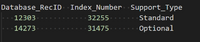
The required output is:


2020-05-21_0535.png


Thank you!

1 ACCEPTED SOLUTION
dax
Community Support
Community Support

Hi @kbachova , 

You could save your above code as json file, then try below M code

let
    Source = Json.Document(File.Contents("C:\Users\<username>\Desktop\gantt.json")),
    #"Parsed JSON" = Json.Document(Source),
    #"Converted to Table" = Record.ToTable(#"Parsed JSON"),
    #"Transposed Table" = Table.Transpose(#"Converted to Table"),
    #"Promoted Headers" = Table.PromoteHeaders(#"Transposed Table", [PromoteAllScalars=true]),
    #"Expanded row_values" = Table.ExpandListColumn(#"Promoted Headers", "row_values"),
    #"Extracted Values" = Table.TransformColumns(#"Expanded row_values", {"row_values", each Text.Combine(List.Transform(_, Text.From), ","), type text}),
    #"Expanded column_definitions" = Table.ExpandListColumn(#"Extracted Values", "column_definitions"),
    #"Added Custom" = Table.AddColumn(#"Expanded column_definitions", "Custom", each Record.FieldNames([column_definitions])),
    #"Extracted Values1" = Table.TransformColumns(#"Added Custom", {"Custom", each Text.Combine(List.Transform(_, Text.From)), type text}),
    #"Removed Columns" = Table.RemoveColumns(#"Extracted Values1",{"column_definitions"}),
    #"Grouped Rows" = Table.Group(#"Removed Columns", {"row_values"}, {{"combine", each Text.Combine([Custom], ","), type text}}),
    #"Added Index" = Table.AddIndexColumn(#"Grouped Rows", "Index", 0, 1),
    #"Pivoted Column" = Table.Pivot(#"Added Index", List.Distinct(#"Added Index"[combine]), "combine", "row_values"),
    #"Demoted Headers" = Table.DemoteHeaders(#"Pivoted Column"),
    #"Split Column by Delimiter" = Table.SplitColumn(#"Demoted Headers", "Column2", Splitter.SplitTextByDelimiter(",", QuoteStyle.Csv), {"Column2.1", "Column2.2", "Column2.3"}),
    #"Promoted Headers1" = Table.PromoteHeaders(#"Split Column by Delimiter", [PromoteAllScalars=true]),
    #"Changed Type2" = Table.TransformColumnTypes(#"Promoted Headers1",{{"Index", Int64.Type}, {"Database_RecID", Int64.Type}, {"Index_Number", Int64.Type}, {"Support_Type", type text}})
in
    #"Changed Type2"

Best Regards,
Zoe Zhi

If this post helps, then please consider Accept it as the solution to help the other members find it more quickly.

View solution in original post

3 REPLIES 3
dax
Community Support
Community Support

Hi @kbachova , 

You could save your above code as json file, then try below M code

let
    Source = Json.Document(File.Contents("C:\Users\<username>\Desktop\gantt.json")),
    #"Parsed JSON" = Json.Document(Source),
    #"Converted to Table" = Record.ToTable(#"Parsed JSON"),
    #"Transposed Table" = Table.Transpose(#"Converted to Table"),
    #"Promoted Headers" = Table.PromoteHeaders(#"Transposed Table", [PromoteAllScalars=true]),
    #"Expanded row_values" = Table.ExpandListColumn(#"Promoted Headers", "row_values"),
    #"Extracted Values" = Table.TransformColumns(#"Expanded row_values", {"row_values", each Text.Combine(List.Transform(_, Text.From), ","), type text}),
    #"Expanded column_definitions" = Table.ExpandListColumn(#"Extracted Values", "column_definitions"),
    #"Added Custom" = Table.AddColumn(#"Expanded column_definitions", "Custom", each Record.FieldNames([column_definitions])),
    #"Extracted Values1" = Table.TransformColumns(#"Added Custom", {"Custom", each Text.Combine(List.Transform(_, Text.From)), type text}),
    #"Removed Columns" = Table.RemoveColumns(#"Extracted Values1",{"column_definitions"}),
    #"Grouped Rows" = Table.Group(#"Removed Columns", {"row_values"}, {{"combine", each Text.Combine([Custom], ","), type text}}),
    #"Added Index" = Table.AddIndexColumn(#"Grouped Rows", "Index", 0, 1),
    #"Pivoted Column" = Table.Pivot(#"Added Index", List.Distinct(#"Added Index"[combine]), "combine", "row_values"),
    #"Demoted Headers" = Table.DemoteHeaders(#"Pivoted Column"),
    #"Split Column by Delimiter" = Table.SplitColumn(#"Demoted Headers", "Column2", Splitter.SplitTextByDelimiter(",", QuoteStyle.Csv), {"Column2.1", "Column2.2", "Column2.3"}),
    #"Promoted Headers1" = Table.PromoteHeaders(#"Split Column by Delimiter", [PromoteAllScalars=true]),
    #"Changed Type2" = Table.TransformColumnTypes(#"Promoted Headers1",{{"Index", Int64.Type}, {"Database_RecID", Int64.Type}, {"Index_Number", Int64.Type}, {"Support_Type", type text}})
in
    #"Changed Type2"

Best Regards,
Zoe Zhi

If this post helps, then please consider Accept it as the solution to help the other members find it more quickly.
@dax Thank you! This worked!

Greg_Deckler
Community Champion
Community Champion

Still doesn't validate as valid JSON.
https://jsonformatter.curiousconcept.com/


Follow on LinkedIn
@ me in replies or I'll lose your thread!!!
Instead of a Kudo, please vote for this idea
Become an expert!: Enterprise DNA
External Tools: MSHGQM
YouTube Channel!: Microsoft Hates Greg
Latest book!:
DAX For Humans

DAX is easy, CALCULATE makes DAX hard...

Helpful resources

Announcements
New to Fabric survey Carousel

New to Fabric Survey

If you have recently started exploring Fabric, we'd love to hear how it's going. Your feedback can help with product improvements.

Power BI DataViz World Championships carousel

Power BI DataViz World Championships - June 2026

A new Power BI DataViz World Championship is coming this June! Don't miss out on submitting your entry.

Join our Fabric User Panel

Join our Fabric User Panel

Share feedback directly with Fabric product managers, participate in targeted research studies and influence the Fabric roadmap.

March Power BI Update Carousel

Power BI Community Update - March 2026

Check out the March 2026 Power BI update to learn about new features.