Get Fabric or SQL Certified for Free.
Get certified for free when you join Fabric Data Days 2026 and dive into Fabric, Power BI, SQL, AI, and other essential data skills.
Join now- Power BI forums
- Get Help with Power BI
- Desktop
- Service
- Report Server
- Power Query
- Mobile Apps
- Developer
- DAX Commands and Tips
- Custom Visuals Development Discussion
- Health and Life Sciences
- Power BI Spanish forums
- Translated Spanish Desktop
- Training and Consulting
- Instructor Led Training
- Dashboard in a Day for Women, by Women
- Galleries
- Data Stories Gallery
- Themes Gallery
- Contests Gallery
- QuickViz Gallery
- Quick Measures Gallery
- Visual Calculations Gallery
- Fabric Apps Gallery
- Notebook Gallery
- Translytical Task Flow Gallery
- TMDL Gallery
- R Script Showcase
- Webinars and Video Gallery
- Ideas
- Custom Visuals Ideas (read-only)
- Issues
- Issues
- Events
- Upcoming Events
July 28 - August 9 | Final Round of the Power BI Dataviz World Championships. This is your chance. Learn more
- Power BI forums
- Forums
- Get Help with Power BI
- Power Query
- Re: JSON file on SharePoint Folder
- Subscribe to RSS Feed
- Mark Topic as New
- Mark Topic as Read
- Float this Topic for Current User
- Bookmark
- Subscribe
- Printer Friendly Page


- Mark as New
- Bookmark
- Subscribe
- Mute
- Subscribe to RSS Feed
- Permalink
- Report Inappropriate Content
JSON file on SharePoint Folder
Hi,
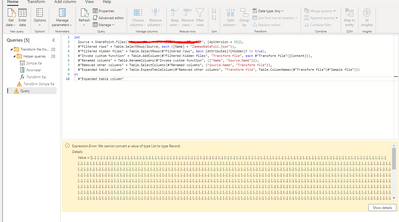
I have JSON file in sharepoint folder but when I try to make Dataflow with PQ and when I load file and click on Content column (Binary) in order to load content I got this error message.
Any help? Thanks in advance.
Vlada
Solved! Go to Solution.


- Mark as New
- Bookmark
- Subscribe
- Mute
- Subscribe to RSS Feed
- Permalink
- Report Inappropriate Content
Hi @PBI_Vladimir ,
to debug this error, please go to the query "Transform Sample file" instead and go to the step where the error occurs (usually, you get a buttton at the last step that "jumps" you to the problematic step).
Please paste the M-code for that error here then.
Imke Feldmann (The BIccountant)
If you liked my solution, please give it a thumbs up. And if I did answer your question, please mark this post as a solution. Thanks!
How to integrate M-code into your solution -- How to get your questions answered quickly -- How to provide sample data -- Check out more PBI- learning resources here -- Performance Tipps for M-queries
- Mark as New
- Bookmark
- Subscribe
- Mute
- Subscribe to RSS Feed
- Permalink
- Report Inappropriate Content
Hi @PBI_Vladimir ,
sorry, missed your previous response.
What I need is a screenshot of the Source-step of the query "Transform Sample File" instead of the one you've posted.
Thx!
Imke Feldmann (The BIccountant)
If you liked my solution, please give it a thumbs up. And if I did answer your question, please mark this post as a solution. Thanks!
How to integrate M-code into your solution -- How to get your questions answered quickly -- How to provide sample data -- Check out more PBI- learning resources here -- Performance Tipps for M-queries
- Mark as New
- Bookmark
- Subscribe
- Mute
- Subscribe to RSS Feed
- Permalink
- Report Inappropriate Content
Hi ImkeF,
thank you!
With Your answers, You encouraged me to think and research and so I found a solution (see my reply below)
-----------
regards
Vlada
- Mark as New
- Bookmark
- Subscribe
- Mute
- Subscribe to RSS Feed
- Permalink
- Report Inappropriate Content
Hi @PBI_Vladimir ,
please try the following code for that query
#"Transform Sample file"
let
Source = Json.Document(Parameter, 65001),
#"Converted to table" = Table.FromRows(Source)
in
#"Converted to table"
Otherwise, if that doesn't work, please post a screenshot of the result that the step "Source" in that query returns.
Imke Feldmann (The BIccountant)
If you liked my solution, please give it a thumbs up. And if I did answer your question, please mark this post as a solution. Thanks!
How to integrate M-code into your solution -- How to get your questions answered quickly -- How to provide sample data -- Check out more PBI- learning resources here -- Performance Tipps for M-queries
- Mark as New
- Bookmark
- Subscribe
- Mute
- Subscribe to RSS Feed
- Permalink
- Report Inappropriate Content
I did it, I put:
-------------
and it's works
- Mark as New
- Bookmark
- Subscribe
- Mute
- Subscribe to RSS Feed
- Permalink
- Report Inappropriate Content
If I good understand - this screen shot.

- Mark as New
- Bookmark
- Subscribe
- Mute
- Subscribe to RSS Feed
- Permalink
- Report Inappropriate Content
Hi @PBI_Vladimir ,
to debug this error, please go to the query "Transform Sample file" instead and go to the step where the error occurs (usually, you get a buttton at the last step that "jumps" you to the problematic step).
Please paste the M-code for that error here then.
Imke Feldmann (The BIccountant)
If you liked my solution, please give it a thumbs up. And if I did answer your question, please mark this post as a solution. Thanks!
How to integrate M-code into your solution -- How to get your questions answered quickly -- How to provide sample data -- Check out more PBI- learning resources here -- Performance Tipps for M-queries
- Mark as New
- Bookmark
- Subscribe
- Mute
- Subscribe to RSS Feed
- Permalink
- Report Inappropriate Content
Hi ImkeF,
Thank you for help, here the picture of Transform Sample File ...
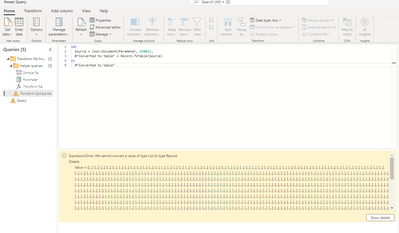
and on Show Details here is a code
---------- Message ----------
Expression.Error: We cannot convert a value of type List to type Record.
---------- Session ID ----------
fb4b7769-0f81-4880-a977-2f1b44caf803
---------- Request ID ----------
89abd794-fa39-4c26-8e81-70141f6fa193
---------- Mashup script ----------
section Section1;
shared Query = let
Source = SharePoint.Files("https://sharepoint........", [ApiVersion = 15]),
#"Filtered rows" = Table.SelectRows(Source, each ([Name] = "ZammadDataFull.json")),
#"Filtered hidden files" = Table.SelectRows(#"Filtered rows", each [Attributes]?[Hidden]? <> true),
#"Invoke custom function" = Table.AddColumn(#"Filtered hidden files", "Transform file", each #"Transform file"([Content])),
#"Renamed columns" = Table.RenameColumns(#"Invoke custom function", {{"Name", "Source.Name"}}),
#"Removed other columns" = Table.SelectColumns(#"Renamed columns", {"Source.Name", "Transform file"}),
#"Expanded table column" = Table.ExpandTableColumn(#"Removed other columns", "Transform file", Table.ColumnNames(#"Transform file"(#"Sample file")))
in
#"Expanded table column";
shared #"Sample file" = let
Source = SharePoint.Files("https://sharepoint......", [ApiVersion = 15]),
#"Filtered rows" = Table.SelectRows(Source, each [Name] = "ZammadDataFull.json"),
#"Filtered hidden files" = Table.SelectRows(#"Filtered rows", each [Attributes]?[Hidden]? <> true),
Navigation = #"Filtered hidden files"{0}[Content]
in
Navigation;
shared Parameter = let
Parameter = #"Sample file" meta [IsParameterQuery = true, IsParameterQueryRequired = true, Type = type binary, BinaryIdentifier = #"Sample file"]
in
Parameter;
shared #"Transform Sample file" = let
Source = Json.Document(Parameter, 65001),
#"Converted to table" = Record.ToTable(Source)
in
#"Converted to table";
[FunctionQueryBinding = "{""exemplarFormulaName"":""Transform Sample file""}"]
shared #"Transform file" = (Parameter as binary) => let
Source = Json.Document(Parameter, 65001),
#"Converted to table" = Record.ToTable(Source)
in
#"Converted to table";

Helpful resources

Fabric Community Sticker Challenge - Barcelona 2026
If you love stickers, then you will definitely want to check out our community sticker challenge, Barcelona edition!

Power BI Monthly Update - July 2026
Check out the July 2026 Power BI update to learn about new features.

Power BI DataViz World Championships - June 2026
A new Power BI DataViz World Championship is coming this June! Don't miss out on submitting your entry.

| User | Count |
|---|---|
| 4 | |
| 2 | |
| 2 | |
| 2 | |
| 1 |


