Hello Experts,
I am in need of some assistance,
let
    // Define the base URL and initial page number
    baseUrl = Tenant & Component_Base_API,
    pageNumber = 1,
    // Define the API key
    apiKey = APIKey,
    // Define a function to get data from a specific page
    GetPageData = (page) =>
        let
            // Construct the URL for the specific page
            url = baseUrl & "?page=" & Text.From(page),
            // Make the API call and parse the JSON response
            response = Json.Document(Web.Contents(url, [Headers=[#"api-key"=apiKey]])),
            // Extract the 'Page' array from the response
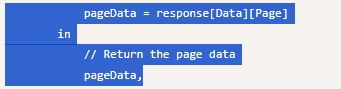
            pageData = response[Data][Page]
        in
            // Return the page data
            pageData,

    // Initialize an empty list to store all page data
    allPages = {},

    // Start a loop to fetch pages until no more data is returned
    FetchPages = (page) =>
        let
            // Get data from the current page
            pageData = GetPageData(page),
            // Check if there are any results on the page
            noResults = List.IsEmpty(pageData),
            // If there are results, append them to the list of all pages
            // Continue fetching the next page if there are more results
            // Otherwise, exit the loop
            nextPage = if noResults then null else FetchPages(page + 1),
            // Return the current pageData or an empty list if no results
            currentData = if noResults then {} else pageData
        in
            // Return the concatenated list of page data
            currentData & nextPage,

    // Call the FetchPages function starting from the initial page
    result = FetchPages(pageNumber),

    // Convert the result into a table
    table = Table.FromList(result, Splitter.SplitByNothing(), null, null, ExtraValues.Error),

    // Promote headers from the first row
    promotedHeaders = Table.PromoteHeaders(table, [PromoteAllScalars = true])
in
    promotedHeaders
So I am working with the API and I am using parameters to funnel the base URL & API key in.
I seem to be running into the below error:
Expression.Error: We cannot convert the value 1 to type List.
Details:
Value=1
Type=[Type]
In the call I get a collumn with the current page number & i also get a uri with the full next page URI, so my code is trying to take the page number collumn + 1 and create the new call to get the data until ther is no other pages left to get
Im stumped on the fact i entered 1 and the list error that is I am getting back