Join us at FabCon Atlanta from March 16 - 20, 2026, for the ultimate Fabric, Power BI, AI and SQL community-led event. Save $200 with code FABCOMM.
Register now!Get Fabric Certified for FREE during Fabric Data Days. Don't miss your chance! Request now
Hi all,
I have the following problem: I want to find the items in a column which match to all items in a second column.
Example: I want the users who match to all 3 products:
| Product | User | Results |
| Product A | User1 | TRUE |
| Product B | User1 | TRUE |
| Product C | User1 | TRUE |
| Product A | User2 | FALSE |
| Product B | User2 | FALSE |
| Product A | User3 | TRUE |
| Product B | User3 | TRUE |
| Product C | User3 | TRUE |
| Product B | User4 | FALSE |
Any help would be much appreciated.
Many thanks in advance
Philip
Solved! Go to Solution.
@philtab ,
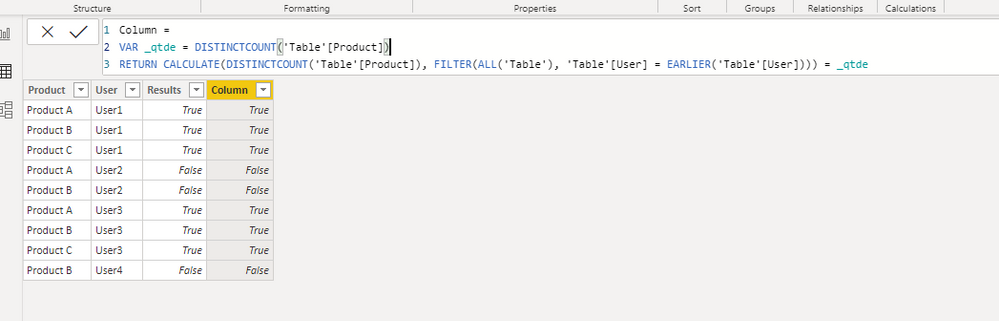
Check this calculated column:
Column =
VAR _qtde = DISTINCTCOUNT('Table'[Product])
RETURN CALCULATE(DISTINCTCOUNT('Table'[Product]), FILTER(ALL('Table'), 'Table'[User] = EARLIER('Table'[User]))) = _qtde
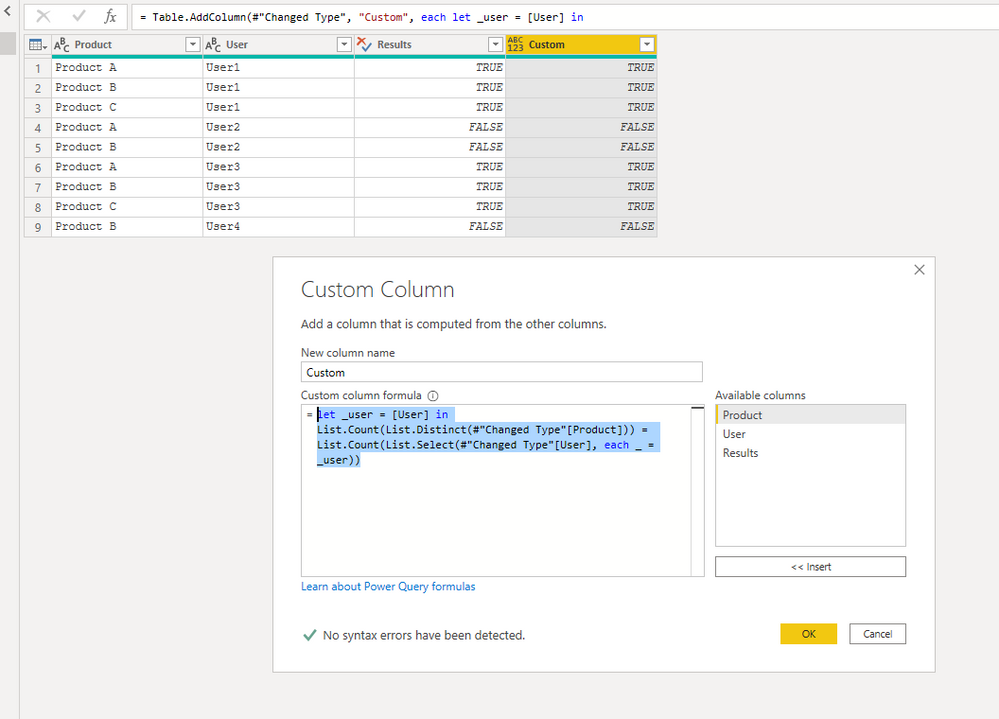
Power Query:
let _user = [User] in
List.Count(List.Distinct(#"Changed Type"[Product])) =
List.Count(List.Select(#"Changed Type"[User], each _ = _user))
@philtab ,
Check this calculated column:
Column =
VAR _qtde = DISTINCTCOUNT('Table'[Product])
RETURN CALCULATE(DISTINCTCOUNT('Table'[Product]), FILTER(ALL('Table'), 'Table'[User] = EARLIER('Table'[User]))) = _qtde
Power Query:
let _user = [User] in
List.Count(List.Distinct(#"Changed Type"[Product])) =
List.Count(List.Select(#"Changed Type"[User], each _ = _user))
Hi @philtab ,
I'm happy it helped.
Please accept my solution as an answer, so other users can benefit from it.
Thanks.
Hi camargos88,
unfortunately I missed one more complexity. The products belong to a certain Category.
And I need to check wether a user is mapped to all producuts within that category (products and categories are unique)
| Category | Product | User | Result |
| X | Product A | User1 | TRUE |
| X | Product B | User1 | TRUE |
| X | Product C | User1 | TRUE |
| X | Product B | User2 | FALSE |
| Y | Product D | User3 | TRUE |
| Y | Product E | User3 | TRUE |
| Y | Product D | User4 | FALSE |
| Y | Product E | User5 | FALSE |
| Z | Product F | User2 | TRUE |
| Z | Product G | User2 | TRUE |
| Z | Product F | User6 | FALSE |
Is there are way to address this in your power query statement?
Many thanks again
Philip
@philtab ,
Try this new code:
let
_user = [User],
_category = [Category]
in
List.Count(List.Distinct(Table.SelectRows(#"Changed Type",
each [Category] = _category)[Product])) =
List.Count(List.Distinct(Table.SelectRows(#"Changed Type",
each [User] = _user and [Category] = _category)[Product]))
Check out the November 2025 Power BI update to learn about new features.
Advance your Data & AI career with 50 days of live learning, contests, hands-on challenges, study groups & certifications and more!
| User | Count |
|---|---|
| 10 | |
| 9 | |
| 6 | |
| 5 | |
| 3 |